
As AI-assisted development rapidly evolves in 2026, understanding the difference between Claude Code Skills, Agents, and Workflows has become essential for building scalable and intelligent automation systems. In the world of AI, these three terms refer to different levels of autonomy and structure. A workflow is a rigid, step-by-step process. An agent is an autonomous AI that decides how to achieve a goal. A skill is a specialized, reusable capability or playbook that an agent uses to do its job.
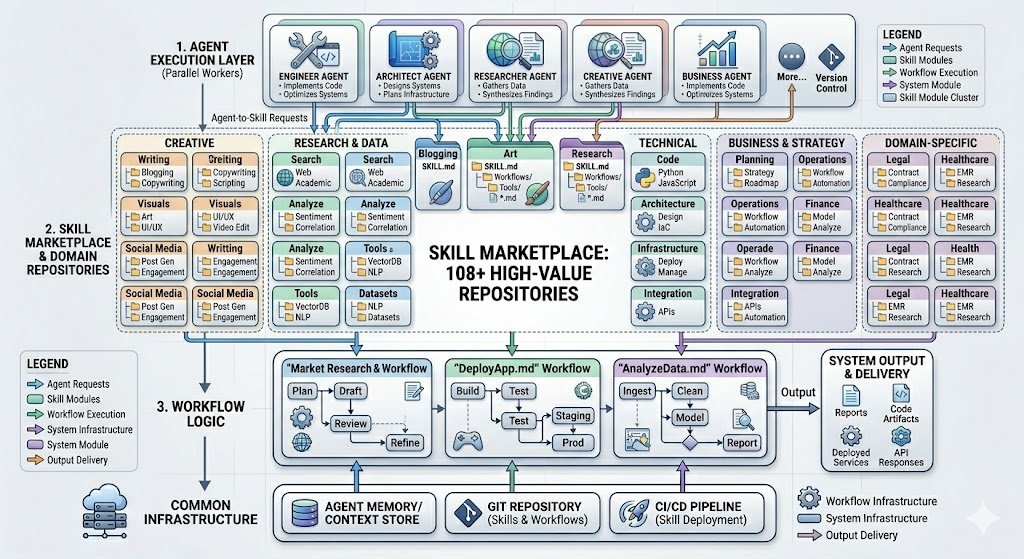
These three layers form a powerful hierarchical architecture where Skills operate as specialized reusable capabilities, Agents function as autonomous reasoning entities that coordinate decision-making, and Workflows provide the structured orchestration pipeline connecting multiple agents and skills into complete production systems. In modern AI engineering, especially within advanced coding ecosystems like Claude Code, mastering this three-tier hierarchy enables developers to create faster, more modular, context-aware, and self-improving AI applications.
| Primitive | Purpose | When to Use | Location |
|---|---|---|---|
| Skill | Domain container | Grouping related capabilities | ~/.claude/skills/{Domain}/ |
| Workflow | Task procedure | Executing specific operations | ~/.claude/skills/{Domain}/Workflows/ |
| Agent | Parallel worker | Concurrent multi-task execution | ~/.claude/agents/ |
Jump to: Skills · Workflows · Agents · Decision Flowchart · Real-World Examples · FAQ
- Quick Answer — The Three-Tier Table
- Why Three Tiers? The Problem Claude Code Solves
- The Full Hierarchy Visualized
- Tier 1: Skills — Domain Containers
- Skill Anatomy: Inside SKILL.md
- Tier 2: Workflows — Task Procedures
- Tier 3: Agents — Parallel Workers
- Full Comparison Table
- Decision Flowchart: Which One to Use
- Real-World Examples by Domain
- Common Mistakes to Avoid
- Building Your Personal AI Infrastructure
- Frequently Asked Questions
Why Three Tiers? The Problem Claude Code Solves
Before Skills were introduced, Claude Code users relied on a flat directory of markdown prompt files — sometimes called “Commands.” This worked at small scale, but as your automation library grew, problems emerged fast:
- No clear separation between what Claude knows and what Claude does
- No way to group related capabilities into cohesive domains
- No standard pattern for parallel or concurrent execution
- Monolithic prompt files that became impossible to maintain
The three-tier hierarchy solves all of these problems by assigning each primitive a single, clear job. As you’ll see in the Decision Flowchart section, the choice between a Skill, Workflow, or Agent usually becomes obvious once you ask the right questions.
- Skills define what Claude knows about a domain
- Workflows define how Claude performs specific tasks within that domain
- Agents define who does the work — especially when multiple workers run in parallel
The Full Hierarchy Visualized
Here is the architectural diagram that makes the three-tier hierarchy concrete. Notice that Agents sit at the top as parallel workers, Skills sit in the middle as domain containers, and Workflows are nested inside Skills as task procedures:
┌──────────────────────────────────────────────────────────────┐
│                          AGENTS                              │
│             (Parallel workers — execute skills)              │
│   ┌─────────────┐  ┌─────────────┐  ┌─────────────┐        │
│   │  Engineer   │  │  Architect  │  │  Researcher │  ...   │
│   └──────┬──────┘  └──────┬──────┘  └──────┬──────┘        │
└──────────┼────────────────┼────────────────┼────────────────┘
           │                │                │
           ▼                ▼                ▼
┌──────────────────────────────────────────────────────────────┐
│                          SKILLS                              │
│              (Domain containers — 108+ skills)                │
│   ┌──────────────────────────────────────────────────────┐  │
│   │  Blogging/      Research/      Art/          ...     │  │
│   │  ├── SKILL.md   ├── SKILL.md   ├── SKILL.md          │  │
│   │  ├── Workflows/ ├── Workflows/ ├── Workflows/         │  │
│   │  ├── Tools/     ├── Tools/     ├── Tools/             │  │
│   │  └── *.md       └── *.md       └── *.md               │  │
│   └──────────────────────────────────────────────────────┘  │
└──────────────────────────────────────────────────────────────┘
           │                │                │
           ▼                ▼                ▼
┌──────────────────────────────────────────────────────────────┐
│                        WORKFLOWS                             │
│            (Task procedures — inside each skill)             │
│       Create.md   Publish.md   Deploy.md   Research.md       │
└──────────────────────────────────────────────────────────────┘
~/.claude/agents/ — a separate top-level directory. Skills and their nested Workflows both live under ~/.claude/skills/. This physical separation reflects their functional difference: agents are workers, skills are knowledge domains.Tier 1: Skills — Domain Containers
A Skill is a self-contained module that encapsulates everything Claude needs to know and do within a specific domain. Think of it like a department in a company: the Blogging department handles everything blog-related. The Research department handles everything research-related. Each department has its own knowledge, its own procedures, and its own tools.
When to Create a Skill
Skill Directory Structure
Every skill follows a flat, consistent structure — maximum two levels deep. Context files live in the skill root, not in subdirectories. See the Skill Anatomy section for the full SKILL.md breakdown.
~/.claude/skills/
├── Blogging/                   # Domain container (TitleCase naming)
│   ├── SKILL.md                # Main file: triggers, routing, docs
│   ├── Voice.md                # Context file (root level, NOT in subdir)
│   ├── Formatting.md           # Context file (root level, NOT in subdir)
│   ├── Workflows/              # Task procedures only
│   │   ├── Create.md           # Write new content
│   │   ├── Publish.md          # Deploy to production
│   │   └── Rewrite.md          # Edit existing content
│   └── Tools/                  # CLI automation scripts
│       └── DevServer.ts
├── Research/
│   ├── SKILL.md
│   ├── Sources.md
│   ├── Workflows/
│   │   ├── QuickResearch.md
│   │   ├── StandardResearch.md
│   │   └── ExtensiveResearch.md
│   └── Tools/
└── Art/
    ├── SKILL.md
    ├── Aesthetic.md
    ├── Workflows/
    │   ├── Essay.md
    │   ├── TechnicalDiagrams.md
    │   └── Mermaid.md
    └── Tools/
        └── Generate.ts
- TitleCase everywhere —
Blogging, notbloggingorBLOGGING - Context files in the skill root — never create a
context/subdirectory - Only two subdirectories are allowed:
Workflows/andTools/ - Maximum 2 levels deep — enforces the flat hierarchy that makes skills portable
- SKILL.md is always uppercase — this is the required entry-point filename
Skill Anatomy: Inside SKILL.md
The SKILL.md file is the brain of every skill. It has two distinct parts that together enable Claude to auto-activate the right skill based on your natural language and route you to the right workflow.
Part 1: YAML Frontmatter — The Trigger
This is what Claude reads to decide whether to activate the skill. The description field is especially important — it lists the intent signals that trigger activation:
---
name: Blogging
description: Blog workflow. USE WHEN blog, website, publish, deploy, write post, content.
---
Part 2: Markdown Body — Routing and Documentation
The body tells Claude how to route your request to the correct Workflow once the skill is active:
# Blogging

## Overview
All capabilities for creating, publishing, and editing blog content.
Context files: Voice.md (style), Formatting.md (structure rules).

## Workflow Routing

| Workflow     | Trigger Phrases              | File                      |
|--------------|------------------------------|---------------------------|
| **Create**   | "write a post", "new article"| Workflows/Create.md       |
| **Publish**  | "deploy", "publish", "push"  | Workflows/Publish.md      |
| **Rewrite**  | "edit this", "revise", "fix" | Workflows/Rewrite.md      |

## Context Files
- Voice.md — Writing style and tone guidelines
- Formatting.md — Post structure, heading rules, metadata format
Claude reads this routing table, matches your request to the closest workflow trigger, and loads that workflow file automatically. You don’t have to specify the workflow — the skill routes for you.
- You say: “Write a blog post about the new Claude features”
- Claude scans all skill
descriptionfields → matches Blogging skill - Claude loads
SKILL.md→ reads the routing table - Your request matches “write a post” → loads
Workflows/Create.md - Claude also loads context files:
Voice.md,Formatting.md - Claude executes the Create workflow with full context
Tier 2: Workflows — Task Procedures
A Workflow is a step-by-step procedure for executing a specific task within a domain. If a Skill is the department, a Workflow is the standard operating procedure for a specific job that department performs. Workflows always live inside their parent skill’s Workflows/ subdirectory — they are never standalone files.
When to Create a Workflow
What a Workflow File Looks Like
Here is a simplified example of Blogging/Workflows/Create.md:
# Create Blog Post Workflow

## Purpose
Write a new blog post from scratch following Daniel's voice and formatting standards.

## Pre-conditions
- Load Voice.md for style guidelines
- Load Formatting.md for structure rules
- Confirm topic and target audience before starting

## Steps

### Step 1: Research & Outline
- Research the topic using the Research skill if needed
- Create a structured outline with H2 and H3 headings
- Confirm outline with user before writing

### Step 2: Draft
- Write full draft following Voice.md guidelines
- Use formatting rules from Formatting.md
- Target 800–2000 words depending on topic complexity

### Step 3: SEO & Metadata
- Write SEO title (under 60 chars), meta description (under 160 chars)
- Choose primary keyword and 3–5 secondary keywords
- Generate tags

### Step 4: Review
- Check against Voice.md for tone consistency
- Verify all Formatting.md rules are met
- Flag any factual claims that need verification

## Output Format
Deliver complete markdown with full frontmatter block ready for publishing.
Workflows vs. Skills: The Key Distinction
Example Workflows Across Domains
| Domain Skill | Workflow Name | File Path | Trigger Phrases |
|---|---|---|---|
| Blogging | Create | Blogging/Workflows/Create.md |
“write a post”, “new article” |
| Blogging | Publish | Blogging/Workflows/Publish.md |
“deploy”, “publish to site” |
| Research | ExtensiveResearch | Research/Workflows/ExtensiveResearch.md |
“deep dive”, “comprehensive research” |
| Research | QuickResearch | Research/Workflows/QuickResearch.md |
“quick lookup”, “brief overview” |
| Art | Essay | Art/Workflows/Essay.md |
“create header image”, “blog art” |
| Art | TechnicalDiagrams | Art/Workflows/TechnicalDiagrams.md |
“make a diagram”, “architecture diagram” |
Tier 3: Agents — Parallel Workers
An Agent is a specialized, autonomous worker that executes tasks — often concurrently with other agents. Unlike Skills and Workflows, which live under ~/.claude/skills/, Agents have their own top-level directory: ~/.claude/agents/. This physical separation signals their functional difference: agents are not knowledge containers or task procedures — they are workers that invoke skills and workflows to get things done.
When to Create an Agent
Agent File Structure
Agents live flat in their directory — no subdirectories needed:
~/.claude/agents/
├── Engineer.md        # Code implementation specialist
├── Architect.md       # System design specialist
├── Researcher.md      # Information gathering specialist
├── Editor.md          # Writing review specialist
├── SecurityAuditor.md # Security review specialist
├── DataAnalyst.md     # Data interpretation specialist
└── ... (25+ agents)
What an Agent File Looks Like
---
name: Researcher
description: Parallel research agent. Spawns for concurrent research tasks.
---

# Researcher Agent

## Role
I am a specialized research worker. I execute research workflows in parallel
with other agents to gather comprehensive information efficiently.

## Capabilities
- Execute Research/Workflows/QuickResearch.md for rapid lookups
- Execute Research/Workflows/ExtensiveResearch.md for deep dives
- Synthesize findings from multiple sources simultaneously
- Return structured research reports for orchestrator review

## Behavior
- Always cite sources with direct links
- Flag uncertainty and conflicting information explicitly
- Deliver findings in structured markdown, ready for synthesis
- Request clarification before starting if topic is ambiguous
How Agents Work in Practice
- You request: “Research the competitive landscape for AI coding tools”
- The Research Skill activates and determines extensive parallel research is needed
- Three Researcher agents spawn simultaneously:
- Agent 1 → researches GitHub Copilot
- Agent 2 → researches Cursor and Windsurf
- Agent 3 → researches Claude Code and competitors
- Each agent executes
Research/Workflows/ExtensiveResearch.mdon their assigned topic - Results merge back and are synthesized into a single report
Result: 3x faster than sequential research, with more comprehensive coverage.
A Skill is a knowledge domain with routing intelligence. An Agent is an autonomous worker with specialized expertise. You can think of Skills as libraries and Agents as librarians. The librarian knows how to use the library — and multiple librarians can work simultaneously.
Full Comparison Table: Skills vs Workflows vs Agents
| Attribute | Skill | Workflow | Agent |
|---|---|---|---|
| Primary Role | Domain container & router | Step-by-step task executor | Autonomous parallel worker |
| Location | ~/.claude/skills/{Domain}/ |
~/.claude/skills/{Domain}/Workflows/ |
~/.claude/agents/ |
| Entry Filename | SKILL.md (required) |
Any TaskName.md |
Any AgentName.md |
| Standalone? | Yes — self-contained module | No — always inside a Skill | Yes — own top-level directory |
| Can contain Workflows? | Yes | No | No (invokes them instead) |
| Can contain Tools? | Yes (via Tools/ subdir) | No | No |
| Runs in parallel? | No | No | Yes — core feature |
| Auto-activated by intent? | Yes (via description field) | Yes (via parent skill routing) | Yes (when spawned by orchestrator) |
| Has shared context files? | Yes (root-level .md files) | Inherits from parent skill | Self-contained in agent file |
| Naming convention | TitleCase domain noun (Blogging) |
TitleCase verb/task (Create, Publish) |
TitleCase role noun (Engineer) |
| Typical count (PAI project) | 77+ | Hundreds | 20+ |
Decision Flowchart: Which Primitive Should You Use?
When adding a new capability to your Claude Code setup, work through these questions in order. This flowchart makes the choice deterministic — no guessing required. See how this maps to real-world examples in the next section.
→ YES: You need a Skill. Does this domain already have a Skill? If yes, add to it. If no, create a new one.
→ NO: Go to Step 2.
→ YES: You need a Workflow inside that domain’s Skill. Create
DomainName/Workflows/TaskName.md.→ NO: Go to Step 3.
→ YES: You need a context file in the Skill root (e.g.,
Voice.md, Formatting.md).→ NO: Go to Step 4.
→ YES: You need a Tool inside the Skill’s
Tools/ subdirectory (TypeScript or shell script).→ NO: Go to Step 5.
→ YES: You need an Agent in
~/.claude/agents/.→ NO: You likely have a Workflow in the wrong place. Re-examine whether it belongs inside an existing Skill.
Best AI Tools and Tutorials 2026





“If it’s a domain, make a Skill. If it’s a task, make a Workflow inside a Skill. If it’s a worker, make an Agent.”
Real-World Examples by Domain
These examples come directly from the PAI (Personal AI Infrastructure) project by Daniel Miessler. They illustrate exactly how the three-tier hierarchy plays out across different professional domains.
Example 1: Blogging Domain
~/.claude/skills/Blogging/SKILL.mdContext files:
Voice.md, Formatting.mdWorkflows: Create, Publish, Rewrite
Tools: DevServer.ts
Use case: “Write a post about AI memory systems” → Blogging Skill activates → routes to Create Workflow → Voice.md and Formatting.md loaded automatically
Example 2: Research Domain
~/.claude/skills/Research/SKILL.mdContext files:
Sources.md (trusted source list)Workflows: QuickResearch, StandardResearch, ExtensiveResearch
Agents invoked: Researcher (parallel, spawned for ExtensiveResearch)
Use case: “Do a deep dive on AI coding assistants” → Research Skill routes to ExtensiveResearch → spawns 3 Researcher Agents in parallel
Example 3: Art / Visuals Domain
~/.claude/skills/Art/SKILL.mdContext files:
Aesthetic.md (visual style guide)Workflows: Essay (blog headers), TechnicalDiagrams, Mermaid
Tools: Generate.ts (image generation automation)
Use case: “Make a diagram of the three-tier architecture” → Art Skill routes to TechnicalDiagrams Workflow → Aesthetic.md loaded for style consistency
Example 4: Software Engineering Domain
~/.claude/skills/Engineering/SKILL.mdContext files:
Standards.md, TestingRules.mdWorkflows: Implement, Review, Refactor, Debug
Agents: Engineer.md, Architect.md, SecurityAuditor.md
Use case: “Build the new authentication module” → Engineering Skill activates → spawns Engineer Agent (implementation) + Architect Agent (design review) + SecurityAuditor Agent (security check) in parallel
The Full Project Directory Structure
~/.claude/
├── skills/                       # 108+ domain containers
│   ├── Blogging/
│   │   ├── SKILL.md
│   │   ├── Voice.md
│   │   ├── Formatting.md
│   │   ├── Workflows/
│   │   │   ├── Create.md
│   │   │   ├── Publish.md
│   │   │   └── Rewrite.md
│   │   └── Tools/
│   │       └── DevServer.ts
│   ├── Research/
│   │   ├── SKILL.md
│   │   ├── Sources.md
│   │   ├── Workflows/
│   │   │   ├── QuickResearch.md
│   │   │   ├── StandardResearch.md
│   │   │   └── ExtensiveResearch.md
│   │   └── Tools/
│   ├── Art/
│   │   ├── SKILL.md
│   │   ├── Aesthetic.md
│   │   ├── Workflows/
│   │   │   ├── Essay.md
│   │   │   ├── TechnicalDiagrams.md
│   │   │   └── Mermaid.md
│   │   └── Tools/
│   │       └── Generate.ts
│   └── ... (108 more skills)
├── agents/                       # Parallel workers
│   ├── Engineer.md
│   ├── Architect.md
│   ├── Researcher.md
│   ├── Editor.md
│   ├── SecurityAuditor.md
│   └── ... (15+ more agents)
└── MEMORY/                       # Learning and state persistence
    ├── LEARNING/
    └── STATE/
Common Mistakes to Avoid
Based on community feedback since Skills launched in October 2025, these are the most frequent errors people make when building their three-tier hierarchy. Review the Decision Flowchart if you find yourself making any of these.
Workflows must always live inside a Skill’s
Workflows/ subdirectory. A workflow without a parent skill cannot be routed to automatically and loses its context inheritance.Agents are for parallel execution. If you only need one task done sequentially, a Workflow is the right primitive. Creating agents unnecessarily adds overhead without benefit.
context/ subdirectory inside a SkillContext files (Voice.md, Formatting.md, Sources.md) live in the Skill root — never in a subdirectory. The flat structure is intentional; it keeps the hierarchy maximum 2 levels deep.
TitleCase is required everywhere.
blogging/ instead of Blogging/, or create.md instead of Create.md, breaks discoverability and violates the naming convention that makes the system scannable.SKILL.md should only contain triggers, routing logic, and high-level documentation. The actual procedural steps belong in Workflows. A bloated SKILL.md defeats the modularity purpose.
Agents live exclusively in
~/.claude/agents/. Placing agent files inside ~/.claude/skills/ conflates the role of domain container with parallel worker, breaking the architectural separation.Blogging/Workflows/Subtype/SpecificVariant.md, stop. That’s a signal you need to either create a new top-level Skill or consolidate multiple workflows into one more flexible one.Building Your Personal AI Infrastructure
The three-tier hierarchy isn’t just an organizational pattern — it’s the foundation of a portable, composable, ever-growing system of AI capabilities that grows smarter as you add to it.
Starting from Zero: A Recommended Build Order
The Key Benefits of This Architecture
| Benefit | How the Hierarchy Delivers It |
|---|---|
| Encapsulation | All blogging capabilities in one place — nothing leaks across domains |
| Discoverability | ls skills/Blogging/Workflows/ instantly shows all blogging tasks |
| Portability | Skills are self-contained — share or export any skill without dependencies |
| Intent routing | Natural language triggers the right skill automatically — no slash commands needed |
| Modularity | Small, focused files instead of monolithic 2000-line system prompts |
| Scalability | 77 skills and 20+ agents with no performance degradation — flat structures scale |
| Maintainability | Update Voice.md once → all Blogging workflows inherit the change instantly |
“Every domain gets a Skill. Every task gets a Workflow. Every parallel job gets an Agent. Nothing else gets created.”
Frequently Asked Questions
What is the difference between a Claude Code Skill and a Workflow?
A Skill is a domain container — it holds everything related to a subject area (Blogging, Research, Security) including context files, routing logic, and multiple Workflows. A Workflow is a specific task procedure that lives inside a Skill. Skills route; Workflows execute. You activate a Skill by mentioning its domain naturally; the Skill then selects the appropriate Workflow based on your specific request.
Can a Workflow exist outside of a Skill?
No. Workflows must always live inside a Skill’s Workflows/ subdirectory at ~/.claude/skills/{Domain}/Workflows/. A standalone workflow file is not a valid configuration in the three-tier hierarchy. If you have a procedure that doesn’t belong in any existing Skill, that’s a signal you need to create a new Skill first.
When should I use an Agent instead of a Workflow?
Use an Agent when you need parallel, concurrent execution of multiple tasks simultaneously. If you can run the task sequentially and it only needs one worker, a Workflow is sufficient. Agents are specifically for orchestrating concurrent workloads — for example, having three Researcher agents simultaneously investigate three different topics, then merging their outputs.
Where do Agent files live in the directory structure?
Agents have their own top-level directory: ~/.claude/agents/. They do not live inside the skills directory. This physical separation reflects their functional difference — agents are workers that invoke skills and workflows, not domain containers themselves.
How does Claude know which Skill to activate?
Claude reads the description field in the YAML frontmatter of each SKILL.md file. This field contains trigger keywords and phrases (e.g., “USE WHEN blog, website, publish, deploy, write”). When you send a natural language request, Claude matches your intent against all skill descriptions and activates the best match. This is why writing a comprehensive, keyword-rich description field is critical for reliable routing.
What is a SKILL.md file and is it required?
Yes, SKILL.md is required in every Skill directory. It is the entry point for the entire Skill. It contains two parts: a YAML frontmatter block with the skill’s name and trigger description, and a markdown body with the workflow routing table and high-level documentation. Without SKILL.md, Claude cannot identify the directory as a Skill or route requests to its Workflows.
Can I share or export a Skill to use with other people?
Yes — this is one of the major benefits of the three-tier architecture. Because each Skill is a self-contained directory with no external dependencies (all context files live inside the Skill root), you can copy or zip any Skill directory and share it. The recipient drops it into their ~/.claude/skills/ directory and it works immediately. Daniel Miessler’s PAI project on GitHub makes the full skill library open source for exactly this reason.
What is the maximum nesting depth allowed inside a Skill?
Maximum two levels deep. Inside a Skill, you have the root level (SKILL.md and context files) and one level of subdirectories (Workflows/ and Tools/). You cannot create subdirectories inside Workflows/ — all workflow files must be flat inside that folder. This constraint is intentional: it forces clarity and prevents the kind of over-engineering that made the old monolithic prompt approach unmaintainable.
How many Skills, Workflows, and Agents is too many?
The PAI project demonstrates that 77+ Skills, hundreds of Workflows, and 20+ Agents can coexist without performance degradation, precisely because the flat hierarchy keeps everything scannable and discoverable. There is no hard ceiling. The practical limit is your ability to write clear, distinct trigger descriptions — if two Skills have overlapping triggers, routing ambiguity can emerge. Keep trigger descriptions precise and domain-specific to avoid this.
Do I need to use TypeScript for Tools inside Skills?
TypeScript is the convention in the PAI project (files like DevServer.ts, Generate.ts), but it is not a technical requirement enforced by Claude Code. Tools in the Tools/ subdirectory can be shell scripts, Python scripts, or any executable format your system supports. TypeScript is recommended for type safety and consistency in complex automation scenarios.
What happened to Claude Code “Commands” — are they the same as Workflows?
Yes — Workflows were previously called Commands before Anthropic introduced the Skills layer in October 2025. When Skills launched, the naming convention shifted: what were standalone Command files became Workflows nested inside Skill directories. The underlying format (markdown files with instructions) is the same; what changed is their location, their relationship to a parent Skill, and the routing mechanism that activates them.
Conclusion: The Three-Tier Hierarchy Is a Force Multiplier
The confusion between Claude Code Skills, Workflows, and Agents dissolves the moment you internalize one simple principle: each primitive has exactly one job. Skills are domain containers that organize related capabilities. Workflows are task procedures that execute specific operations within those domains. Agents are parallel workers that invoke skills and workflows concurrently to handle complex, multi-part work.
The Decision Flowchart in this guide makes the choice deterministic: if it’s a domain, make a Skill; if it’s a task, make a Workflow; if it’s a worker, make an Agent. Apply that rule consistently and your Claude Code setup will scale to dozens of domains and hundreds of tasks without becoming a maintenance nightmare.
- ✅ Identify your top 3–5 professional domains — create a Skill for each
- ✅ List the 2–3 most repetitive tasks per domain — create a Workflow for each
- ✅ Identify shared context (voice, style, rules) — add context files to Skill root
- ✅ Find tasks that could run in parallel — create specialized Agents
- ✅ Follow TitleCase naming everywhere
- ✅ Keep Skills maximum 2 levels deep
- ✅ Write precise, keyword-rich trigger descriptions in every SKILL.md
This architecture scales beautifully — 108 Skills, hundreds of Workflows, and 20+ Agents operating as a coherent, intent-driven personal AI system. Start small, stay consistent with the hierarchy, and your Claude Code setup will compound in value every week you use it.