Claude Opus 4.6, released by Anthropic in early February 2026, is one of the most powerful AI models—featuring a groundbreaking 1-million-token context window (in beta, with 200K standard), 128,000-token output capacity, and a new adaptive thinking system with four effort levels for deeper reasoning. It excels at advanced coding, agentic workflows, and long-horizon autonomous tasks, outperforming Opus 4.5 on key benchmarks including Finance Agent and setting new records in needle-in-a-haystack retrieval. This complete guide teaches you how to write your own custom skills for Claude Opus 4.6 Agent Teams—from foundational concepts to production-ready multi-agent deployments.
One of the biggest reasons Claude Opus 4.6 matters is that it fits naturally into agent teams. Instead of one model trying to do everything in a single pass, businesses and builders can assign distinct roles such as planner, researcher, coder, writer, reviewer, and verifier. When you combine those roles with reusable instructions, you can write your own skills and create more dependable workflows.
📅 Release Date: Early February 2026
📍 Availability: Anthropic API, Claude Console – Global Access
Anthropic has made Claude Opus 4.6 available for developer access through the Anthropic API and Claude Console. The model ships with a standard 200K token context window, with the 1-million-token context available in beta. Developers can build custom skills, test multi-agent workflows, deploy autonomous agent teams, and leverage adaptive thinking for complex coding and reasoning tasks. The model holds top spots on agentic terminal coding benchmarks and introduces lower over-refusal rates alongside enhanced safety evaluations.
📖 Table of Contents
What Is Claude Opus 4.6?
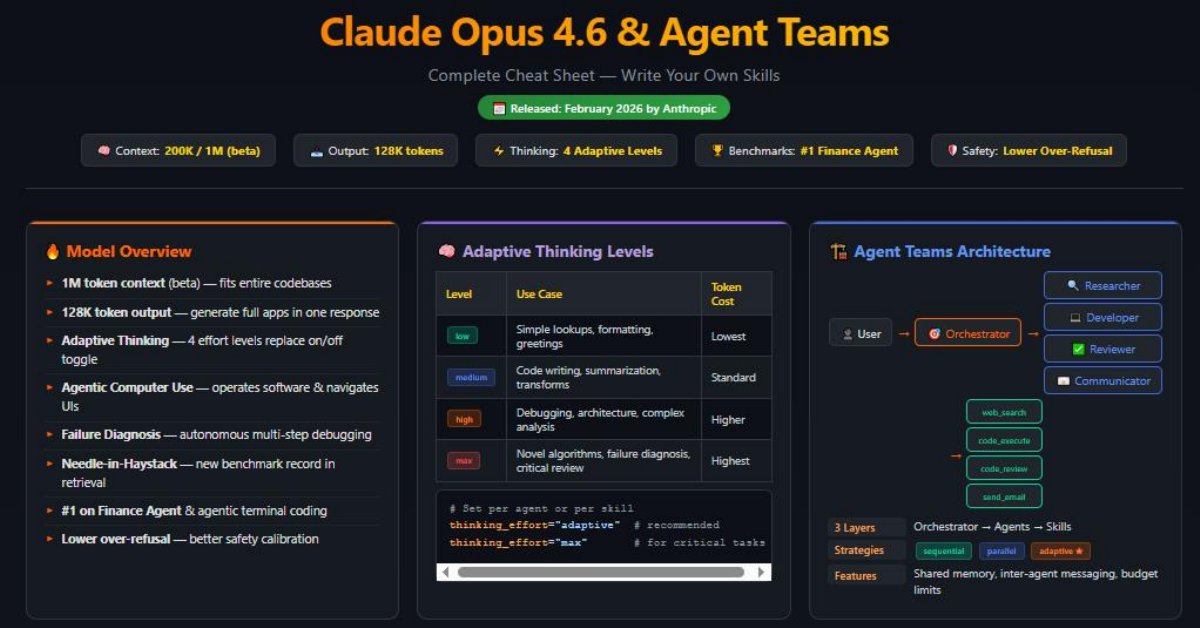
Claude Opus 4.6 is Anthropic’s premier and most capable large language model, released in early February 2026. It represents a major leap over its predecessor, Claude Opus 4.5, particularly in advanced coding, agentic workflows, long-horizon autonomous tasks, and deep reasoning. The model introduces several breakthrough capabilities that fundamentally change how developers build AI-powered agent systems.
- 1-Million-Token Context Window (Beta): Process entire codebases, legal corpora, or research libraries in a single prompt—with 200K tokens available as the standard context
- 128,000-Token Output Capacity: Generate complete applications, detailed reports, or extensive analyses in a single response
- Adaptive Thinking: A new reasoning system with four effort levels (low, medium, high, max) that replaces traditional thinking modes
- Advanced Agentic Computer Use: Operates software, navigates interfaces, diagnoses system failures, and executes multi-step coding tasks autonomously
- Needle-in-a-Haystack Retrieval: Sets new benchmarks for finding specific information within massive context windows
- Lower Over-Refusal Rates: Enhanced safety evaluations without sacrificing helpfulness—the model refuses less unnecessarily while maintaining robust safety
- Top Benchmark Performance: Holds top spots on Finance Agent, agentic terminal coding, and general reasoning benchmarks
Unlike standard LLM interactions where you send a prompt and receive a response, Claude Opus 4.6 in agent mode can plan, execute, observe, and iterate. It can call external tools, read and write files, execute code, browse the web, operate software interfaces, diagnose failures, and coordinate with other agents—all within a single workflow. Its ability to handle vast codebases through the 1M context window and produce 128K-token outputs makes it uniquely suited for complex, real-world software engineering and data analysis tasks.
Understanding Adaptive Thinking – The Core Innovation
One of the most significant innovations in Claude Opus 4.6 is Adaptive Thinking, which replaces the traditional binary “thinking mode on/off” approach from earlier Claude models. This system allows the AI to dynamically adjust the depth and computational effort it applies to each task.
| Effort Level | When It’s Used | Thinking Depth | Best For |
|---|---|---|---|
| Low | Simple, straightforward tasks | Minimal internal reasoning | Greetings, simple lookups, formatting, basic Q&A |
| Medium | Moderate complexity tasks | Standard reasoning chain | Code writing, summarization, data transformation |
| High | Complex multi-step problems | Deep analysis with multiple perspectives | Debugging, architecture design, complex analysis |
| Max | Extremely difficult or novel problems | Exhaustive reasoning with verification | Novel algorithm design, failure diagnosis, critical code review |
In the context of Agent Teams and skills, adaptive thinking is critical because it allows agents to conserve resources on simple skill calls while applying maximum reasoning power when diagnosing complex failures or orchestrating multi-step workflows.
# You can specify the thinking effort level per agent or per skill call
from claude_agent_sdk import Agent, AgentConfig

# Agent with adaptive thinking configuration
analyst = Agent(
    config=AgentConfig(
        name="DataAnalyst",
        model="claude-opus-4.6",
        thinking_effort="adaptive",  # Let the model decide (recommended)
        # Or set explicitly: "low", "medium", "high", "max"
        role="You are a senior data analyst...",
        skills=[query_database, analyze_trends],
    )
)

# Override thinking effort for specific skill invocations
@skill(
    name="diagnose_system_failure",
    description="Diagnoses complex system failures by analyzing logs, metrics, and code.",
    thinking_effort="max"  # Always use maximum reasoning for critical diagnostics
)
async def diagnose_failure(input: DiagnosisInput, ctx: SkillContext) -> SkillResult:
    # The agent will apply exhaustive reasoning to this skill
...thinking_effort="adaptive" (the default) is recommended for most agent configurations. This allows Opus 4.6 to intelligently allocate reasoning depth—using “low” effort for simple skill parameter generation and “max” effort when planning complex multi-agent strategies. This optimizes both performance and API costs.Understanding Agent Teams Architecture
Agent Teams in Claude Opus 4.6 represent a paradigm shift from single-agent interactions to multi-agent collaboration. Opus 4.6’s enhanced agentic capabilities—including autonomous computer use, software failure diagnosis, and multi-step coding—make it the ideal backbone for teams of specialized agents working together.
- Orchestrator Layer: The master agent that receives the user’s objective, breaks it into sub-tasks, and delegates to specialist agents. With adaptive thinking at “high” or “max” effort, the orchestrator performs sophisticated planning
- Agent Layer: Individual agents with specific roles (e.g., Researcher, Coder, Reviewer, Data Analyst) equipped with relevant skills
- Skill Layer: Modular, reusable functions that agents invoke to perform concrete actions (e.g., web_search, code_execute, file_write, api_call)
Here’s how the data flows in an Agent Team:
User Objective
    ↓
[Orchestrator Agent] ← Adaptive Thinking: "high" effort for planning
    ↓ Decomposes into sub-tasks
    ├── [Research Agent] → uses: web_search, summarize, extract_data
    ├── [Code Agent] → uses: code_write, code_execute, debug, diagnose_failure
    ├── [Review Agent] → uses: code_review, quality_check, suggest_fix
    └── [Deploy Agent] → uses: build_project, run_tests, deploy
    ↓
Consolidated Output → UserWhat Are Skills in Claude Opus 4.6?
A Skill in the Claude Opus 4.6 ecosystem is a self-contained, reusable capability that an agent can invoke to perform a specific action. Skills bridge the gap between the AI’s reasoning capabilities and real-world actions—leveraging Opus 4.6’s superior tool use accuracy and agentic execution.
- Built-in Skills: Pre-packaged by Anthropic (file operations, web search, code execution, computer use)
- Custom Skills: Written by you to connect to your own APIs, databases, tools, and workflows
- Community Skills: Shared through the Anthropic Skills Registry
Every skill consists of four core components:
| Component | Purpose | Example |
|---|---|---|
| Name | Unique identifier for the skill | fetch_stock_price |
| Description | Natural language explanation so the agent knows when to use it | “Fetches the current stock price for a given ticker symbol” |
| Input Schema | Defines required and optional parameters | {"ticker": "string", "exchange": "string (optional)"} |
| Handler Function | The actual code that executes when the skill is invoked | Python function that calls a stock API |
Prerequisites Before Writing Your First Skill
Before diving into skill development, ensure you have the following set up:
- Python 3.11+ installed on your system
- Anthropic API Key with Opus 4.6 access (sign up at console.anthropic.com)
- anthropic SDK v0.40+ installed:
pip install anthropic>=0.40 - claude-agent-sdk v2.0+ installed:
pip install claude-agent-sdk>=2.0 - A code editor (VS Code recommended with the Claude Agent Extension)
- Basic understanding of JSON Schema for input/output definitions
- Familiarity with Python’s
async/awaitsyntax
Install everything at once:
# Create a virtual environment
python -m venv claude-agents-env
source claude-agents-env/bin/activate  # On Windows: claude-agents-env\Scripts\activate

# Install required packages
pip install anthropic>=0.40 claude-agent-sdk>=2.0 pydantic httpx python-dotenv

# Verify installation
python -c "import claude_agent_sdk; print(claude_agent_sdk.__version__)"Anatomy of a Custom Skill – Deep Dive
Let’s break down every piece of a custom skill so you understand exactly what goes where and why.
The Skill Definition File
Every custom skill is defined using the @skill decorator from the claude-agent-sdk. Here is the complete anatomy:
from claude_agent_sdk import skill, SkillContext, SkillResult
from pydantic import BaseModel, Field
from typing import Optional

# Step 1: Define Input Schema
class WeatherInput(BaseModel):
    city: str = Field(description="Name of the city to get weather for")
    units: Optional[str] = Field(
        default="celsius",
        description="Temperature units: 'celsius' or 'fahrenheit'"
    )

# Step 2: Define Output Schema
class WeatherOutput(BaseModel):
    city: str
    temperature: float
    condition: str
    humidity: int
    wind_speed: float

# Step 3: Create the Skill with Decorator
@skill(
    name="get_weather",
    description="Retrieves current weather conditions for a specified city. "
                "Use this when the user asks about weather, temperature, or "
                "atmospheric conditions in any location.",
    version="1.0.0",
    tags=["weather", "location", "real-time-data"],
    retry_policy={"max_retries": 3, "backoff_factor": 2},
    timeout=30,
    thinking_effort="low"  # Simple API call, no deep reasoning needed
)
async def get_weather(input: WeatherInput, ctx: SkillContext) -> SkillResult:
    """Fetch current weather from OpenWeatherMap API."""

    # Step 4: Access configuration and secrets
    api_key = ctx.secrets.get("OPENWEATHER_API_KEY")

    # Step 5: Execute the actual logic
    import httpx
    async with httpx.AsyncClient() as client:
        response = await client.get(
            "https://api.openweathermap.org/data/2.5/weather",
            params={"q": input.city, "appid": api_key, "units": "metric"}
        )
        data = response.json()

    # Step 6: Transform and return results
    temp = data["main"]["temp"]
    if input.units == "fahrenheit":
        temp = (temp * 9/5) + 32

    return SkillResult(
        success=True,
        data=WeatherOutput(
            city=input.city,
            temperature=round(temp, 1),
            condition=data["weather"][0]["description"],
            humidity=data["main"]["humidity"],
            wind_speed=data["wind"]["speed"]
        ),
        message=f"Weather data retrieved for {input.city}"
)@skilldecorator: Registers the function as a callable skill in the agent’s toolkitdescription: This is the MOST important field—Opus 4.6 reads this to decide whether to use the skill. Be specific and include trigger phrasesSkillContext (ctx): Provides access to secrets, configuration, logging, shared memory, and inter-agent messagingSkillResult: Standardized return format with success/failure status, data, and human-readable messageretry_policy: Automatic retry on failure with exponential backofftimeout: Maximum execution time in seconds before the skill is terminatedthinking_effort: Hints to the agent how much reasoning to apply when preparing to call this skill
Step-by-Step Guide: Writing Your First Skill
Let’s build a practical custom skill from scratch—a Database Query Skill that allows an agent to query a PostgreSQL database using natural language. This is particularly powerful with Opus 4.6, as its advanced coding capabilities allow it to generate highly accurate SQL from natural language descriptions.
Before writing any code, answer these questions:
- What single action does this skill perform? → “Executes a read-only SQL query on a PostgreSQL database”
- What inputs does it need? → Database name, SQL query
- What outputs does it return? → Query results as structured data
- What could go wrong? → Invalid SQL, connection timeout, permission denied
from pydantic import BaseModel, Field, validator
from typing import Optional, List, Dict, Any

class DBQueryInput(BaseModel):
    database: str = Field(
        description="Name of the database to query (e.g., 'analytics', 'users')"
    )
    query: str = Field(
        description="SQL SELECT query to execute. Must be read-only."
    )
    limit: Optional[int] = Field(
        default=100,
        description="Maximum number of rows to return (default 100, max 1000)"
    )

    @validator("query")
    def validate_read_only(cls, v):
        dangerous = ["INSERT", "UPDATE", "DELETE", "DROP", "ALTER", "TRUNCATE"]
        upper_query = v.upper().strip()
        for keyword in dangerous:
            if keyword in upper_query:
                raise ValueError(f"Write operations ({keyword}) are not allowed")
        return v

    @validator("limit")
    def validate_limit(cls, v):
        if v and v > 1000:
            return 1000
        return v

class DBQueryOutput(BaseModel):
    columns: List[str]
    rows: List[Dict[str, Any]]
    row_count: int
query_time_ms: floatfrom claude_agent_sdk import skill, SkillContext, SkillResult
import asyncpg
import time
@skill(
name="query_database",
description="Executes a read-only SQL SELECT query against a PostgreSQL "
"database and returns structured results. Use this when the user "
"asks to look up data, find records, generate reports, or analyze "
"information stored in a database. Only supports SELECT queries.",
version="1.0.0",
tags=["database", "sql", "query", "data-retrieval"],
retry_policy={"max_retries": 2, "backoff_factor": 1},
timeout=60,
thinking_effort="medium" # SQL generation needs moderate reasoning
)
async def query_database(input: DBQueryInput, ctx: SkillContext) -> SkillResult:
"""Execute a read-only SQL query against PostgreSQL."""
# Get database connection string from secrets
db_configs = ctx.secrets.get("DATABASE_CONFIGS")
if input.database not in db_configs:
return SkillResult(
success=False,
data=None,
message=f"Database '{input.database}' not found. Available: {list(db_configs.keys())}"
)
conn_string = db_configs[input.database]
try:
start_time = time.time()
# Add LIMIT if not present
query = input.query.strip().rstrip(";")
if "LIMIT" not in query.upper():
query += f" LIMIT {input.limit}"
# Execute query
conn = await asyncpg.connect(conn_string)
try:
rows = await conn.fetch(query)
elapsed = (time.time() - start_time) * 1000
if not rows:
return SkillResult(
success=True,
data=DBQueryOutput(
columns=[], rows=[], row_count=0, query_time_ms=round(elapsed, 2)
),
message="Query executed successfully but returned no results."
)
columns = list(rows[0].keys())
result_rows = [dict(row) for row in rows]
# Log for auditing
ctx.log.info(f"Query on '{input.database}': {len(result_rows)} rows in {elapsed:.1f}ms")
return SkillResult(
success=True,
data=DBQueryOutput(
columns=columns,
rows=result_rows,
row_count=len(result_rows),
query_time_ms=round(elapsed, 2)
),
message=f"Retrieved {len(result_rows)} rows from '{input.database}' in {elapsed:.1f}ms"
)
finally:
await conn.close()
except asyncpg.PostgresSyntaxError as e:
return SkillResult(success=False, data=None, message=f"SQL Syntax Error: {str(e)}")
except asyncpg.InsufficientPrivilegeError:
return SkillResult(success=False, data=None, message="Permission denied for this query")
except Exception as e:
ctx.log.error(f"Database query failed: {str(e)}")
return SkillResult(success=False, data=None, message=f"Query failed: {str(e)}")from claude_agent_sdk import Agent, AgentConfig
from skills.database import query_database
from skills.weather import get_weather
# Create an agent with custom skills
data_analyst = Agent(
config=AgentConfig(
name="DataAnalyst",
model="claude-opus-4.6",
thinking_effort="adaptive", # Let Opus 4.6 decide reasoning depth
role="You are a senior data analyst. You help users understand their data "
"by querying databases, creating visualizations, and providing insights.",
skills=[query_database, get_weather],
max_iterations=10,
temperature=0.1
)
)# Run the agent with a user query
import asyncio
async def main():
response = await data_analyst.run(
"How many new users signed up last week? "
"Check the users database."
)
print(response.final_output)
asyncio.run(main())- The agent reads the user query and applies adaptive thinking to plan its approach
- It scans its available skills and matches
query_databasebased on the description - Opus 4.6’s advanced coding capabilities generate accurate SQL:
SELECT COUNT(*) FROM users WHERE created_at >= NOW() - INTERVAL '7 days' - It invokes the skill with proper parameters
- It receives the result and formulates a natural language response with analysis
Advanced Skill Patterns and Techniques
Pattern 1: Stateful Skills with Memory
Some skills need to maintain state across invocations. Use the SkillContext.state object:
@skill(
    name="track_conversation_metrics",
    description="Tracks and accumulates metrics throughout the conversation, "
                "such as API calls made, tokens used, and errors encountered.",
    stateful=True
)
async def track_metrics(input: MetricsInput, ctx: SkillContext) -> SkillResult:
    # Initialize state if first call
    if "call_count" not in ctx.state:
        ctx.state["call_count"] = 0
        ctx.state["total_tokens"] = 0
        ctx.state["errors"] = []

    ctx.state["call_count"] += 1
    ctx.state["total_tokens"] += input.tokens_used

    if input.error:
        ctx.state["errors"].append(input.error)

    return SkillResult(
        success=True,
        data={"cumulative_stats": dict(ctx.state)},
        message=f"Metrics updated. Total calls: {ctx.state['call_count']}"
    )
Pattern 2: Chained Skills (Skill Composition)
Skills can invoke other skills, creating powerful pipelines. Opus 4.6’s improved planning means it excels at understanding when to chain versus when to call skills independently:
@skill(
    name="generate_report",
    description="Generates a comprehensive report by querying data, "
                "analyzing trends, and formatting results.",
    dependencies=["query_database", "analyze_trends", "format_markdown"],
    thinking_effort="high"  # Complex orchestration needs deeper reasoning
)
async def generate_report(input: ReportInput, ctx: SkillContext) -> SkillResult:
    # Call the query_database skill
    raw_data = await ctx.invoke_skill("query_database", {
        "database": input.database,
        "query": input.data_query
    })

    if not raw_data.success:
        return SkillResult(success=False, message=f"Data fetch failed: {raw_data.message}")

    # Call the analyze_trends skill
    analysis = await ctx.invoke_skill("analyze_trends", {
        "data": raw_data.data,
        "metrics": input.metrics
    })

    # Call the format_markdown skill
    formatted = await ctx.invoke_skill("format_markdown", {
        "title": input.report_title,
        "sections": [raw_data.data, analysis.data]
    })

    return SkillResult(success=True, data=formatted.data, message="Report generated")
Pattern 3: Failure Diagnosis Skills
Opus 4.6’s standout capability is software failure diagnosis. You can create skills that leverage this:
@skill(
    name="diagnose_system_failure",
    description="Analyzes system logs, error traces, and metrics to diagnose "
                "software failures. Use when a deployment fails, a service is "
                "down, or unexpected errors are occurring. Provides root cause "
                "analysis and recommended fixes.",
    tags=["debugging", "diagnosis", "devops"],
    thinking_effort="max",  # Always use maximum reasoning for diagnosis
    timeout=120
)
async def diagnose_failure(input: DiagnosisInput, ctx: SkillContext) -> SkillResult:
    # Gather all relevant context using the large context window
    logs = await ctx.invoke_skill("read_file", {"path": input.log_path})
    metrics = await ctx.invoke_skill("query_database", {
        "database": "monitoring",
        "query": f"SELECT * FROM system_metrics WHERE service='{input.service}' "
                 f"AND timestamp >= NOW() - INTERVAL '1 hour' ORDER BY timestamp"
    })
    config = await ctx.invoke_skill("read_file", {"path": input.config_path})

    # Opus 4.6 with max thinking effort will deeply analyze all this data
    # and provide root cause analysis
    return SkillResult(
        success=True,
        data={
            "logs_analyzed": len(logs.data.split('\n')),
            "metrics_points": metrics.data.get("row_count", 0),
            "context_loaded": True
        },
        message="Diagnosis context loaded. Agent will now analyze with max reasoning depth."
    )
Pattern 4: Streaming Skills for Long-Running Tasks
@skill(
    name="process_large_file",
    description="Processes large CSV or JSON files in chunks, streaming "
                "progress updates to the user.",
    streaming=True,
    timeout=300
)
async def process_large_file(input: FileInput, ctx: SkillContext) -> SkillResult:
    import aiofiles
    total_lines = 0
    processed = 0

    async with aiofiles.open(input.file_path, 'r') as f:
        async for line in f:
            total_lines += 1

    async with aiofiles.open(input.file_path, 'r') as f:
        async for line in f:
            await process_line(line, input.transform_rules)
            processed += 1

            if processed % 1000 == 0:
                await ctx.stream_update(
                    progress=processed / total_lines,
                    message=f"Processed {processed}/{total_lines} rows..."
                )

    return SkillResult(
        success=True,
        data={"rows_processed": processed},
        message=f"Successfully processed {processed} rows"
    )
Configuring Agent Teams with Custom Skills
Now let’s put it all together and configure a full Agent Team where multiple agents collaborate using their respective skills, with Opus 4.6’s adaptive thinking and massive context window powering the orchestration.
from claude_agent_sdk import AgentTeam, Agent, AgentConfig, OrchestratorConfig

# Import your custom skills
from skills.database import query_database
from skills.web import web_search, scrape_page
from skills.code import write_code, execute_code, debug_code, diagnose_failure
from skills.files import read_file, write_file
from skills.communication import send_email, send_slack

# Define specialized agents
researcher = Agent(
    config=AgentConfig(
        name="Researcher",
        model="claude-opus-4.6",
        thinking_effort="adaptive",
        role="You are an expert research analyst. Gather information from "
             "databases and the web. Always cite your sources and verify facts "
             "from multiple sources before reporting.",
        skills=[query_database, web_search, scrape_page, read_file],
        max_iterations=15,
        temperature=0.2
    )
)

developer = Agent(
    config=AgentConfig(
        name="Developer",
        model="claude-opus-4.6",
        thinking_effort="adaptive",
        role="You are a senior software engineer. Write clean, efficient, "
             "well-documented code. Always include error handling and tests. "
             "You can diagnose complex software failures autonomously.",
        skills=[write_code, execute_code, debug_code, diagnose_failure, read_file, write_file],
        max_iterations=25,  # More iterations for complex coding tasks
        temperature=0.1
    )
)

reviewer = Agent(
    config=AgentConfig(
        name="Reviewer",
        model="claude-opus-4.6",
        thinking_effort="high",  # Always think deeply during reviews
        role="You are a code reviewer and quality assurance specialist. "
             "Review all code for bugs, security issues, performance problems, "
             "and adherence to best practices. Opus 4.6 excels at code review.",
        skills=[read_file, write_code],
        max_iterations=10,
        temperature=0.1
    )
)

communicator = Agent(
    config=AgentConfig(
        name="Communicator",
        model="claude-opus-4.6",
        thinking_effort="low",  # Simple formatting/messaging tasks
        role="You handle all external communications—sending emails, "
             "Slack messages, and formatting reports for stakeholders.",
        skills=[send_email, send_slack, write_file],
        max_iterations=5,
        temperature=0.3
    )
)

# Create the Agent Team
team = AgentTeam(
    orchestrator=OrchestratorConfig(
        model="claude-opus-4.6",
        thinking_effort="high",  # Orchestrator needs deep planning
        strategy="adaptive",
        max_delegation_depth=3,
        conflict_resolution="orchestrator_decides",
        context_window="200k"  # Or "1m" if enrolled in beta
    ),
    agents=[researcher, developer, reviewer, communicator],
    shared_memory=True,
    budget_limit={"max_api_calls": 100, "max_tokens": 500000}
)| Strategy | How It Works | Best For |
|---|---|---|
| Sequential | Agents work one after another in a defined order | Pipeline workflows (research → code → review) |
| Parallel | Multiple agents work simultaneously on independent sub-tasks | Tasks that can be decomposed into independent parts |
| Adaptive | Orchestrator dynamically decides sequencing based on task analysis using adaptive thinking | Complex, unpredictable workflows (recommended for Opus 4.6) |
Running the Agent Team
import asyncio

async def main():
    result = await team.execute(
        objective="Research the latest trends in renewable energy storage, "
                  "write a Python script that visualizes the market growth data, "
                  "review the code for quality, and email the final report to "
                  "team@example.com with the visualization attached."
    )

    print("=== Team Execution Summary ===")
    print(f"Status: {result.status}")
    print(f"Total agents used: {result.agents_used}")
    print(f"Total skill invocations: {result.skill_calls}")
    print(f"Total tokens consumed: {result.total_tokens}")
    print(f"Thinking effort distribution: {result.thinking_stats}")
    print(f"\n{result.final_output}")

asyncio.run(main())
Inter-Agent Communication and Skill Sharing
One of the most powerful features of Agent Teams is the ability for agents to communicate and share information. Opus 4.6’s massive context window ensures that shared data doesn’t get lost or truncated even in long-running workflows.
- Shared Memory: A common knowledge base all agents can read from and write to
- Direct Messages: One agent explicitly sends data to another
- Artifacts: Files and data objects placed in a shared workspace
- Status Updates: Agents broadcast their progress to the orchestrator
# Skill that writes to shared memory
@skill(
    name="share_findings",
    description="Publishes research findings to shared team memory so other "
                "agents can access the data."
)
async def share_findings(input: FindingsInput, ctx: SkillContext) -> SkillResult:
    await ctx.shared_memory.put(
        key=f"research_{input.topic}",
        value={
            "findings": input.findings,
            "sources": input.sources,
            "confidence": input.confidence_score,
            "timestamp": datetime.utcnow().isoformat()
        },
        tags=["research", input.topic]
    )

    await ctx.broadcast(
        message=f"New research findings available on '{input.topic}'",
        target_agents=["Developer", "Reviewer"]
    )

    return SkillResult(
        success=True,
        data={"shared_key": f"research_{input.topic}"},
        message=f"Findings on '{input.topic}' shared with team"
    )

# Skill that reads from shared memory
@skill(
    name="get_team_findings",
    description="Retrieves research findings previously shared by the Research agent."
)
async def get_team_findings(input: GetFindingsInput, ctx: SkillContext) -> SkillResult:
    data = await ctx.shared_memory.get(f"research_{input.topic}")

    if not data:
        return SkillResult(
            success=False,
            message=f"No findings found for topic '{input.topic}'. "
                    f"Ask the Research agent to investigate first."
        )

    return SkillResult(success=True, data=data, message="Findings retrieved")
Leveraging the 1M Token Context Window in Skills
One of Claude Opus 4.6’s most transformative features is the 1-million-token context window (available in beta; 200K standard). This fundamentally changes how skills can be designed—entire codebases, documentation sets, and conversation histories can be loaded into a single agent’s context.
- Approximately 750,000 words or 3,000+ pages of text
- An entire medium-sized codebase (50,000–100,000 lines of code)
- Multiple API documentation sets loaded simultaneously
- Complete project histories including all commits, PRs, and discussions
# Skill that loads an entire codebase into context for analysis
@skill(
    name="analyze_codebase",
    description="Loads and analyzes an entire codebase for architecture review, "
                "dependency mapping, and security audit. Leverages the 1M token "
                "context window to hold all files simultaneously.",
    tags=["code-analysis", "architecture", "security"],
    thinking_effort="max",
    timeout=180,
    context_requirement="large"  # Signals this skill needs extended context
)
async def analyze_codebase(input: CodebaseInput, ctx: SkillContext) -> SkillResult:
    import os

    all_files = {}
    total_tokens_estimate = 0

    # Walk the directory and load all relevant files
    for root, dirs, files in os.walk(input.repo_path):
        # Skip common non-essential directories
        dirs[:] = [d for d in dirs if d not in [
            'node_modules', '.git', '__pycache__', 'venv', '.env'
        ]]

        for file in files:
            if file.endswith(tuple(input.file_extensions)):
                filepath = os.path.join(root, file)
                relative_path = os.path.relpath(filepath, input.repo_path)

                with open(filepath, 'r', errors='ignore') as f:
                    content = f.read()

                all_files[relative_path] = content
                total_tokens_estimate += len(content) // 4  # Rough estimate

    # Check if we're within context limits
    if total_tokens_estimate > 900000:
        ctx.log.warning(f"Codebase ({total_tokens_estimate} est. tokens) may exceed context limit")

    return SkillResult(
        success=True,
        data={
            "files_loaded": len(all_files),
            "estimated_tokens": total_tokens_estimate,
            "file_tree": list(all_files.keys()),
            "contents": all_files  # Full codebase in context
        },
        message=f"Loaded {len(all_files)} files (~{total_tokens_estimate:,} tokens) for analysis"
)Real-World Skill Examples
Example 1: GitHub Integration Skill
@skill(
    name="create_github_pr",
    description="Creates a GitHub Pull Request with specified branch, title, "
                "and description. Use when code changes are ready for review.",
    tags=["github", "version-control", "deployment"]
)
async def create_github_pr(input: GitHubPRInput, ctx: SkillContext) -> SkillResult:
    import httpx
    token = ctx.secrets.get("GITHUB_TOKEN")

    async with httpx.AsyncClient() as client:
        response = await client.post(
            f"https://api.github.com/repos/{input.repo}/pulls",
            headers={
                "Authorization": f"token {token}",
                "Accept": "application/vnd.github.v3+json"
            },
            json={
                "title": input.title,
                "body": input.description,
                "head": input.source_branch,
                "base": input.target_branch
            }
        )

        if response.status_code == 201:
            pr_data = response.json()
            return SkillResult(
                success=True,
                data={"pr_url": pr_data["html_url"], "pr_number": pr_data["number"]},
                message=f"PR #{pr_data['number']} created: {pr_data['html_url']}"
            )
        else:
            return SkillResult(
                success=False,
                message=f"GitHub API error {response.status_code}: {response.text}"
            )
Example 2: Agentic Computer Use Skill
Opus 4.6 can operate software and navigate interfaces. This skill leverages that capability:
@skill(
    name="operate_application",
    description="Uses Claude's agentic computer use to interact with desktop "
                "or web applications—clicking buttons, filling forms, navigating "
                "menus, and reading screen content. Use when the task requires "
                "operating software that doesn't have an API.",
    tags=["computer-use", "automation", "ui-interaction"],
    thinking_effort="high",
    timeout=120
)
async def operate_application(input: ComputerUseInput, ctx: SkillContext) -> SkillResult:
    from claude_agent_sdk.computer_use import ScreenSession

    session = ScreenSession(
        display=input.display_id,
        resolution=input.resolution or "1920x1080"
    )

    try:
        # Execute the sequence of UI actions
        results = []
        for step in input.action_steps:
            if step.action == "screenshot":
                screenshot = await session.capture_screen()
                results.append({"type": "screenshot", "data": screenshot})
            elif step.action == "click":
                await session.click(x=step.x, y=step.y)
                results.append({"type": "click", "location": f"{step.x},{step.y}"})
            elif step.action == "type":
                await session.type_text(step.text)
                results.append({"type": "type", "text": step.text})
            elif step.action == "navigate":
                await session.navigate_to(step.url)
                results.append({"type": "navigate", "url": step.url})

        final_screenshot = await session.capture_screen()

        return SkillResult(
            success=True,
            data={"actions_completed": len(results), "steps": results,
                  "final_state": final_screenshot},
            message=f"Completed {len(results)} UI actions successfully"
        )
    finally:
        await session.close()
Example 3: Multi-Step Data Pipeline Skill
@skill(
    name="etl_pipeline",
    description="Runs an Extract-Transform-Load pipeline. Extracts data from "
                "a source, applies transformations, and loads into a destination.",
    tags=["etl", "data-pipeline", "transformation"],
    thinking_effort="medium",
    timeout=120
)
async def etl_pipeline(input: ETLInput, ctx: SkillContext) -> SkillResult:
    import pandas as pd

    # EXTRACT
    await ctx.stream_update(progress=0.1, message="Extracting data...")
    if input.source_type == "csv":
        df = pd.read_csv(input.source_path)
    elif input.source_type == "database":
        db_result = await ctx.invoke_skill("query_database", {
            "database": input.source_db,
            "query": input.extraction_query
        })
        df = pd.DataFrame(db_result.data["rows"])

    # TRANSFORM
    await ctx.stream_update(progress=0.4, message="Applying transformations...")
    for transform in input.transformations:
        if transform.type == "filter":
            df = df.query(transform.expression)
        elif transform.type == "rename":
            df = df.rename(columns=transform.mapping)
        elif transform.type == "aggregate":
            df = df.groupby(transform.group_by).agg(transform.aggregations)

    # LOAD
    await ctx.stream_update(progress=0.8, message="Loading transformed data...")
    output_path = f"/outputs/{input.pipeline_name}_{int(time.time())}.csv"
    df.to_csv(output_path, index=False)

    return SkillResult(
        success=True,
        data={
            "rows_processed": len(df),
            "columns": list(df.columns),
            "output_path": output_path,
            "sample": df.head(5).to_dict()
        },
        message=f"ETL pipeline complete: {len(df)} rows processed and saved"
    )
Testing and Debugging Skills
Robust testing is essential for skills because agents rely on them autonomously. A broken skill means a broken agent. Opus 4.6’s advanced debugging capabilities can also help you identify issues faster.
Unit Testing Skills
import pytest
from unittest.mock import AsyncMock, patch
from skills.database import query_database, DBQueryInput
from claude_agent_sdk.testing import MockSkillContext

@pytest.mark.asyncio
async def test_query_database_success():
    """Test successful database query."""
    ctx = MockSkillContext(
        secrets={"DATABASE_CONFIGS": {"analytics": "postgresql://..."}}
    )

    input_data = DBQueryInput(
        database="analytics",
        query="SELECT COUNT(*) as total FROM users",
        limit=10
    )

    with patch("asyncpg.connect") as mock_connect:
        mock_conn = AsyncMock()
        mock_conn.fetch.return_value = [{"total": 42}]
        mock_connect.return_value = mock_conn

        result = await query_database(input_data, ctx)

    assert result.success is True
    assert result.data.row_count == 1
    assert result.data.rows[0]["total"] == 42

@pytest.mark.asyncio
async def test_query_database_rejects_write():
    """Test that write operations are rejected."""
    with pytest.raises(ValueError, match="Write operations"):
        DBQueryInput(
            database="analytics",
            query="DELETE FROM users WHERE id = 1"
        )

@pytest.mark.asyncio
async def test_query_database_unknown_db():
    """Test error handling for unknown database."""
    ctx = MockSkillContext(
        secrets={"DATABASE_CONFIGS": {"analytics": "postgresql://..."}}
    )

    input_data = DBQueryInput(database="nonexistent", query="SELECT 1")
    result = await query_database(input_data, ctx)

    assert result.success is False
    assert "not found" in result.message
The Skill Debugger Tool
from claude_agent_sdk.debug import SkillDebugger

debugger = SkillDebugger()

# Interactive testing
await debugger.test_skill(
    skill=query_database,
    input={"database": "analytics", "query": "SELECT * FROM users LIMIT 5"},
    verbose=True,
    mock_secrets={"DATABASE_CONFIGS": {"analytics": "postgresql://localhost/test"}}
)

# Trace an entire agent team execution
await debugger.trace_team(
    team=team,
    objective="Generate a sales report for Q2 2025",
    output_file="debug_trace.json",
    show_thinking=True  # Shows adaptive thinking effort decisions
)- ✅ Always test skills in isolation before attaching to agents
- ✅ Check that your skill description is precise—vague descriptions cause wrong skill selection
- ✅ Verify error handling returns helpful messages (agents use error messages to retry differently)
- ✅ Test with edge cases: empty inputs, huge data, timeouts, network failures
- ✅ Use
ctx.log.debug()liberally during development - ✅ Monitor adaptive thinking effort levels—if a simple skill is triggering “max” thinking, refine the description
Performance Optimization for Skills
Poorly optimized skills can make your agent team slow and expensive. With Opus 4.6’s larger context window and 128K output capacity, managing token usage is even more important.
| Optimization | Technique | Impact |
|---|---|---|
| Adaptive Thinking Tuning | Set appropriate thinking_effort per skill—don’t use “max” for simple lookups |
40-70% token savings on simple skills |
| Caching | Use ctx.cache for repeated queries with the same parameters |
50-90% faster repeated calls |
| Connection Pooling | Reuse database and HTTP connections instead of creating new ones | 30-60% reduction in latency |
| Parallel Execution | Use asyncio.gather() for independent sub-tasks within a skill |
2-5x speed improvement for multi-call skills |
| Data Minimization | Return only necessary fields—critical with 128K output capacity available | Reduces token usage and downstream processing |
| Smart Descriptions | Write precise descriptions to prevent agents from calling wrong skills | Eliminates wasted API calls |
| Context Window Management | Only load the 1M context when truly needed; 200K suffices for most tasks | Significant cost savings |
# Caching example with adaptive thinking
@skill(
    name="get_company_info",
    description="Retrieves comprehensive company information by ticker symbol.",
    cache_ttl=3600,
    thinking_effort="low"  # Simple lookup, minimal reasoning needed
)
async def get_company_info(input: CompanyInput, ctx: SkillContext) -> SkillResult:
    cache_key = f"company_{input.ticker}"

    cached = await ctx.cache.get(cache_key)
    if cached:
        return SkillResult(success=True, data=cached, message="From cache")

    data = await fetch_company_data(input.ticker)
    await ctx.cache.set(cache_key, data, ttl=3600)

    return SkillResult(success=True, data=data, message="Fresh data fetched")
Security Best Practices
- Never hardcode secrets – Always use
ctx.secrets - Validate all inputs – Use Pydantic validators to sanitize every parameter
- Enforce read-only where possible – Default to read-only database access
- Rate limit skills – Prevent runaway agent loops from hammering APIs
- Use least-privilege API keys – Create dedicated keys with minimal permissions
- Log all skill invocations – Maintain an audit trail, especially for computer use skills
- Set budget limits – Cap API calls, tokens, and compute time per team execution
- Sandbox code execution – Run agent-generated code in isolated containers
- Implement approval gates – Require human confirmation for destructive actions
- Review skill outputs – Don’t expose raw database responses containing PII
# Approval gate for sensitive operations
@skill(
    name="delete_user_data",
    description="Permanently deletes a user's data upon GDPR request. "
                "Requires human approval before execution.",
    requires_approval=True,
    destructive=True,
    thinking_effort="high"  # Careful reasoning before destructive action
)
async def delete_user_data(input: DeleteInput, ctx: SkillContext) -> SkillResult:
    approval = await ctx.request_human_approval(
        action=f"Delete all data for user {input.user_id}",
        details=f"This will remove {input.data_types} from all systems.",
        timeout=300
    )

    if not approval.granted:
        return SkillResult(
            success=False,
            message=f"Deletion denied by {approval.reviewer}: {approval.reason}"
        )

    await perform_deletion(input.user_id, input.data_types)

    return SkillResult(
        success=True,
        data={"deleted_user": input.user_id, "approved_by": approval.reviewer},
        message=f"User data deleted. Approved by {approval.reviewer}"
    )
Claude Opus 4.6 vs. Previous Models – Skills & Agent Capabilities
| Feature | Claude Opus 4.0 | Claude Opus 4.5 | Claude Opus 4.6 (Feb 2026) |
|---|---|---|---|
| Context Window | 200K tokens | 200K tokens | 200K standard / 1M beta |
| Output Capacity | ~8K tokens | ~16K tokens | 128K tokens |
| Thinking Mode | On/Off toggle | Extended thinking | Adaptive (4 effort levels) |
| Agent Teams Support | ❌ No | ⚠️ Beta | ✅ Full support |
| Custom Skills API | ❌ Basic tool use only | ⚠️ Limited skill registry | ✅ Full SDK with decorators |
| Skill Chaining | ❌ No | ❌ No | ✅ Yes (invoke_skill) |
| Agentic Computer Use | ❌ No | ⚠️ Basic | ✅ Advanced (UI navigation, software operation) |
| Software Failure Diagnosis | ❌ No | ⚠️ Limited | ✅ Autonomous multi-step diagnosis |
| Needle-in-a-Haystack | Good | Better | New benchmark record |
| Over-Refusal Rate | Higher | Moderate | Lowest (better safety calibration) |
| Shared Memory | ❌ No | ❌ No | ✅ Full key-value store |
| Streaming Skills | ❌ No | ⚠️ Text only | ✅ Progress + data streaming |
| Human Approval Gates | ❌ No | ❌ No | ✅ Built-in |
| Finance Agent Benchmark | — | Competitive | Top spot |
| Agentic Terminal Coding | — | Good | Best in class |
Common Mistakes to Avoid
Bad: "Handles data stuff"
Good: "Executes a read-only SQL SELECT query against a PostgreSQL database and returns structured rows. Use when the user asks to look up, search, count, or analyze records."
Why it matters: Opus 4.6 reads the description to decide which skill to use. Its tool-use accuracy is excellent, but vague descriptions still cause misselection.
Bad: One skill that fetches data, transforms it, generates a chart, AND emails the report.
Good: Four separate skills (fetch_data, transform_data, generate_chart, send_email) that the agent chains together.
Why it matters: Opus 4.6 excels at orchestrating multiple granular skills. Let the agent’s adaptive thinking decide the optimal sequence rather than hardcoding pipelines.
Bad: raise Exception("Something went wrong")
Good: return SkillResult(success=False, message="Database connection timed out after 30s. The 'analytics' database may be down. Try again or use 'analytics_replica' instead.")
Why it matters: Opus 4.6’s failure diagnosis capabilities mean it can intelligently recover from errors—but only if your error messages are descriptive enough for the agent to reason about alternatives.
Bad: Setting thinking_effort="max" on all skills and agents.
Good: Use “low” for simple lookups, “medium” for standard code generation, “high” for complex analysis, and “max” only for critical diagnosis or novel problem-solving.
Why it matters: Max effort dramatically increases token consumption and latency. Adaptive thinking exists specifically to optimize this tradeoff automatically.
The 1M context window is powerful but expensive. Don’t load entire codebases when you only need one file. Design skills that load context incrementally—start with file trees and metadata, then load specific files on demand.
All skills should be async. Using synchronous libraries (like requests instead of httpx) blocks the event loop and prevents other agents from running concurrently.
Deploying Skills to Production
- ✅ All skills pass unit tests and integration tests
- ✅ Secrets are stored in environment variables or a secrets manager
- ✅ Rate limits are configured for all external API skills
- ✅ Monitoring and alerting are set up for skill failures
- ✅ Logging captures skill invocations, inputs (sanitized), and outcomes
- ✅ Budget limits are set on the Agent Team
- ✅ Human approval gates are in place for destructive operations
- ✅ Skills are versioned for rollback capability
- ✅ Adaptive thinking levels are tuned per skill for cost optimization
- ✅ Context window usage is monitored (especially if using 1M beta)
Deployment with Docker
# Dockerfile for Agent Team Service
FROM python:3.11-slim

WORKDIR /app

COPY requirements.txt .
RUN pip install --no-cache-dir -r requirements.txt

COPY skills/ ./skills/
COPY agents/ ./agents/
COPY main.py .

# Security: Run as non-root user
RUN useradd -m agentuser
USER agentuser

ENV ANTHROPIC_API_KEY=${ANTHROPIC_API_KEY}
ENV PYTHONUNBUFFERED=1

CMD ["python", "main.py"]
Skills Registry for Your Organization
from claude_agent_sdk import SkillRegistry

registry = SkillRegistry(
    name="acme-corp-skills",
    storage="s3://acme-skills-registry/"
)

# Publish a skill
await registry.publish(
    skill=query_database,
    version="1.2.0",
    changelog="Added connection pooling and caching",
    compatible_models=["claude-opus-4.6", "claude-opus-4.5"],
    access="organization"
)

# Discover and install skills from registry
available = await registry.search(tags=["database", "analytics"])
for s in available:
    print(f"{s.name} v{s.version}: {s.description}")

# Install a shared skill
shared_skill = await registry.install("query_database", version="1.2.0")
Future Roadmap and What’s Coming Next
- 1M Context GA: The 1-million-token context window is expected to move from beta to general availability, making it the standard for all Opus plans
- Community Skills Marketplace: Share and discover skills from the global developer community
- Visual Skill Builder: A no-code/low-code interface for creating skills without writing Python
- Agent Teams v2: Support for hierarchical teams (teams of teams), persistent agent memory across sessions, and scheduled autonomous runs
- Skill Observability Dashboard: Real-time monitoring of skill usage, latency, error rates, and cost per skill
- Multi-Model Agent Teams: Mix Claude, GPT, Gemini, and open-source models within the same team
- On-Premise Deployment: Run Agent Teams entirely within your infrastructure for regulated industries
- Skill Auto-Generation: Describe what you need in natural language, and Opus 4.6 generates the skill code for you using its advanced coding capabilities
- Adaptive Thinking v2: Even more granular effort levels and the ability for skills to dynamically adjust mid-execution
Frequently Asked Questions (FAQ)
What exactly is a “Skill” in Claude Opus 4.6?
A Skill is a modular, reusable function that a Claude agent can invoke to perform a specific action—such as querying a database, calling an API, writing a file, operating software interfaces, or sending an email. Skills extend what Claude can do beyond text generation, allowing it to interact with external systems and execute real-world tasks autonomously. With Opus 4.6’s advanced agentic capabilities, skills can also leverage computer use and failure diagnosis.
What is Adaptive Thinking and how does it affect skills?
Adaptive Thinking is Opus 4.6’s new reasoning system that replaces the traditional on/off thinking mode. It offers four effort levels—low, medium, high, and max—allowing the model to adjust reasoning depth based on task complexity. For skills, this means you can specify how much reasoning the agent should apply when preparing to call a skill. Simple API lookups use “low” effort (saving tokens), while complex failure diagnosis uses “max” effort for exhaustive analysis. Setting “adaptive” lets the model decide automatically.
How large is the context window in Claude Opus 4.6?
Claude Opus 4.6 offers a standard 200K token context window, with a 1-million-token context window available in beta. The 1M context can hold approximately 750,000 words—enough for entire codebases, legal document sets, or research libraries. Additionally, Opus 4.6 supports up to 128,000 tokens of output in a single response, enabling it to generate complete applications or comprehensive reports.
Do I need to know Python to write custom skills?
Currently, it is good to know. The Claude Agent SDK uses Python as the primary language for skill development. You need some familiarity with Python’s async/await syntax, Pydantic models for data validation, and basic API concepts. Anthropic has announced a visual no-code skill builder on their roadmap.
How many agents can I have in a single Agent Team?
Claude Opus 4.6 supports multiple agents in a single team with no hard-coded limit. However, for practical performance and cost reasons, most teams work best with 3–7 specialized agents. More agents means more coordination overhead and higher API costs. Start small and add agents only when you need distinct specializations.
Can different agents in a team use different thinking effort levels?
Yes. You can assign different thinking_effort levels to different agents based on their role. For example, use “high” for the orchestrator (which needs deep planning), “adaptive” for the developer agent, “high” for the reviewer, and “low” for a simple notification agent. This optimizes both cost and performance across the team.
What is agentic computer use and how does Opus 4.6 handle it?
Agentic computer use is Opus 4.6’s ability to operate software applications autonomously—clicking buttons, filling forms, navigating menus, reading screen content, and interacting with both desktop and web interfaces. This is particularly useful for automating tasks in software that lacks APIs. Opus 4.6 significantly improves on earlier models’ computer use capabilities with better UI element recognition and action accuracy.
How does Opus 4.6 handle software failure diagnosis?
Opus 4.6 excels at autonomous multi-step software failure diagnosis. When given system logs, error traces, metrics, and configuration files, it can identify root causes of failures, suggest fixes, and even implement them through agentic coding. With the 1M context window, it can load entire project histories and log files simultaneously for comprehensive diagnosis. Set thinking_effort="max" for diagnosis skills to get the deepest analysis.
How is billing calculated for Agent Teams with Opus 4.6?
You are billed per API call at the standard Opus 4.6 rate. Each agent’s thinking (affected by effort level), each skill invocation that requires model reasoning, and each inter-agent communication counts as API usage. Higher thinking effort levels consume more tokens. Using the 1M context window beta also affects costs proportionally. Set budget limits using budget_limit in your team configuration to prevent unexpected charges.
What are the “needle-in-a-haystack” improvements in Opus 4.6?
Opus 4.6 sets new benchmarks in retrieving specific information from within massive context windows. When you load 1 million tokens of data—like an entire codebase or document collection—Opus 4.6 can locate a specific function, clause, or data point with unprecedented accuracy, even when the relevant passage is buried deep within the context. This makes skills that load large datasets significantly more reliable.
What does “lower over-refusal rates” mean for skill development?
Over-refusal is when an AI model unnecessarily refuses a safe and legitimate request due to overly conservative safety filters. Opus 4.6 has been calibrated to maintain robust safety while reducing false refusals. For skill development, this means your agents are less likely to refuse legitimate tool calls, code execution tasks, or data queries that earlier models might have flagged incorrectly. The result is more reliable autonomous workflows.
Can skills call other skills (skill chaining)?
Yes. Claude Opus 4.6 supports skill chaining through the ctx.invoke_skill() method. This allows you to build complex pipelines where one skill calls another. For example, a “generate_report” skill can internally call “query_database,” “analyze_data,” and “format_markdown” skills sequentially. Opus 4.6’s improved planning capabilities make it especially good at determining optimal skill chains.
What happens if a skill fails during execution?
If a skill returns SkillResult(success=False, ...), the agent reads the error message and—using adaptive thinking—decides its next action. It might retry with different parameters, try a different skill, or report the failure to the user. Opus 4.6’s software failure diagnosis capabilities make it exceptionally good at recovering from errors intelligently. If a skill crashes with an unhandled exception, the retry policy kicks in with exponential backoff.
Is the 1-million-token context available for all users?
As of the February 2026 release, the 1-million-token context window is available in beta and may require separate enrollment through the Anthropic Console. The standard 200K token context window is available to all users on Opus 4.6 plans. Check your account settings or contact Anthropic for beta access to the extended context.