
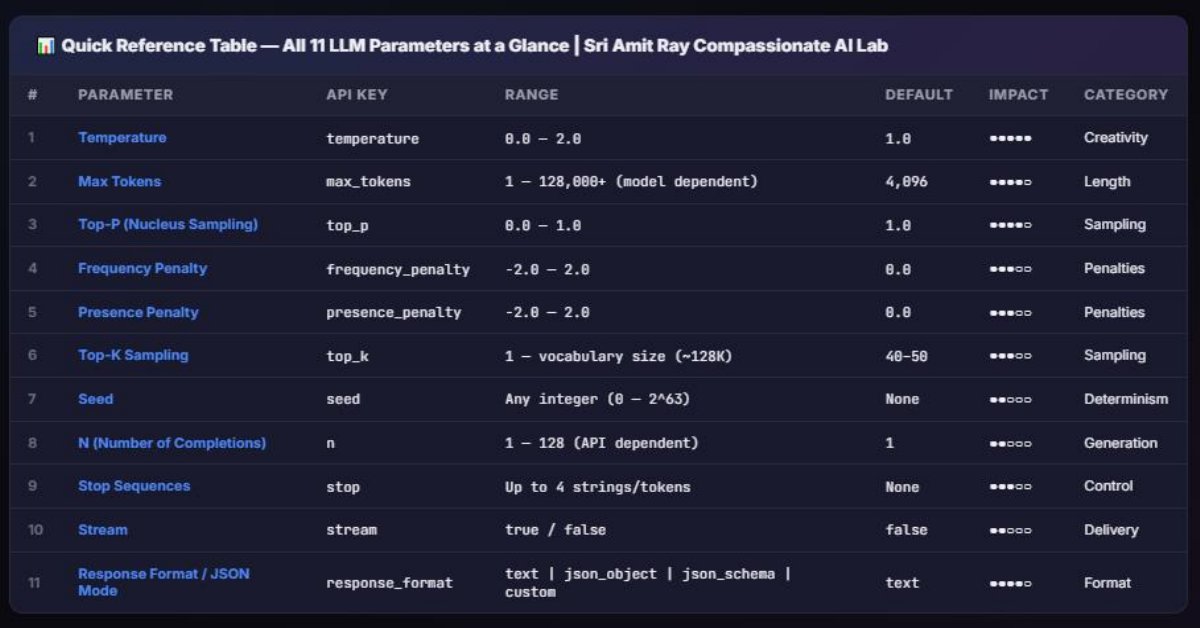
As of April 2026, over 85% of production LLM applications use at least three sampling parameters — temperature, top-p, and max_tokens — yet most developers still rely on default values without understanding what they control. LLM sampling parameters determine how a language model selects the next token during text generation, directly affecting creativity, accuracy, cost, and safety. This guide explains all 11 key LLM generation parameters — including temperature, top-p, top-k, frequency penalty, presence penalty, repetition penalty, max tokens, stop sequences, min-p, seed, and logit bias — with working code examples for OpenAI GPT-5.4, Claude 4.6 Opus, Gemini 3.1 Pro, DeepSeek-V3, and Llama 4 Maverick, plus a downloadable cheat sheet for creative writing, coding, and RAG use cases.

Introduction
With LLMs, every word you see is born from a sharp decision —one choice made from a universe of over 100,000 possibilities. In that instant, the model decides: stay safe or take a leap, repeat or innovate, sound mechanical or feel almost human.
This is the hidden engine behind AI behavior. What feels like intelligence is actually the result of how the model navigates uncertainty—and that navigation is controlled by a small set of powerful parameters like: temperature, Top-P, Top-K, and Min-P.
These are not just settings—they are the difference between dull, predictable output and sharp, creative, high-quality responses. Once you understand how they shape the probability landscape, you stop guessing and start engineering intelligence with precision.
The real power behind modern AI systems does not lie only in their training data or architecture, but in how its probability field is controlled at runtime. Parameters such as temperature, Top-P, Top-K, and Min-P act as dynamic regulators, shaping randomness, filtering choices, and defining the balance between determinism and exploration. This guide explains all 11 key LLM generation parameters for precision AI Engineering.
1. What Are LLM Sampling Parameters?
LLM sampling parameters are inference-time settings that control how a large language model selects tokens from its predicted probability distribution. Unlike model weights (which are fixed after training), these parameters can be adjusted with every single API call.
Think of it this way: the model produces a probability distribution over its entire vocabulary (often 100,000+ tokens) for every position in the output. Sampling parameters act as filters, reshaping functions, and selection rules applied to that distribution before a token is actually chosen.
They answer three fundamental questions:
- How random should the output be? (Temperature, Top-P, Top-K, Min-P)
- How long should the output be? (Max Tokens, Stop Sequences)
- How repetitive can it get? (Frequency Penalty, Presence Penalty, Repetition Penalty)
- Can I steer or reproduce results? (Logit Bias, Seed)
2. How Token Selection Actually Works
Before diving into individual parameters, you need to understand the token generation pipeline. Here’s the step-by-step process that occurs for every single output token:
- Forward Pass: The model processes the input and produces raw scores (logits) for every token in its vocabulary.
- Logit Bias Application: If logit biases are set, they’re added to the raw scores.
- Repetition / Frequency / Presence Penalties: Scores for already-generated tokens are adjusted downward.
- Temperature Scaling: All logits are divided by the temperature value.
- Softmax Conversion: Scaled logits are converted into probabilities (summing to 1.0).
- Top-K Filtering: Only the top K tokens are kept; all others get probability 0.
- Top-P Filtering: Tokens are sorted by probability, and only enough tokens to reach cumulative probability P are kept.
- Min-P Filtering: Tokens below (min_p × highest probability) are removed.
- Renormalization: Remaining probabilities are rescaled to sum to 1.0.
- Sampling: A token is randomly selected according to the final distribution (or the top one is picked if temperature = 0).
This pipeline explains why parameter order matters and why some parameters interact with each other in non-obvious ways.
3. Temperature — The Master Creativity Dial
What It Does
Temperature controls the randomness of token selection by scaling the logit values before the softmax function converts them into probabilities. It’s the single most important LLM sampling parameter.
- Range: 0.0 to 2.0 (varies by provider; some allow up to 5.0)
- Default: 1.0 for most providers (Claude defaults to 1.0, OpenAI to 1.0, Gemini to 1.0)
Function: rescales probability distribution before sampling.
- Low (0–0.3) → deterministic, factual
- Medium (0.5–0.8) → balanced
- High (0.9–1.5) → creative, diverse
Mathematically:
- logits / temperature → softmax
👉 Lower temperature = sharper distribution
👉 Higher temperature = flatter distribution
How It Works Mathematically
Given raw logits zi, the probability of token i is:
P(i) = exp(zi / T) / Σ exp(zj / T)
Where T = temperature. As T decreases, the distribution becomes sharper (more peaked). As T increases, it becomes flatter (more uniform).
Temperature Values Explained
| Temperature | Behavior | Best For |
|---|---|---|
| 0.0 | Greedy decoding — always picks the most probable token. Fully deterministic. | Factual Q&A, classification, structured extraction, math |
| 0.1–0.3 | Very low randomness. Slight variation but still highly focused. | RAG, code generation, summarization, translation |
| 0.4–0.7 | Balanced randomness. Good mix of coherence and variety. | General chat, email drafting, content writing |
| 0.8–1.0 | Moderate to high randomness. More creative and diverse outputs. | Creative writing, brainstorming, dialogue generation |
| 1.2–2.0 | Very high randomness. Outputs become increasingly unpredictable and potentially incoherent. | Experimental creative work, data augmentation, exploration |
Quick Code Example
# OpenAI — Temperature comparison
from openai import OpenAI
client = OpenAI()

for temp in [0.0, 0.5, 1.0, 1.5]:
    response = client.chat.completions.create(
        model="gpt-4o",
        temperature=temp,
        messages=[{"role": "user", "content": "Describe the ocean in one sentence."}]
    )
    print(f"Temp {temp}: {response.choices[0].message.content}")
4. Top-P (Nucleus Sampling) — Dynamic Vocabulary Filtering
What It Does
Top-P (also called nucleus sampling) dynamically selects the smallest set of tokens whose cumulative probability exceeds the threshold P. Unlike Top-K which uses a fixed count, Top-P adapts to the model’s confidence level.
- Range: 0.0 to 1.0
- Default: 1.0 (no filtering) for most providers
How It Works
After temperature scaling and softmax:
- Sort all tokens by probability in descending order.
- Accumulate probabilities from the top: P1, P1+P2, P1+P2+P3, …
- Once the cumulative sum exceeds the top_p threshold, discard all remaining tokens.
- Renormalize the remaining probabilities and sample.
Why Top-P Is Adaptive
This is the key advantage of Top-P. Consider two scenarios:
- High confidence: The model is 95% sure the next word is “Paris.” With top_p=0.95, only 1–2 tokens remain. Result: deterministic-like behavior.
- Low confidence: The model spreads probability across 50 tokens. With top_p=0.95, perhaps 30 tokens remain. Result: diverse sampling.
| Top-P Value | Behavior | Best For |
|---|---|---|
| 0.1–0.3 | Very narrow nucleus. Only the most probable tokens survive. | Factual, precise outputs |
| 0.5–0.7 | Moderate filtering. Removes unlikely tokens while preserving variety. | Balanced content generation |
| 0.9–0.95 | Wide nucleus. Most reasonable tokens are included. | Creative writing, brainstorming |
| 1.0 | No filtering. All tokens considered (default). | When relying on temperature alone |
# Anthropic Claude — Top-P example
import anthropic
client = anthropic.Anthropic()

response = client.messages.create(
    model="claude-opus-4-6",
    max_tokens=1024,
    top_p=0.9,
    temperature=0.8,
    messages=[{"role": "user", "content": "Write a haiku about machine learning."}]
)
print(response.content[0].text)
5. Top-K — Hard Token Cutoff
What It Does
Top-K sampling restricts the model’s choice to the K most probable tokens, discarding everything else. It’s a simpler, less adaptive alternative to Top-P.
- Range: 1 to vocabulary size (typically 1–1000)
- Default: Varies. Google Gemini defaults to 40. Many open-source models use 50. OpenAI does not expose top_k directly in their API as of April 2026.
How It Works
- After temperature scaling, sort tokens by probability.
- Keep only the top K tokens.
- Set all other probabilities to 0.
- Renormalize and sample.
| Top-K Value | Behavior |
|---|---|
| 1 | Greedy decoding (equivalent to temperature=0) |
| 10–20 | Very focused, good for factual tasks |
| 40–50 | Balanced (Gemini’s default range) |
| 100+ | Wide pool, more creative but may include unlikely tokens |
Top-K’s Weakness
The main limitation of Top-K is that it’s not adaptive. Whether the model is 99% confident or spreading probability evenly, it always keeps exactly K tokens. This can either be too restrictive (cutting out valid options when the model is uncertain) or too permissive (including garbage tokens when the model is confident).
# Google Gemini — Top-K example
import google.generativeai as genai

genai.configure(api_key="YOUR_API_KEY")
model = genai.GenerativeModel("gemini-2.5-pro")

response = model.generate_content(
    "Explain quantum computing to a child.",
    generation_config=genai.GenerationConfig(
        temperature=0.7,
        top_k=30,
        top_p=0.9,
        max_output_tokens=1024
    )
)
print(response.text)
6. Temperature vs Top-P vs Top-K — Head-to-Head Comparison
This is one of the most commonly asked questions about LLM sampling parameters. Here’s a comprehensive comparison:
| Feature | Temperature | Top-P | Top-K |
|---|---|---|---|
| What it controls | Shape of the probability distribution | Cumulative probability threshold | Fixed number of candidate tokens |
| Adaptive? | No — always reshapes the full distribution | Yes — candidate pool size varies with confidence | No — always keeps exactly K tokens |
| When applied | Before softmax | After softmax | After softmax |
| Can produce deterministic output? | Yes (at 0) | Approximately (at very low values) | Yes (at K=1) |
| OpenAI support | ✅ Yes | ✅ Yes | ❌ No |
| Claude support | ✅ Yes | ✅ Yes | ✅ Yes (top_k) |
| Gemini support | ✅ Yes | ✅ Yes | ✅ Yes |
| DeepSeek support | ✅ Yes | ✅ Yes | ✅ Yes (via API) |
| Best used with | Top-P OR Top-K (not both ideally) | Temperature (as alternative to each other) | Temperature (common in open-source) |
• OpenAI/Claude users: Use temperature OR top_p. Leave the other at default.
• Gemini users: Temperature + top_k work well together. Top-p is also available.
• Open-source (Llama, DeepSeek local): Temperature + top_k + top_p can all be combined. Add min_p for best results.
7. Min-P — The Newer, Smarter Filter
What It Does
Min-P is a relatively newer sampling method (popularized in 2024–2026) that sets a minimum probability threshold relative to the most probable token. Any token with probability less than min_p × P(top_token) is discarded. Unlike Top-k or Top-p, which can over-truncate or include inefficient tokens, Min-p filters out tokens that are extremely unlikely relative to the top choice, ensuring quality. You can use Temperature + Min-P for open-source deployments to keep control over the model system. Use Temperature + Top-P for commercial APIs, to keep control over the model behavior.
- Min-P Range: 0.0 to 1.0
- Default: 0.0 (disabled) on most platforms
- Availability: Supported in vLLM, llama.cpp, Ollama, text-generation-inference, and via some hosted APIs (DeepSeek, Together AI). Not natively available in OpenAI or Claude APIs as of April 2026.
Why Min-P Is Gaining Popularity
Min-P elegantly solves Top-K’s rigidity and Top-P’s occasional inclusion of very low-probability tokens. A min_p of 0.05 means “only keep tokens that have at least 5% of the probability of the best token.” This is adaptive like Top-P but with a clearer semantic meaning.
# Using Min-P with Ollama (Llama 4 Maverick)
import ollama

response = ollama.chat(
    model='llama4-maverick',
    messages=[{'role': 'user', 'content': 'Write a startup pitch for an AI gardening app.'}],
    options={
        'temperature': 0.8,
        'top_k': 50,
        'top_p': 0.95,
        'min_p': 0.05,  # Relative minimum probability filter
    }
)
print(response['message']['content'])
8. Max Tokens — Output Length Control
What It Does
Max tokens (also max_tokens, max_output_tokens, or max_completion_tokens) sets the maximum number of tokens the model will generate in its response. It’s a hard upper limit — the model may stop earlier (at a natural ending or stop sequence), but it will never exceed this count.
Important Distinctions by Provider (April 2026)
| Provider / Model | Parameter Name | Max Output Limit | Context Window |
|---|---|---|---|
| OpenAI GPT-4o | max_completion_tokens | 16,384 tokens | 128K |
| OpenAI o3 | max_completion_tokens | 100,000 tokens | 200K |
| Claude 4 Opus | max_tokens | 32,768 tokens | 200K |
| Claude 4 Sonnet | max_tokens | 64,000 tokens | 200K |
| Gemini 2.5 Pro | max_output_tokens | 65,536 tokens | 1M+ |
| DeepSeek-V3 | max_tokens | 8,192 tokens (default) | 128K |
| Llama 4 Maverick | max_tokens (via API/runtime) | Configurable | 1M |
# Setting max tokens — OpenAI
response = client.chat.completions.create(
    model="gpt-4o",
    max_completion_tokens=500,  # Note: OpenAI uses max_completion_tokens now
    messages=[{"role": "user", "content": "Summarize the French Revolution in brief."}]
)

# Setting max tokens — Claude
response = client.messages.create(
    model="claude-4-opus-20260401",
    max_tokens=1024,  # Required parameter for Claude
    messages=[{"role": "user", "content": "Summarize the French Revolution in brief."}]
)
9. Frequency Penalty — Reducing Word-Level Repetition
What It Does
Frequency penalty reduces the logit score of a token proportionally to how many times it has already appeared in the generated output. The more a token has been used, the more it gets penalized.
- Range: -2.0 to 2.0 (OpenAI, DeepSeek); not available in Claude or Gemini natively
- Default: 0.0
- Formula: logit_adjusted = logit – (frequency_penalty × count_of_token_in_output)
Practical Effects
| Value | Effect |
|---|---|
| 0.0 | No penalty. Tokens can repeat freely. |
| 0.3–0.5 | Mild penalty. Reduces obvious repetition while keeping natural language patterns. |
| 0.8–1.2 | Strong penalty. Actively forces diverse vocabulary. Can feel unnatural for long outputs. |
| 1.5–2.0 | Very strong. May cause the model to use obscure words to avoid repetition. |
| Negative values | Encourages repetition. Rarely useful in practice. |
# Frequency penalty to reduce repetition
response = client.chat.completions.create(
    model="gpt-4o",
    temperature=0.7,
    frequency_penalty=0.5,
    max_completion_tokens=300,
    messages=[{"role": "user", "content": "Write a 200-word essay about renewable energy."}]
)
10. Presence Penalty — Encouraging Topic Diversity
What It Does
Presence penalty applies a one-time flat penalty to any token that has appeared at least once in the output, regardless of how many times. It encourages the model to talk about new topics rather than repeating the same ideas.
- Range: -2.0 to 2.0 (OpenAI, DeepSeek)
- Default: 0.0
- Formula: logit_adjusted = logit – (presence_penalty × 1{token_appeared})
Frequency Penalty vs Presence Penalty
| Aspect | Frequency Penalty | Presence Penalty |
|---|---|---|
| Penalty scales with count? | Yes — more uses = more penalty | No — same penalty whether used 1 or 100 times |
| Primary effect | Reduces word-level repetition | Encourages topical diversity |
| Best for | Preventing “the the the” or repeated phrases | Encouraging the model to explore new subjects |
| Can be combined? | Yes — they work on different mechanisms and can be used together | |
# Using both penalties together
response = client.chat.completions.create(
    model="gpt-4o",
    temperature=0.8,
    frequency_penalty=0.4,  # Reduce word repetition
    presence_penalty=0.6,   # Encourage new topics
    max_completion_tokens=500,
    messages=[{"role": "user", "content": "Write a diverse exploration of modern architecture."}]
)
11. Repetition Penalty — The Open-Source Alternative
What It Does
Repetition penalty is the open-source world’s version of frequency/presence penalties, commonly used with Llama, Mistral, DeepSeek (local), and other Hugging Face models. It divides the logit of any already-seen token by the penalty value (if positive) or multiplies it (if negative).
- Range: Typically 1.0 to 2.0 (1.0 = no penalty)
- Default: 1.0
- Common values: 1.1–1.3 for most tasks
- Formula: If logit > 0: logit_new = logit / repetition_penalty. If logit < 0: logit_new = logit × repetition_penalty
# Repetition penalty with Hugging Face Transformers
from transformers import AutoModelForCausalLM, AutoTokenizer

tokenizer = AutoTokenizer.from_pretrained("meta-llama/Llama-4-Maverick-17B-128E")
model = AutoModelForCausalLM.from_pretrained("meta-llama/Llama-4-Maverick-17B-128E")

inputs = tokenizer("The future of AI is", return_tensors="pt")
outputs = model.generate(
    **inputs,
    max_new_tokens=200,
    temperature=0.7,
    top_p=0.9,
    top_k=50,
    repetition_penalty=1.15,  # Mild repetition reduction
    do_sample=True
)
print(tokenizer.decode(outputs[0], skip_special_tokens=True))
12. Stop Sequences — Controlled Termination
What It Does
Stop sequences are strings that tell the model to immediately stop generating when encountered. The stop sequence itself is typically not included in the output.
- OpenAI: Up to 4 stop sequences via the stop parameter
- Claude: Up to 4 via stop_sequences
- Gemini: Via stop_sequences in GenerationConfig
Common Use Cases
- Stopping at newlines for single-line extraction: stop=[“\n”]
- Stopping at delimiters for structured output: stop=[““`”, “—“]
- Stopping at conversation markers: stop=[“User:”, “Human:”]
- Stopping at JSON closing braces: stop=[“}”] (then manually append it)
# Stop sequences — extract only the first paragraph
response = client.chat.completions.create(
    model="gpt-4o",
    temperature=0.3,
    stop=["\n\n"],  # Stop at double newline
    messages=[{"role": "user", "content": "Explain photosynthesis."}]
)

# Claude stop sequences
response = client.messages.create(
    model="claude-4-sonnet-20260401",
    max_tokens=500,
    stop_sequences=["###", "END"],
    messages=[{"role": "user", "content": "List 5 benefits of exercise. End with ###"}]
)
13. Seed — Reproducible Outputs
What It Does
The seed parameter initializes the random number generator to a fixed state, making outputs (mostly) deterministic across identical requests. This is critical for testing, debugging, benchmarking, and compliance.
- Range: Any integer
- Support (April 2026):
- OpenAI: ✅ Supported (with system_fingerprint for verification)
- Claude: ❌ Not supported natively (use temperature=0 for near-determinism)
- Gemini: ✅ Supported via seed in GenerationConfig
- DeepSeek: ✅ Supported
- Llama (local): ✅ Via torch seed / llama.cpp seed parameter
# Reproducible outputs with OpenAI
response1 = client.chat.completions.create(
    model="gpt-4o",
    seed=42,
    temperature=0.5,
    messages=[{"role": "user", "content": "Give me 3 startup ideas."}]
)

response2 = client.chat.completions.create(
    model="gpt-4o",
    seed=42,
    temperature=0.5,
    messages=[{"role": "user", "content": "Give me 3 startup ideas."}]
)

# response1 and response2 should be identical (or nearly so)
print(response1.choices[0].message.content == response2.choices[0].message.content)
14. Logit Bias — Token-Level Steering
What It Does
Logit bias allows you to directly increase or decrease the probability of specific tokens by adding a bias value to their logits before sampling. This gives you surgical control over individual words or tokens.
- Range: -100 to 100 (OpenAI). -100 effectively bans a token; 100 makes it almost guaranteed.
- Input format: Dictionary mapping token IDs to bias values
- Support: OpenAI ✅, DeepSeek ✅, Claude ❌ (not supported), Gemini ❌ (not via standard API)
Use Cases
- Banning words: Prevent the model from saying “delve,” “tapestry,” or any overused term
- Enforcing format: Force the model to output “yes” or “no” by boosting those tokens
- Controlling language: Ban non-English tokens for English-only outputs
- Safety: Reduce probability of harmful tokens
import tiktoken

# Get token IDs for words to ban
encoding = tiktoken.encoding_for_model("gpt-4o")
ban_tokens = ["delve", "tapestry", "multifaceted", "moreover"]

logit_bias = {}
for word in ban_tokens:
    tokens = encoding.encode(word)
    for token_id in tokens:
        logit_bias[str(token_id)] = -100  # Effectively ban

response = client.chat.completions.create(
    model="gpt-4o",
    temperature=0.7,
    logit_bias=logit_bias,
    messages=[{"role": "user", "content": "Write about the complexity of modern society."}]
)
print(response.choices[0].message.content)
15. Parameter Support Across Providers (April 2026)
Not every provider supports every parameter. Here’s the definitive compatibility matrix as of April 2026:
| Parameter | OpenAI (GPT-4o, o3) | Anthropic (Claude 4) | Google (Gemini 2.5) | DeepSeek (V3) | Meta (Llama 4)* |
|---|---|---|---|---|---|
| temperature | ✅ 0–2 | ✅ 0–1 | ✅ 0–2 | ✅ 0–2 | ✅ Configurable |
| top_p | ✅ 0–1 | ✅ 0–1 | ✅ 0–1 | ✅ 0–1 | ✅ |
| top_k | ❌ | ✅ | ✅ | ✅ | ✅ |
| min_p | ❌ | ❌ | ❌ | ✅ (via vLLM) | ✅ (via runtimes) |
| max_tokens | ✅ | ✅ (required) | ✅ | ✅ | ✅ |
| frequency_penalty | ✅ -2 to 2 | ❌ | ✅ | ✅ -2 to 2 | ✅ (via runtimes) |
| presence_penalty | ✅ -2 to 2 | ❌ | ✅ | ✅ -2 to 2 | ✅ (via runtimes) |
| repetition_penalty | ❌ | ❌ | ❌ | ✅ (local) | ✅ |
| stop sequences | ✅ (up to 4) | ✅ (up to 4) | ✅ | ✅ | ✅ |
| seed | ✅ | ❌ | ✅ | ✅ | ✅ (local) |
| logit_bias | ✅ | ❌ | ❌ | ✅ | ✅ (local) |
*Llama 4 parameter support depends on the inference runtime (vLLM, llama.cpp, TGI, Ollama, etc.), not Meta’s model directly.
16. Complete Code Examples — All 5 Providers
OpenAI GPT-4o — Full Parameter Example
from openai import OpenAI
client = OpenAI()

response = client.chat.completions.create(
    model="gpt-4o",
    temperature=0.7,
    top_p=0.9,
    max_completion_tokens=500,
    frequency_penalty=0.3,
    presence_penalty=0.5,
    seed=42,
    stop=["\n\n---"],
    logit_bias={"12345": -100},  # Ban specific token ID
    messages=[
        {"role": "system", "content": "You are a helpful technical writer."},
        {"role": "user", "content": "Explain microservices architecture."}
    ]
)

print(response.choices[0].message.content)
print(f"Tokens used: {response.usage.total_tokens}")
print(f"Finish reason: {response.choices[0].finish_reason}")
Anthropic Claude 4 Opus — Full Parameter Example
import anthropic
client = anthropic.Anthropic()

response = client.messages.create(
    model="claude-4-opus-20260401",
    max_tokens=1024,         # Required for Claude
    temperature=0.7,
    top_p=0.9,
    top_k=40,                # Claude supports top_k
    stop_sequences=["END", "---"],
    system="You are a creative storyteller.",
    messages=[
        {"role": "user", "content": "Write a short mystery opening."}
    ]
)

print(response.content[0].text)
print(f"Input tokens: {response.usage.input_tokens}")
print(f"Output tokens: {response.usage.output_tokens}")
print(f"Stop reason: {response.stop_reason}")
Google Gemini 2.5 Pro — Full Parameter Example
import google.generativeai as genai

genai.configure(api_key="YOUR_API_KEY")
model = genai.GenerativeModel(
    "gemini-2.5-pro",
    system_instruction="You are an expert data scientist."
)

config = genai.GenerationConfig(
    temperature=0.4,
    top_p=0.85,
    top_k=30,
    max_output_tokens=800,
    stop_sequences=["```"],
    seed=123,
    frequency_penalty=0.3,
    presence_penalty=0.4
)

response = model.generate_content(
    "Write a Python function to detect anomalies in time series data.",
    generation_config=config
)
print(response.text)
DeepSeek-V3 — Full Parameter Example (OpenAI-Compatible API)
from openai import OpenAI

# DeepSeek uses OpenAI-compatible API
client = OpenAI(
    api_key="YOUR_DEEPSEEK_KEY",
    base_url="https://api.deepseek.com"
)

response = client.chat.completions.create(
    model="deepseek-chat",  # DeepSeek-V3
    temperature=0.5,
    top_p=0.9,
    max_tokens=600,
    frequency_penalty=0.3,
    presence_penalty=0.4,
    seed=42,
    stop=["###"],
    messages=[
        {"role": "system", "content": "You are a senior backend engineer."},
        {"role": "user", "content": "Design a rate limiter in Go."}
    ]
)
print(response.choices[0].message.content)
Llama 4 Maverick via Ollama — Full Parameter Example
import ollama

response = ollama.chat(
    model='llama4-maverick',
    messages=[
        {'role': 'system', 'content': 'You are a concise technical assistant.'},
        {'role': 'user', 'content': 'Explain the CAP theorem in 3 sentences.'}
    ],
    options={
        'temperature': 0.3,
        'top_k': 20,
        'top_p': 0.85,
        'min_p': 0.05,
        'repeat_penalty': 1.15,     # Ollama's repetition penalty
        'num_predict': 200,          # Ollama's max_tokens equivalent
        'stop': ['\n\n'],
        'seed': 42,
    }
)
print(response['message']['content'])
17. LLM Parameters Cheat Sheet by Use Case
This is the cheat sheet you’ll want to bookmark. These are battle-tested parameter combinations for the most common use cases as of April 2026.
📋 Parameter Cheat Sheet
| Use Case | Temperature | Top-P | Top-K | Freq. Penalty | Pres. Penalty | Max Tokens | Notes |
|---|---|---|---|---|---|---|---|
| Factual Q&A / Classification | 0.0 | 1.0 | — | 0.0 | 0.0 | 256–512 | Deterministic. Use structured output / JSON mode. |
| RAG (Retrieval-Augmented Generation) | 0.1–0.3 | 0.9 | 20–30 | 0.0 | 0.0 | 500–1000 | Low temp keeps answers grounded in retrieved context. |
| Code Generation | 0.0–0.2 | 0.95 | — | 0.0 | 0.0 | 1000–4000 | Near-deterministic for correct syntax. Use stop sequences. |
| Code Review / Debugging | 0.1 | 0.9 | — | 0.0 | 0.0 | 1000–2000 | Precision matters. Low randomness. |
| Summarization | 0.2–0.4 | 0.9 | — | 0.3 | 0.0 | 300–800 | Slight frequency penalty reduces redundancy. |
| Translation | 0.1–0.3 | 0.95 | — | 0.0 | 0.0 | Match input length | Low temp for accuracy. Higher for literary translation. |
| General Chatbot / Assistant | 0.5–0.7 | 0.9 | 40 | 0.2 | 0.3 | 500–1500 | Balanced: helpful but not robotic. |
| Content Writing / Blog Posts | 0.6–0.8 | 0.9 | — | 0.4 | 0.5 | 1500–4000 | Higher penalties prevent repetitive paragraphs. |
| Creative Writing / Fiction | 0.8–1.2 | 0.95 | 50–100 | 0.5 | 0.6 | 2000–8000 | High creativity. Experiment with values. |
| Brainstorming / Idea Generation | 1.0–1.5 | 0.95 | 100 | 0.7 | 0.8 | 500–1500 | Maximum diversity. High penalties prevent repeated ideas. |
| Data Extraction / Parsing | 0.0 | 1.0 | — | 0.0 | 0.0 | 500–1000 | Fully deterministic. Use JSON mode + stop sequences. |
| Math / Reasoning | 0.0–0.1 | 1.0 | — | 0.0 | 0.0 | 2000–4000 | Use chain-of-thought prompting. Deterministic for accuracy. |
| Role-Play / Character AI | 0.8–1.0 | 0.92 | 60 | 0.3 | 0.4 | 500–1500 | Natural dialogue variation without going off-character. |
| Data Augmentation | 1.2–1.8 | 0.95 | 100 | 0.8 | 0.8 | Varies | Maximum diversity for training data generation. |
18. Best Practices & Common Mistakes
✅ Best Practices
- Tune one parameter at a time. Change temperature, evaluate, then consider adjusting top_p. Never change multiple parameters simultaneously during testing.
- Use temperature OR top_p, not both (for OpenAI/Claude). Set one to default and tune the other. For open-source models, combining temperature + top_p + min_p is acceptable.
- Always set max_tokens intentionally. Don’t rely on defaults — they vary wildly between providers and can lead to truncated or excessively long outputs.
- Use stop sequences for structured outputs. They’re more reliable than hoping the model stops at the right place.
- Use seed for testing and debugging. Lock outputs during development, then remove seed in production if you want variety.
- Start low, increase gradually. Begin with temperature 0.3 and increase only if outputs are too boring or repetitive.
- Log your parameter choices. When something works well, document the exact parameters. When it fails, you need to know what you used.
- Consider the full pipeline. Parameters interact with prompts, system messages, and context. A great prompt at temperature 0.7 might outperform a mediocre prompt at temperature 0.0.
❌ Common Mistakes
- Setting temperature = 2.0 for creative writing. This almost always produces incoherent gibberish. 0.8–1.0 is the sweet spot for creativity with coherence.
- Using both high temperature AND low top_p. This creates a paradox: you’re making the distribution flatter (temperature) while also cutting most of it off (top_p). Pick one approach.
- Ignoring max_tokens for cost optimization. Setting max_tokens=4096 for a task that needs 100 tokens won’t always use 4096 tokens, but it signals the model that long outputs are acceptable.
- Applying high frequency_penalty to code generation. Code legitimately repeats keywords, variable names, and patterns. Penalizing this breaks the output.
- Using the same parameters for all tasks. A chatbot, a code generator, and a creative writer need fundamentally different configurations.
- Not testing with edge cases. Parameters that work for short outputs may fail for long-form content. Always test at your expected output length.
19. Frequently Asked Questions (FAQ)
What is the best temperature for LLM?
There is no single “best” temperature — it depends entirely on your use case. For factual tasks, RAG, and code generation, use 0.0–0.3. For general conversation and content writing, use 0.5–0.7. For creative writing and brainstorming, use 0.8–1.2. Start low and increase until outputs have the right balance of accuracy and creativity for your specific application.
What is the difference between temperature and top_p?
Temperature reshapes the entire probability distribution (making it sharper or flatter), while top_p filters the distribution by keeping only the minimum set of tokens whose cumulative probability reaches the threshold. Temperature affects all tokens simultaneously; top_p removes low-probability tokens entirely. Most providers recommend using one or the other, not both.
Should I use top_p or top_k?
Top-P is generally preferred because it’s adaptive — it includes fewer tokens when the model is confident and more when it’s uncertain. Top-K always keeps a fixed number of tokens regardless of confidence. However, top_k is simpler and slightly faster computationally. For open-source models, many experts now recommend min_p as a superior alternative to both.
What does temperature 0 mean in LLM?
Temperature 0 enables greedy decoding, where the model always selects the token with the highest probability. This produces deterministic (or near-deterministic) outputs, making it ideal for factual tasks, classification, data extraction, and any scenario where consistency matters more than creativity.
What is frequency penalty vs presence penalty?
Frequency penalty scales with how many times a token has been used (more uses = stronger penalty), reducing word-level repetition. Presence penalty applies a flat, one-time penalty to any token that has appeared at all, encouraging the model to explore new topics. You can use both together — frequency penalty for reducing repeated words, presence penalty for encouraging topical diversity.
Does OpenAI support top_k?
No. As of April 2026, OpenAI does not expose a top_k parameter in their API. They support temperature, top_p, frequency_penalty, presence_penalty, logit_bias, seed, stop, and max_completion_tokens. If you need top_k, use Claude, Gemini, or open-source models via runtimes like vLLM or Ollama.
What is min_p and should I use it?
Min-P is a sampling method that removes tokens with probability below a percentage of the top token’s probability. For example, min_p=0.05 keeps only tokens with at least 5% of the highest-probability token’s probability. It’s adaptive like top_p but with clearer semantics. It’s highly recommended for open-source models (via Ollama, vLLM, llama.cpp) but is not yet available in OpenAI or Claude APIs.
What max_tokens should I set?
Set max_tokens to the maximum length you actually need for your task, plus a 20% buffer. For short answers: 256–512. For paragraphs: 500–1000. For articles: 2000–4000. For long-form content: 4000–8000. Remember that max_tokens is a ceiling, not a target — the model can stop earlier. Also note that max_tokens refers to output tokens only, not including the input/prompt tokens.
Can I get perfectly reproducible LLM outputs?
Approximately, yes. Use temperature=0 and a fixed seed value. OpenAI provides a system_fingerprint to verify infrastructure consistency. However, no provider guarantees 100% determinism due to floating-point arithmetic, hardware differences, and potential model updates. For critical applications, always validate outputs rather than assuming reproducibility.
What are the best parameters for RAG applications?
For RAG, use temperature 0.1–0.3, top_p 0.9, frequency_penalty 0.0, and presence_penalty 0.0. Low temperature keeps the model grounded in the retrieved context rather than hallucinating. Avoid penalties since you want the model to faithfully reproduce terminology from the source documents, which may involve legitimate repetition.
What parameters should I use for coding tasks?
For code generation, use temperature 0.0–0.2 and top_p 0.95. Avoid frequency and presence penalties since code naturally repeats variable names, keywords, and patterns. Set max_tokens high enough for complete functions (1000–4000). Use stop sequences like “` or \n\n to prevent runaway generation. For code review and debugging, temperature 0.1 works well.
How do LLM parameters affect cost?
Parameters don’t directly affect per-token pricing, but they indirectly impact cost. Higher max_tokens allows longer (more expensive) outputs. Higher temperature can lead to more verbose responses. Lower temperature with good prompts often produces concise, efficient outputs. Stop sequences can reduce unnecessary token generation and save money.
What is logit bias and when should I use it?
Logit bias lets you boost or suppress specific tokens by their ID. Set a token’s bias to -100 to effectively ban it, or +5 to +10 to strongly encourage it. Use it to ban overused AI words (“delve,” “tapestry”), enforce yes/no classification outputs, or prevent the model from outputting certain languages. It’s a surgical tool — use it sparingly and test thoroughly.
Do reasoning models (o3, Claude with extended thinking) use different parameters?
Yes. OpenAI’s o3 and o4-mini reasoning models have restrictions — temperature is fixed at 1 for reasoning, and top_p defaults to 1. The “thinking” tokens consume output budget, so you need higher max_completion_tokens. Claude’s extended thinking mode similarly has parameter constraints. Always check the latest documentation for reasoning-specific parameter limitations.
20. Conclusion
Understanding LLM sampling parameters is no longer optional for anyone building AI-powered applications in 2026. The 11 parameters covered in this guide — temperature, top-p, top-k, min-p, max tokens, frequency penalty, presence penalty, repetition penalty, stop sequences, seed, and logit bias — give you precise control over how language models generate text.
Here are the three most important takeaways:
- Temperature is your primary dial. Master it first. For most use cases, a temperature between 0.0 and 0.8 covers 90% of needs.
- Match parameters to your use case. Use the cheat sheet above as a starting point, then fine-tune based on your specific quality criteria.
- Different providers support different parameters. Always check the compatibility matrix before writing code, especially when migrating between OpenAI, Claude, Gemini, DeepSeek, or open-source models.
Bookmark this guide, use the cheat sheet in your daily workflow, and remember: the difference between a mediocre AI application and a great one often comes down to 3–4 well-tuned parameters.