
The future of AI productivity is no longer about writing bigger prompts — it is about building smarter systems. In 2026, the most advanced Claude Code users are moving toward structured AI workspaces powered by persistent context, reusable templates, project memory, operational rules, and autonomous execution pipelines. This methodology is now widely known as the Claude Folder Structure.
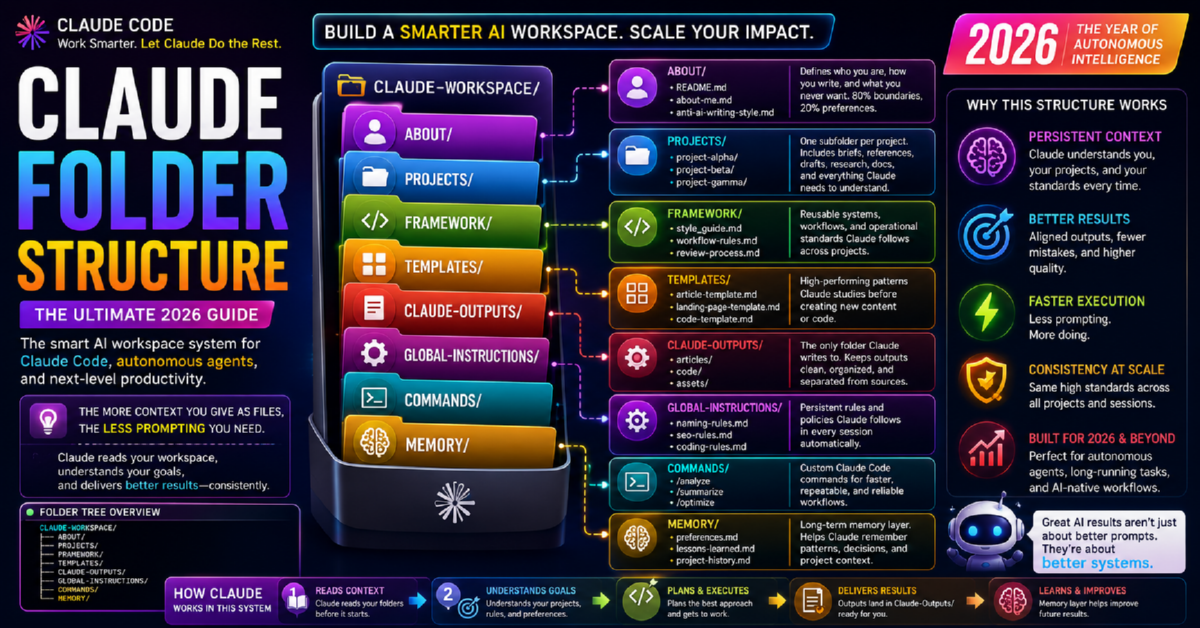
Instead of treating Claude like a temporary chatbot session, users are designing long-term contextual environments where Claude continuously reads organized files, follows system rules, studies reusable patterns, and generates outputs inside dedicated project workspaces.
This guide combines the best architectural ideas from modern Claude workspace systems into a single optimized framework for Claude Code, autonomous agents, AI-assisted software engineering, prompt engineering, context management, and scalable AI workflows.
What Is a Claude Folder Structure?
A Claude Folder Structure is a deliberate, file-based AI workspace architecture that gives Claude persistent contextual memory, project continuity, reusable operational logic, and autonomous execution guidance — without relying on long, repetitive prompts.
Rather than re-explaining your preferences, standards, and background every session, you organize that knowledge into clearly named folders and Markdown files. Claude reads them before it works. The result is a consistent, context-aware environment that thinks before it acts — and scales across every project you manage.
This architecture transforms Claude from a reactive, session-limited chatbot into a context-aware AI collaborator capable of long-running reasoning, structured output generation, tone enforcement, coding standards compliance, and fully autonomous workflow execution.
Explore the key building blocks — the ABOUT folder, PROJECTS folder, GLOBAL-INSTRUCTIONS folder, and MEMORY folder — each serving a specific role in making Claude genuinely intelligent about your work.
Why Claude Folder Systems Matter in 2026
The biggest limitation of traditional prompting has always been memory fragmentation. Every new Claude conversation risks losing accumulated context — your preferences, formatting standards, project history, quality boundaries, and operational rules. You type the same things again and again. Quality varies. Frustration builds.
Claude Folder Structures solve this by externalizing memory into organized, AI-readable files. As of May 2026, with Claude Code’s native support for persistent CLAUDE.md instruction files, background agent processes, and multi-agent coordination, folder-structured workspaces are no longer a community workaround. They are the officially supported and recommended paradigm for advanced Claude usage.
- Claude Code now natively reads root-level and subdirectory
CLAUDE.mdfiles automatically - Background agentic processes can run long tasks using folder context without supervision
- Multi-agent subagent coordination uses shared folder memory for parallel workstreams
- Custom slash commands are officially supported inside Claude Code project directories
- Anthropic published updated documentation explicitly recommending workspace folder architecture
Core Benefits of Folder-Based Claude Workspaces
| Benefit | What It Means in Practice |
|---|---|
| Persistent project awareness | Claude knows your project without you explaining it every session |
| Lower hallucination rates | Structured reference files anchor Claude’s responses in fact |
| Consistent output quality | Templates and frameworks enforce your standards automatically |
| Autonomous execution | Claude can complete complex multi-step tasks independently |
| Scalable workflows | Same system works for one project or fifty |
| Reduced repetitive prompting | Write your rules once — they apply everywhere |
| Better team alignment | Shared folders create consistent AI behavior across a team |
Core Architecture Principles
The most effective Claude workspaces built in 2026 share a consistent set of design principles. Whether you are a solo developer, a content team, or running autonomous AI agents, these principles apply universally.
Complete Claude Folder Reference Table
The following table maps every primary folder in the recommended Claude workspace architecture. Each folder serves a distinct function. Together, they create a complete, self-sustaining AI operating environment. Jump directly to any section for a detailed breakdown: ABOUT · PROJECTS · FRAMEWORK · TEMPLATES · CLAUDE-OUTPUTS · GLOBAL-INSTRUCTIONS · COMMANDS · MEMORY.
| Folder | Primary Purpose | Key Files | Core Benefit |
|---|---|---|---|
| ABOUT/ | Personal or team identity, tone, and anti-pattern definitions | about-me.md, anti-ai-style.md, README.md | Claude knows who you are and what to avoid before any task |
| PROJECTS/ | Active project workspaces, each fully self-contained | brief.md, research.md, references/, drafts/ | Full project context loaded before execution begins |
| FRAMEWORK/ | Reusable operational systems and editorial workflows | style_guide.md, workflow-rules.md, review-process.md | Consistent execution patterns without re-explaining processes |
| TEMPLATES/ | Proven high-performing structural patterns | article-template.md, code-template.md, landing-page.md | Claude studies proven structures before generating outputs |
| CLAUDE-OUTPUTS/ | All AI-generated work, strictly isolated | articles/, generated-code/, final-assets/ | Prevents overwriting reference material; clean output tracking |
| GLOBAL-INSTRUCTIONS/ | Always-on rules applying to every task | naming-rules.md, seo-rules.md, coding-standards.md | Automatically enforces operational standards across all work |
| COMMANDS/ | Custom workflow automation and slash commands | analyze.md, draft.md, ship.md, optimize.md | One command triggers a full multi-step workflow |
| MEMORY/ | Long-term contextual learning and project history | preferences.md, lessons-learned.md, project-history.md | Claude maintains continuity across weeks and months of work |
The ABOUT Folder — Identity and Alignment
The ABOUT folder is the first thing Claude reads in any workspace session. It defines who you are, what you value, how you communicate, what quality you expect, and — critically — what should never appear in any output. This is not an optional folder. It is the foundation of every well-functioning Claude workspace.
“80% of your ABOUT file should describe what you reject — not what you want.”
This counterintuitive principle is one of the most powerful insights from the Claude workspace community. Claude learns your anti-patterns, rejected phrases, tone restrictions, formatting exclusions, and stylistic boundaries as clearly as it learns your preferences. The result is dramatically better alignment from the very first output.
- Never use “delve,” “explore,” “tapestry,” or “it’s important to note”
- Never open with a rhetorical question
- Never use passive voice in technical documentation
- Never use three-word bullet points — always write complete sentences
- Never use em dashes in casual writing contexts
- Never produce generic conclusions that restate the introduction
Recommended ABOUT Folder Contents
| File | What It Contains |
|---|---|
| README.md | Overview of the workspace and how Claude should navigate it |
| about-me.md | Your role, industry, audience, goals, and working style |
| anti-ai-style.md | Rejected phrases, banned patterns, tone restrictions, formatting exclusions |
Once your ABOUT folder is complete, you will rarely need to correct Claude’s tone, style, or word choices again. That cognitive overhead transfers permanently to the file system. Pair this with your GLOBAL-INSTRUCTIONS folder for operational rules that complement identity alignment.
The PROJECTS Folder — Operational Center
The PROJECTS folder is the operational core of your Claude workspace. Every active initiative — whether a software product, content campaign, research effort, or client engagement — receives its own self-contained subdirectory with everything Claude needs to work without additional explanation.
This is the folder that eliminates the most prompting overhead. When Claude reads a project’s brief.md and research.md before beginning, it arrives at the task already informed — reducing errors, improving relevance, and enabling genuine continuity across sessions.
PROJECTS/
└── project-alpha/
    ├── brief.md          ← What this project is and why it exists
    ├── research.md       ← Background knowledge and source material
    ├── references/       ← External documents, PDFs, URLs, data files
    ├── drafts/           ← Work-in-progress files
└── CLAUDE.md ← Project-specific Claude instructions (May 2026)CLAUDE.md files automatically when operating inside a project directory. This means you can store project-specific instructions directly inside each project folder — no manual loading required. This is one of the most significant quality-of-life improvements in Claude Code’s 2026 update cycle.Each project in your PROJECTS folder should mirror the output structure inside your CLAUDE-OUTPUTS folder — keeping generated work cleanly associated with the source project that produced it.
The FRAMEWORK Folder — Reusable Operational Systems
The FRAMEWORK folder stores the operational logic that governs how work gets done — not what the work is. This includes editorial review processes, coding protocols, deployment procedures, SEO rules, testing standards, publication workflows, and client communication guidelines.
Without a FRAMEWORK folder, you re-explain these processes constantly. With it, Claude references them automatically — maintaining operational consistency whether it is writing an article, generating code, or executing a multi-step deployment pipeline.
Common FRAMEWORK Files
| File | Purpose |
|---|---|
| style_guide.md | Voice, tone, editorial rules, and writing standards |
| workflow-rules.md | Step-by-step execution protocols for common tasks |
| review-process.md | Quality gates, approval criteria, and revision standards |
| coding-standards.md | Language-specific development rules and patterns |
| seo-framework.md | Keyword integration rules, heading structures, metadata standards |
| publishing-workflow.md | From draft to final: formatting, review, and submission steps |
The FRAMEWORK folder works most powerfully when combined with the TEMPLATES folder. Where FRAMEWORK defines the process, TEMPLATES define the proven structural output patterns that process should produce.
The TEMPLATES Folder — Proven Structural Patterns
The TEMPLATES folder contains your best-performing structural patterns — the arrangements, section orders, formatting conventions, and component sequences that have produced your highest-quality outputs. Claude studies these before generating new content or code.
This is not about rigid, fill-in-the-blank templates. It is about teaching Claude what excellent work looks like in your specific context — so every new output starts from a position of proven structural strength rather than a blank page.
- Consistent formatting and structure across all outputs
- Faster production without quality sacrifice
- Reduced review and revision cycles
- Reusable excellence — your best work informs future work
- Better alignment between what you imagine and what Claude produces
Recommended Template Files
| Template File | Use Case |
|---|---|
| article-template.md | Long-form content with H1, H2, intro, sections, FAQ, conclusion |
| code-template.md | Function structure, error handling, documentation format, test pattern |
| landing-page-template.md | Headline, subheadline, features, CTA, trust signals, FAQ |
| email-template.md | Subject, opening hook, body, CTA, signature format |
| research-report-template.md | Executive summary, methodology, findings, recommendations |
Update your TEMPLATES folder whenever a new output performs exceptionally well. Your templates library should grow smarter over time — functioning as institutional memory for what works.
The CLAUDE-OUTPUTS Folder — Generated Work Repository
The CLAUDE-OUTPUTS folder is the dedicated location where Claude writes all AI-generated work. Keeping outputs strictly separated from source material, references, context files, and templates is a non-negotiable architectural discipline that prevents organizational collapse as your workspace scales.
Structure your CLAUDE-OUTPUTS folder to mirror your PROJECTS folder hierarchy. This keeps generated work cleanly associated with the project that produced it and makes output retrieval straightforward:
CLAUDE-OUTPUTS/
├── project-alpha/
│   ├── articles/
│   ├── generated-code/
│   └── final-assets/
├── project-beta/
│   ├── landing-pages/
│   └── email-sequences/
└── general/
    ├── research-summaries/
    └── one-off-tasks/
The CLAUDE-OUTPUTS folder also serves as an audit trail of all AI-generated work — useful for review, versioning, team sharing, and quality benchmarking over time.
The GLOBAL-INSTRUCTIONS Folder — Always-On Operational Rules
The GLOBAL-INSTRUCTIONS folder contains rules that apply to every task Claude performs — regardless of which project is active or which template is in use. These are the non-negotiable operational standards: naming conventions, SEO requirements, accessibility rules, security policies, output formatting standards, and legal compliance requirements.
CLAUDE.md file in Claude Code functions as a direct programmatic equivalent to this folder. Anthropic’s May 2026 documentation explicitly recommends placing persistent behavioral instructions here for automatic injection at the start of every agentic session.What Global Instructions Should Cover
| Instruction File | What It Governs |
|---|---|
| naming-rules.md | File naming conventions, variable naming patterns, URL slug formats |
| seo-rules.md | Keyword density, heading hierarchy, meta description length, internal link rules |
| coding-standards.md | Language-specific style, commenting requirements, error handling patterns |
| accessibility-rules.md | Alt text requirements, heading structure, color contrast standards |
| security-policy.md | What Claude should never output: credentials, PII, internal system details |
| output-format-rules.md | Markdown vs HTML, heading levels, table formats, list styles |
Think of your GLOBAL-INSTRUCTIONS folder as an automatic compliance layer. Claude does not need to be reminded of these standards — they are always loaded, always active. Pair this with your ABOUT folder for complete identity and operational alignment.
The COMMANDS Folder — Workflow Automation
The COMMANDS folder stores custom workflow definitions that trigger predefined multi-step execution sequences. In Claude Code environments, these map directly to the native /command system introduced and expanded throughout 2025–2026.
A well-designed commands library turns complex, multi-step workflows into single-word instructions. Instead of prompting Claude through a ten-step research-and-draft process, you type /draft and Claude executes the entire workflow using your framework, templates, and project context automatically.
Example Command Definitions
| Command | Execution Sequence |
|---|---|
/analyze |
Load project brief + research + references → produce structured analysis with recommendations |
/draft |
Read article template + style guide + project brief → generate first draft to CLAUDE-OUTPUTS |
/optimize |
Apply SEO rules + review against framework standards → return optimized version with change log |
/review |
Apply review-process.md criteria → return structured quality assessment with improvement priorities |
/ship |
Final review pass + naming rules + accessibility check → write finalized file to CLAUDE-OUTPUTS/final-assets |
/summarize |
Read reference files → produce executive summary matching output-format-rules.md |
Your COMMANDS folder is the productivity multiplier of your entire workspace. As your workflows mature, your commands library becomes more valuable — encoding institutional workflow knowledge that any team member (or autonomous agent) can invoke instantly.
The MEMORY Folder — Persistent Long-Term Learning
The MEMORY folder is where your workspace gets smarter over time. It stores accumulated contextual knowledge — what approaches have worked, what has failed, how your preferences have evolved, and the full decision history of long-running projects.
Without a MEMORY folder, every new session starts from the same baseline. With it, Claude arrives already informed by weeks or months of accumulated project intelligence — creating genuine continuity that makes long-term AI collaboration feel qualitatively different from session-based chatbot usage.
- preferences.md — Refined preferences discovered during ongoing work; updated after every significant session
- lessons-learned.md — What Claude should do differently next time; specific improvement notes from past outputs
- project-history.md — Timeline of decisions, versions, pivots, and rationale across a project’s lifespan
- quality-benchmarks.md — Examples of excellent outputs to maintain as quality reference points
Treat your MEMORY folder as a living document. Update it after significant sessions. Review it when starting new projects. The quality of Claude’s outputs will compound over time in direct proportion to how diligently you maintain this folder.
Recommended Claude Workspace Hierarchy
The following complete directory structure represents the optimized Claude workspace architecture for 2026 — combining all folder systems into a single, navigable workspace. This is the structure recommended for both solo users and team environments using Claude Code agentic workflows.
CLAUDE-WORKSPACE/
│
├── CLAUDE.md                        ← Root-level persistent instructions (Claude Code)
│
├── ABOUT/
│   ├── README.md                    ← Workspace navigation guide for Claude
│   ├── about-me.md                  ← Identity, role, audience, working style
│   └── anti-ai-style.md             ← Rejected phrases, banned patterns, tone rules
│
├── PROJECTS/
│   ├── project-alpha/
│   │   ├── CLAUDE.md                ← Project-specific Claude instructions
│   │   ├── brief.md                 ← Project scope, goals, audience
│   │   ├── research.md              ← Background knowledge and source material
│   │   ├── references/              ← PDFs, URLs, data files, external docs
│   │   └── drafts/                  ← Work-in-progress files
│   └── project-beta/
│       ├── brief.md
│       └── references/
│
├── FRAMEWORK/
│   ├── style_guide.md
│   ├── workflow-rules.md
│   ├── review-process.md
│   ├── seo-framework.md
│   └── coding-standards.md
│
├── TEMPLATES/
│   ├── article-template.md
│   ├── landing-page-template.md
│   ├── code-template.md
│   ├── email-template.md
│   └── research-report-template.md
│
├── CLAUDE-OUTPUTS/
│   ├── project-alpha/
│   │   ├── articles/
│   │   ├── generated-code/
│   │   └── final-assets/
│   └── project-beta/
│       └── landing-pages/
│
├── GLOBAL-INSTRUCTIONS/
│   ├── naming-rules.md
│   ├── seo-rules.md
│   ├── coding-standards.md
│   ├── accessibility-rules.md
│   └── security-policy.md
│
├── COMMANDS/
│   ├── analyze.md
│   ├── draft.md
│   ├── optimize.md
│   ├── review.md
│   └── ship.md
│
└── MEMORY/
    ├── preferences.md
    ├── lessons-learned.md
    ├── project-history.md
    └── quality-benchmarks.md
Advanced AI Workspace Design in 2026
The most capable Claude users in 2026 are extending the folder structure methodology into fully autonomous AI engineering environments. The Claude Folder Structure is no longer just an organizational tool — it is the control layer for sophisticated multi-agent AI systems.
What Advanced Users Are Building
coding-standards.md, run tests, review output against framework rules, and commit to repositories — entirely without manual intervention. The folder structure provides all necessary context.research.md files, flagging new information, and summarizing findings into the MEMORY folder — while human operators focus on higher-level decisions.Best Workflow Strategy: Step-by-Step Setup Guide
Building your Claude workspace for the first time takes one focused session. Maintaining and improving it becomes a natural habit. Here is the recommended implementation sequence for getting the highest value from the Claude Folder Structure as quickly as possible.
about-me.md and anti-ai-style.md before anything else. Spend more time on what you reject than what you want. This investment pays dividends in every subsequent output.brief.md. Add a CLAUDE.md with project-specific instructions. Move all relevant reference material into references/./draft command alone typically saves 30–45 minutes of prompting overhead per week.lessons-learned.md and preferences.md. This compounding investment is what makes the system genuinely intelligent over time.Common Claude Workspace Mistakes to Avoid
Even experienced Claude users make predictable architectural errors when building their workspaces. Identifying and avoiding these from the start saves significant rework.
brief.md that says “this is a marketing project” gives Claude almost nothing to work with. Briefs should include audience, goals, tone, key messages, constraints, and success criteria.CLAUDE.md means Claude starts every agentic session without persistent behavioral instructions. This file is the single most important file in your entire workspace for agentic workflows.Frequently Asked Questions About Claude Folder Structure
What is a Claude Folder Structure and why do I need one?
A Claude Folder Structure is a file-based AI workspace architecture that organizes your identity preferences, project context, operational rules, templates, and AI-generated outputs into a structured system. You need one because traditional session-based prompting loses context, creates inconsistent outputs, and requires constant repetition. A folder structure externalizes your knowledge into persistent files that Claude reads before every task — dramatically improving quality, consistency, and autonomous execution capability.
Is the Claude Folder Structure officially supported by Anthropic?
Yes. As of May 2026, Anthropic’s Claude Code documentation explicitly supports and recommends folder-based workspace architecture. Native features including persistent CLAUDE.md instruction files, project-level instruction injection, background agent processes, and custom slash commands are all designed to work within organized folder workspace systems.
What should go inside the ABOUT folder?
Your ABOUT folder should contain your professional identity, role, audience, communication style, quality expectations, and — most importantly — an exhaustive list of what you explicitly reject in AI outputs. This includes banned phrases, avoided writing patterns, tone restrictions, and formatting exclusions. Spend more time defining what you do not want than what you do. This is the most reliable way to align Claude with your actual standards quickly.
Why must outputs be separated from project source files?
Mixing AI-generated outputs with source reference material contaminates your knowledge base. When Claude later reads those folders for context, it cannot reliably distinguish between your curated source knowledge and its own previous outputs — leading to compounding errors, hallucination reinforcement, and organizational collapse. The CLAUDE-OUTPUTS folder must remain strictly separate from PROJECTS, TEMPLATES, and FRAMEWORK folders.
Can I use this folder structure with Claude Code for autonomous coding?
Absolutely — and Claude Code is where folder-structured workspaces deliver the most dramatic results. Persistent coding standards, project briefs, review processes, and verification commands give Claude Code agents the full context they need to execute long-running software development tasks with significantly fewer errors, interruptions, and quality issues than session-based prompting ever achieves.
How often should I update the MEMORY folder?
Ideally after every significant Claude session — even if just five minutes of notes. Focus on what worked differently than expected, what Claude should do differently next time, and any preference refinements you noticed during the session. Weekly reviews of the full MEMORY folder help keep it accurate and prevent outdated context from degrading future outputs.
What is context engineering and how does it relate to folder structures?
Context engineering is the practice of deliberately designing structured information environments that improve AI reasoning quality, consistency, and autonomous execution reliability. It is the 2026 evolution of what was previously called prompt engineering. Your Claude Folder Structure is the physical implementation of a context engineering system — each folder is a layer of contextual intelligence that Claude draws on before and during every task.
How long does it take to set up a Claude workspace from scratch?
A functional baseline workspace — with ABOUT, one PROJECT, GLOBAL-INSTRUCTIONS, and a root CLAUDE.md — can be built in two to three focused hours. The most important investment is writing your ABOUT files carefully. Templates, FRAMEWORK files, and COMMANDS definitions can be added progressively over the following weeks as your real workflows reveal what you actually need. Do not wait for a perfect workspace before starting — a good workspace in use today is worth far more than a perfect one still being planned.
Can teams share a Claude workspace?
Yes, and this is increasingly common in 2026. Organizations store Claude workspaces in version-controlled repositories where team members contribute to shared FRAMEWORK, TEMPLATES, GLOBAL-INSTRUCTIONS, and MEMORY folders. This creates organizational AI intelligence — consistent Claude behavior across an entire team — that improves as the team grows and contributes. Project-level CLAUDE.md files allow individual projects to maintain their own specific instructions within the shared workspace framework.
What is the single most important file in a Claude workspace?
For general use, the most impactful single file is your anti-ai-style.md inside the ABOUT folder — because it prevents the most common and frustrating output failures from the start. For Claude Code agentic workflows specifically, the root-level CLAUDE.md file is the most critical — it is the first thing every agentic session reads, and it determines the behavioral baseline for every automated task Claude executes.
Conclusion: The Folder Is the Interface
The Claude Folder Structure has completed its evolution from community best practice to foundational AI workspace standard. In May 2026, with Anthropic’s native support for persistent instruction files, agentic file system access, multi-agent coordination, and custom command systems built directly into Claude Code, organized folder workspaces are not optional architecture for serious Claude users — they are the expected operating environment.
By building your ABOUT folder to define identity, your PROJECTS folder to hold context, your FRAMEWORK folder to store operational logic, your TEMPLATES folder to encode proven patterns, your GLOBAL-INSTRUCTIONS folder to enforce standards automatically, your COMMANDS folder to automate workflows, and your MEMORY folder to compound learning over time — you replace fragmented session-based prompting with a persistent, intelligent, scalable AI system.
about-me.md and write 200 words about who you are and what you do. Then create anti-ai-style.md and list every AI writing habit that frustrates you. That is the foundation. Everything else builds on it. The system compounds from there.The shift from prompt engineering to context engineering is not coming — it is here. The Claude Folder Structure is how you participate in it. The folder is the interface. Build it well, and Claude becomes something qualitatively different from any AI assistant you have used before: a reliable, context-aware, continuously improving collaborator that already knows your work before you explain it.