
As of May 20, 2026, Claude Code’s /goal command — introduced in version 2.1.139+ — has fundamentally transformed autonomous software engineering inside the terminal. For the first time, developers can define a precise completion condition and allow Claude to continue working independently until that condition is fully satisfied. Rather than requiring constant human prompting after every step, the /goal architecture establishes a persistent autonomous execution loop, where Claude continuously plans, writes, tests, refactors, verifies, and iterates on code until the defined objective is achieved.
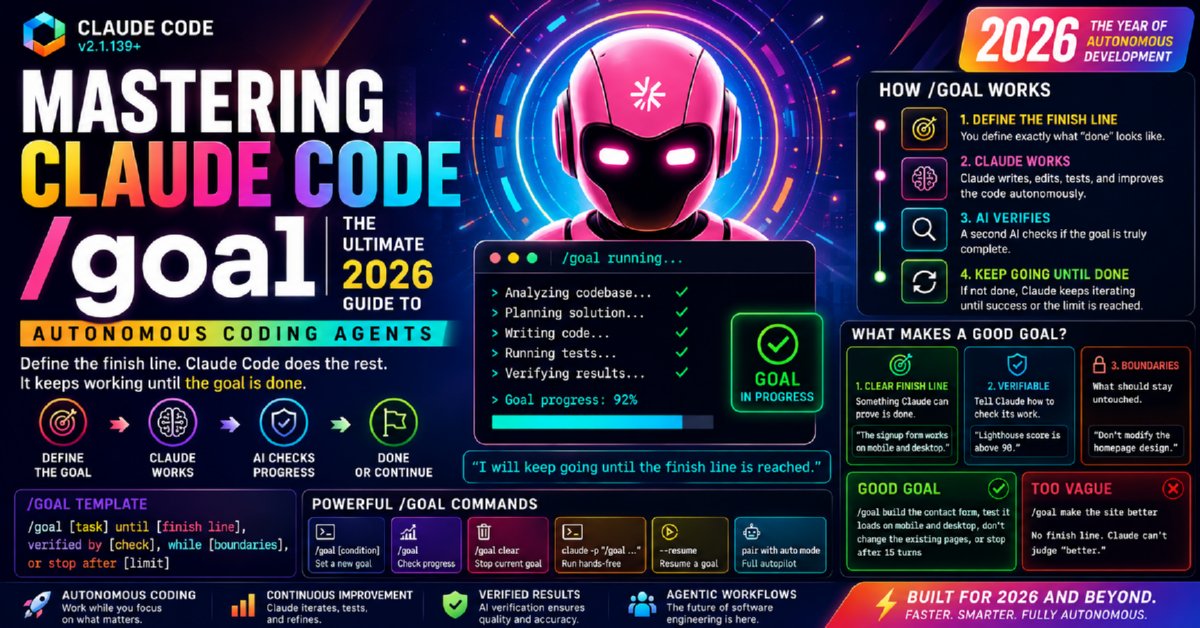
What makes this breakthrough especially significant is the introduction of a dedicated lightweight completion-checker model operating alongside the primary coding agent. After each iteration, the verifier evaluates whether the specified goal has objectively been met. If the condition remains incomplete, Claude automatically launches another reasoning and execution cycle without manual intervention. This creates a self-correcting, verification-aware workflow capable of handling long-running engineering tasks such as fixing failing builds, resolving dependency conflicts, refactoring entire modules, optimizing performance bottlenecks, improving Lighthouse scores, or validating complex CI/CD pipelines.
Unlike traditional AI chat workflows that depend on sequential prompts, /goal introduces outcome-driven autonomous development. Engineers can now specify verifiable targets such as “all tests pass,” “every TypeScript error is resolved,” “the application compiles successfully,” “mobile Lighthouse score exceeds 90,” or “the deployment queue is empty”, while also defining boundaries and safety constraints. Claude then pursues the objective iteratively until the condition becomes measurably true or a predefined stopping limit is reached.
In many ways, the /goal system represents one of the most important shifts in AI-assisted programming in 2026 — moving from reactive prompting toward persistent autonomous coding agents capable of verification, recovery, and self-directed execution. By mastering the /goal syntax and workflow design principles, developers can now offload substantial architectural, testing, debugging, and optimization tasks into a continuously running AI engineering loop, dramatically accelerating modern software development pipelines.
Master Reference: Claude Code /goal at a Glance
Before diving into the full step-by-step guide, use this consolidated reference table as a quick-start overview and ongoing cheat sheet. Every concept below is explained in depth in the sections that follow — use the table of contents to navigate directly to any topic.
| Mastering Claude Code /goal: The Ultimate 2026 Guide to Autonomous Coding Agents | |||||||||||||||||||||
|---|---|---|---|---|---|---|---|---|---|---|---|---|---|---|---|---|---|---|---|---|---|
/goal — Tell Claude What “Done” Looks LikeClaude Code’s /goal command enables autonomous coding workflows by defining a precise finish line. Instead of manually prompting step-by-step, developers describe the desired outcome, verification checks, and boundaries. Claude continues iterating — powered by an independent completion-checker model that fires after every turn — until the objective is met or the defined limit is reached, at which point the goal clears automatically and control returns to you. Requires Claude Code v2.1.139 or later. See the version requirement section for update instructions before proceeding. |
|||||||||||||||||||||
| How /goal Works |
|
||||||||||||||||||||
| What Makes a Good Goal? |
|
||||||||||||||||||||
| Good vs Too Vague Goals |
|
||||||||||||||||||||
| Recommended /goal Template |
/goal [task description]
until [verifiable finish line — runnable command or measurable state],
verified by [specific check: e.g. `npm test` exits 0 / file count < N / grep returns empty],
while [scope boundaries — what to touch and what NOT to touch],
or stop after [turn limit, e.g. 20 turns] and report remaining work.
Every element serves a purpose: task tells Claude what to do, finish line tells the checker when to stop, verification makes the check concrete and runnable, boundaries prevent unintended changes, and the turn limit is your safety net against infinite loops. See full syntax breakdown for detailed examples. |
||||||||||||||||||||
| Core /goal Commands |
All commands require Claude Code v2.1.139+. See troubleshooting if any command returns “unknown command.” |
||||||||||||||||||||
Why /goal Matters in 2026The /goal architecture represents a major evolution in AI-assisted software engineering. Instead of reactive, turn-by-turn prompting, developers now orchestrate outcome-driven autonomous agents that work toward a defined finish line — verified by an independent checker — without requiring human input at every step. This unlocks:
In 2026, autonomous coding agents — Claude Code with |
|||||||||||||||||||||
Version Requirement: Claude Code v2.1.139+ Critical
The /goal command does not exist in earlier versions of Claude Code. If you run /goal on an older version, you will receive an “unknown command” error or no response at all. This is the single most important prerequisite before following any step in this guide.
claude --versionYou should see output like: claude-code/2.1.139 or higher. If your version is lower, update immediately.
# If installed via npm:
npm update -g @anthropic-ai/claude-code

# Verify after update:
claude --version
After updating, confirm the version is 2.1.139 or higher before proceeding with any step in this guide.
| Claude Code Version | /goal Support | Completion Checker | Action Required |
|---|---|---|---|
| Below v2.1.139 | ❌ Not available | ❌ Not available | Update immediately |
| v2.1.139 | ✅ Fully supported | ✅ Available | Ready to use |
| v2.1.139+ (latest) | ✅ Fully supported | ✅ Improved | Recommended — always use latest |
What Is the Claude Code /goal Command?
The Claude Code /goal command is a slash command that shifts Claude from its default turn-by-turn mode into a persistent, autonomous agent mode that keeps working toward a stated completion condition without requiring you to prompt each step.
The core idea is simple but transformative: you describe a verifiable end state, not a list of instructions. Claude figures out how to get there, and an independent checker model confirms when it has.
Without /goal: You prompt → Claude responds → You review → You prompt again → Repeat 20+ times.
With /goal: You state the completion condition → Claude works autonomously across as many turns as needed → A fast checker model tests whether the condition is met after each turn → When the condition is met, the goal clears automatically and control returns to you.
What “Verifiable End State” Means
The phrase “verifiable end state” is the most important concept in understanding /goal. It means the completion condition must be something that can be objectively checked — not assessed subjectively. Good verifiable end states include:
- ✅ “All 47 tests pass with zero failures” — runnable, binary result
- ✅ “Every file in src/models/ is under 200 lines” — measurable, countable
- ✅ “The TypeScript compiler emits zero errors on the entire project” — binary pass/fail
- ✅ “All 12 issues labeled ‘sprint-23’ in the backlog are marked resolved” — enumerable state
- ❌ “The code looks clean” — subjective, not verifiable
- ❌ “Improve the architecture” — no clear completion signal
See the master reference table for a side-by-side good vs. vague comparison, and goal syntax guidelines for detailed writing patterns.
How /goal Actually Works: The Completion Checker Explained
Understanding the mechanics of how /goal operates — especially the role of the independent completion-checker model — helps you write better goals, debug unexpected behavior, and understand why verifiable conditions are non-negotiable.
/goal active, this does not happen automatically — the checker fires instead.npm test or tsc --noEmit and reads their output objectively./goal session is over — no cancel command needed.The completion checker is architecturally significant — not just a convenience feature:
- Independence: It’s separate from Claude, so it catches cases where Claude thinks it’s done but hasn’t actually satisfied the condition.
- Objectivity: It runs real commands and reads real output — not Claude’s self-assessment.
- Speed: It’s fast and cheap, designed to run after every turn without significantly slowing the workflow.
- Precision dependency: This is exactly why your condition must be verifiable. A vague condition gives the checker nothing concrete to test.
See the master reference table for a full breakdown of how each step fits together in practice.
/goal session. If exhausted before the condition is met, Claude stops and reports current progress. You can then fix the blocker and issue a refined /goal. You can also set an explicit limit in your goal text: “or stop after 20 turns and report what remains.”When to Use /goal — and When Not To
- The work is substantial — it will realistically take many steps, file edits, or iterations. A single-turn task doesn’t need
/goal. - The end state is verifiable — there is an objective, testable condition that is clearly either true or false.
- You don’t need to approve each intermediate step — you trust Claude to make incremental decisions autonomously and will review the overall output at the end.
- The task is a quick, single-turn question or fix
- The completion condition is subjective (“make it cleaner”)
- You need to approve every individual code change before the next
- The work involves irreversible production actions (live deployments, production DB writes)
- You haven’t committed your current work — always start from a clean Git state
| Task Type | Use /goal? | Why |
|---|---|---|
| Migrate module to new API until it compiles | ✅ Yes | Substantial + verifiable (compiler output) |
| Implement design doc until acceptance criteria hold | ✅ Yes | Substantial + verifiable (acceptance tests) |
| Split large file until each part is under size budget | ✅ Yes | Verifiable (file line count) |
| Work through labeled issue backlog until queue is empty | ✅ Yes | Verifiable (issue count = 0) |
| Fix this single bug I just found | ❌ No | Single turn is sufficient |
| “Clean up the codebase” | ❌ No | Not verifiable — subjective condition |
| Deploy to production | ❌ No | Irreversible — needs human at each step |
Prerequisites & Setup Before Your First /goal
claude --version
# Must show 2.1.139 or higher — see version requirement section if notgit status
# Must show: nothing to commit, working tree clean
# If not clean:
git add . && git commit -m "checkpoint before /goal session"Because /goal sessions modify dozens of files autonomously, a clean Git state is your rollback guarantee without it you have no clear picture of what the session changed.
claude     # open Claude Code
/init # inside Claude Code — maps your project structureCreate a CLAUDE.md in your project root with your conventions, tech stack, and constraints. Claude reads this at session start, reducing what you need to repeat in each goal. See best practices for the full template.
# Run whatever your goal will check — know the baseline:
npm test          # note: X passing, Y failing
tsc --noEmit      # note: N errors currently
npm run lint      # note: N violations currently
If these commands are broken before your goal starts, the checker can never clear it. Always start from a known, defined baseline — even if it’s a failing one that the goal is meant to fix.
Step-by-Step: Using /goal in Claude Code
Follow these eight steps for a successful /goal session. The example throughout: migrating a module from a deprecated REST client to a new API until every call site compiles and tests pass — one of the four officially documented Anthropic use cases.
cd /path/to/your/project
claudeWe're migrating src/integrations/paymentClient.ts from stripe-v2 to stripe-v3.
Migration differences are in docs/stripe-v3-migration.md.
Tests run with: npm test/goal Migrate all call sites in src/integrations/ from stripe-v2 to stripe-v3 SDK.
The goal is complete when: (1) `tsc --noEmit` exits with zero errors across the entire project,
and (2) `npm test` exits with zero failures.
Do not modify any files outside src/integrations/ and src/__tests__/.
Stop after 25 turns and report remaining work if not complete.Goal set: Migrate stripe-v2 → stripe-v3 until tsc + tests are clean.
My plan:
1. Read docs/stripe-v3-migration.md to understand API differences
2. Audit all files in src/integrations/ for stripe-v2 call patterns
3. Migrate each file, updating imports and call signatures
4. Update corresponding test imports in src/__tests__/
5. Run tsc --noEmit and npm test after each file (catch regressions early)
6. Continue until both commands exit clean
Starting Step 1...If the plan looks wrong, correct it now before execution starts. This is your easiest intervention point.
Claude will read files, write changes, run tsc and npm test, fix errors it finds, and move to the next subtask — all without your input. The completion checker fires silently after each turn.
Checkpoint: The `createCharge()` call in paymentClient.ts has no direct equivalent in stripe-v3.
Options: (A) createPaymentIntent() — requires frontend changes
         (B) createLegacyCharge() — deprecated but available in stripe-v3
Your preference?
Answer clearly. Claude incorporates your answer and resumes autonomously.
✅ Goal condition met and cleared.

Summary: Migrated 8 files in src/integrations/, updated 3 test files.
tsc --noEmit: 0 errors ✅ | npm test: 47/47 passing ✅

Suggested follow-up: Review createPaymentIntent() change in paymentClient.ts (lines 34–67)
— it alters the payment flow and frontend handling may need updating.git diff # review every change Claude made
npm test # verify independently — don't skip this
tsc --noEmit
# If satisfied:
git add .
git commit -m "feat: migrate stripe integration v2→v3 via /goal"Writing Great /goal Conditions: Syntax & Structure
The quality of your /goal condition determines everything. Because the completion checker decides whether Claude keeps going or stops, an imprecise condition leads to premature clearing, infinite loops, or wrong-direction execution. Refer back to the master reference table for the recommended template syntax.
The Five Elements of a Strong /goal
| Element | Purpose | Example |
|---|---|---|
| Task description | What Claude should do | “Migrate src/api/ to use the new HttpClient” |
| Verifiable finish line | What the checker tests | “until tsc --noEmit exits 0″ |
| Specific verification | The exact command or check | “and npm test exits 0 with no failures” |
| Scope boundary | What to touch and what not to | “only src/api/ and src/__tests__/api/” |
| Turn limit (safety net) | Prevents infinite loops | “or stop after 20 turns and report what’s left” |
/goal Fix the auth stuff— vague, no verifiable finish line/goal Write some tests— “some” is not measurable/goal Make it faster— subjective, no benchmark
/goal Fix the broken JWT refresh flow in src/auth/tokenService.ts.
The bug: refresh tokens are not invalidated after use (line ~87), allowing token reuse.

Goal is complete when:
1. `npm test` exits 0 with no failures (all 13 tests passing — 12 existing + 1 new fix test)
2. `tsc --noEmit` exits 0

Scope: Only modify src/auth/tokenService.ts and src/__tests__/tokenService.test.ts.
Do not modify: login/registration flows, any other auth files, or package.json.
Stop after 15 turns and report if not complete.
Official Use Cases from Anthropic Documentation
Anthropic’s official Claude Code documentation specifies four validated patterns for /goal. These are the use cases the completion-checker mechanism is architecturally optimized for. See the master reference table for the structural template that applies to all four.
- Migrating a module to a new API until every call site compiles and tests pass
- Implementing a design doc until all acceptance criteria hold
- Splitting a large file into focused modules until each is under a size budget
- Working through a labeled issue backlog until the queue is empty
Use Case 1 — API Migration Until Compilation + Tests Pass
/goal Migrate all usages of the deprecated `legacyFetch` utility in src/ to the new
`apiClient` (src/utils/apiClient.ts).

Goal is complete when:
- `tsc --noEmit` exits 0
- `npm test` exits 0
- `grep -r "legacyFetch" src/` returns no results

Scope: Only modify files in src/ that currently import legacyFetch.
Do not modify: src/utils/legacyFetch.ts itself (needed for backward compat in lib/).
Stop after 30 turns.
Use Case 2 — Implement Design Doc Until Acceptance Criteria Hold
/goal Implement the notification service as specified in docs/notifications-design.md.

Goal is complete when:
- All acceptance criteria under "## Acceptance Criteria" in docs/notifications-design.md
  are satisfied — verified by running src/__tests__/notifications/ test suite
- `npm test src/__tests__/notifications/` exits 0
- `tsc --noEmit` exits 0

Scope: src/services/notifications/, src/models/Notification.ts, src/__tests__/notifications/
Do not modify: frontend code, email templates, or existing notification configs.
Stop after 25 turns.
Use Case 3 — Split Large File Until Each Part Is Under Size Budget
/goal Split src/controllers/userController.ts (currently 847 lines) into focused,
single-responsibility controller files.

Goal is complete when:
- No file in src/controllers/ exceeds 200 lines
  (verified by: `wc -l src/controllers/*.ts | grep -v total | awk '$1 > 200'` returns empty)
- `tsc --noEmit` exits 0
- `npm test` exits 0

Approach: Extract logical groups (auth, profile, settings, admin) into separate files.
Update all import paths across the codebase as needed.
Do not change any business logic — only reorganize structure.
Stop after 20 turns.
Use Case 4 — Clear Labeled Issue Backlog Until Queue Is Empty
/goal Work through all issues labeled [sprint-24] in BACKLOG.md and resolve each one.

Goal is complete when:
- Every item in BACKLOG.md marked [sprint-24] is checked off (- [ ] changed to - [x])
- `npm test` exits 0 after all fixes

For each issue: read → implement fix → write/update test → verify tests pass → mark [x].
If an issue is ambiguous or needs a product decision, mark it [?] and move on.
Do not mark any issue [x] unless you've verified the fix with a passing test.
Stop after 30 turns and report uncompleted items.
Real-World Examples & Goal Templates
These examples extend beyond the four official patterns into common developer scenarios. Each applies the recommended /goal template with verifiable conditions, scope fencing, and turn limits.
🔒 Dependency Vulnerability Remediation
/goal Resolve all high and critical severity vulnerabilities reported by `npm audit`.

Goal is complete when:
- `npm audit --audit-level=high` exits 0
- `npm test` exits 0 (no regressions from updates)

Approach: Update minimum required versions in package.json. For major version bumps,
check changelogs for breaking changes and adapt our code accordingly.
Do not introduce new dependencies not already in package.json.
Stop after 20 turns.
📝 JSDoc Coverage Completion
/goal Add JSDoc documentation to all exported functions and classes in src/services/.

Goal is complete when:
- `npx typedoc --validation --treatWarningsAsErrors` exits 0
- `tsc --noEmit` exits 0

Each JSDoc must include: @param (all params), @returns, @throws (known errors), @example (at least one).
Do not modify any implementation code — add comments only.
Stop after 20 turns.
🧹 Lint Violation Elimination
/goal Fix all ESLint violations in src/ so the linter passes cleanly.

Goal is complete when:
- `npm run lint` exits 0 with no warnings or errors
- `npm test` exits 0 (no regressions)

For each violation: understand the rule, fix the root cause. Only use eslint-disable-next-line
for genuine false positives — add a comment explaining why.
Do not suppress rules to hit the target. Do not change business logic.
Stop after 25 turns.
🔄 Promise → Async/Await Migration
/goal Convert all .then()/.catch() Promise chains in src/ to async/await syntax.

Goal is complete when:
- `grep -r "\.then(" src/ --include="*.ts"` returns no results
- `grep -r "\.catch(" src/ --include="*.ts"` returns no results
- `tsc --noEmit` exits 0
- `npm test` exits 0

Preserve exact error handling — wrap in try/catch where .catch() existed.
Do not modify test files (.resolves/.rejects syntax is intentional there).
Migrate one file at a time, run tsc after each.
Stop after 30 turns.
Best Practices for Verifiable Goals
- Make the condition runnable. If you can’t express it as a shell command or file state check, rewrite it until you can. The checker runs real commands.
- Fence the scope explicitly. Specify allowed directories and explicit exclusions. This prevents the condition from being met through unintended means.
- Include a “do not” list. Explicitly forbid: don’t skip tests, don’t use eslint-disable, don’t delete code to reduce file size. If you don’t say it, Claude may do it.
- Know your baseline first. Run completion-condition commands before the goal starts. Know how many tests are failing, how many errors exist — this helps evaluate progress and prevents checker confusion.
- Use AND conditions for stronger outcomes. Require multiple conditions (tests pass AND linter clean AND types valid) for more rigorous results.
- Set an explicit turn limit. Add “or stop after N turns and report remaining work” to every goal. This is your safety net against infinite loops from impossible conditions.
CLAUDE.md Template for /goal Sessions
# Project: [Your Project Name]

## Tech Stack
- Language: TypeScript 5.5 | Runtime: Node.js 22 LTS
- Testing: Jest 30 — run: npm test
- Linting: ESLint — run: npm run lint
- Type checking: tsc --noEmit

## /goal Session Rules (ALWAYS FOLLOW)
- Never skip, delete, or comment out tests to satisfy a completion condition
- Never use eslint-disable to pass lint — fix the root cause
- Never modify package.json, .env files, CI/CD config, or DB migrations without explicit instruction
- Always run tsc and npm test after modifying each file (catch regressions early)
- If ambiguous: add // TODO: [question] comment and continue
- No console.log in production code — use Logger utility (src/utils/logger.ts)

## Architecture Conventions
- Repository pattern for all DB access
- Service layer for business logic (controllers stay thin)
- All async functions: async/await only (no .then() chains)
- All errors: AppError class (src/utils/AppError.ts)

## File Size Guidelines
- Controllers: max 150 lines | Services: max 200 lines | Utils: max 100 lines

## Testing Standards
- Unit tests for all service functions
- Integration tests (supertest) for all API endpoints
- Coverage: 80% minimum for src/services/
Claude Code /goal vs. Traditional Prompting
| Dimension | Traditional Turn-by-Turn | /goal Autonomous Mode |
|---|---|---|
| What you provide | Instructions for each step | A verifiable completion condition |
| Human involvement | Every turn requires your input | Only at checkpoints and completion |
| Completion check | You decide when it’s done | Independent checker model decides |
| Error correction | You paste errors back manually | Claude sees and corrects autonomously |
| Token cost | Lower per task | Higher — many autonomous turns |
| Risk profile | Lower — review each step | Higher — review at end; needs clean Git |
| Best for | Quick fixes, questions, exploration, per-step approval tasks | Migrations, backlog clearing, spec implementation, file splitting |
| Version required | Any Claude Code version | v2.1.139 or later |
| Stopping mechanism | Claude responds and waits | Goal auto-clears when condition met |
/goal does not replace traditional prompting — it complements it. Use traditional turns for quick, targeted interactions. Reserve /goal for substantial work with a verifiable end state, as defined in the master reference table.Troubleshooting Common /goal Issues
Cause: Claude Code version below v2.1.139.
Fix: npm update -g @anthropic-ai/claude-code then claude --version to confirm. See version requirement section.
Cause: Completion condition is impossible to meet, or a blocker exists Claude can’t resolve within scope.
Fix: Press Ctrl+C. Run the completion condition command yourself — does it pass now? If not, that’s the blocker. Fix it, then issue a revised /goal. Always include an explicit turn limit to prevent true infinite loops.
Cause: Condition was too narrow — Claude satisfied the letter but not the spirit (e.g., deleted failing tests to make the suite pass).
Fix: Add guards: “all N tests pass — test count must not decrease from baseline of N.” Always review git diff after completion. See security section for the full post-goal review checklist.
Cause: No explicit scope boundary in the goal.
Fix: git checkout -- path/to/unintended/file.ts to restore. For future goals, always include explicit “Only modify:” and “Do not touch:” clauses. See the recommended template.
Cause: Goal scope is too large for efficient single-session execution.
Fix: Break into a chain of smaller, focused goals — each with its own narrow verifiable condition. Chain them sequentially after reviewing and committing each result.
Cause: Goal has too many underspecified decision points.
Fix: Anticipate common forks and address them in the goal text: “If a call site is ambiguous, prefer option A. If the file is unrelated to the scope, skip it and add a TODO. Only checkpoint me for situations not covered by these rules.”
Security & Safety Considerations
- Always start from a clean, committed Git state. Your rollback guarantee. Without it, you can’t cleanly undo what a multi-turn session changes.
- Never run /goal on production systems with live deployment or database write access enabled. Development environment only.
- Always review
git diffbefore committing. The checker verified your condition — not the quality of every change. Never blindly commit goal output.
Files to Always Exclude
- Database migration files (
database/migrations/,prisma/migrations/) - Environment configuration (
.env,.env.production, any*.env.*) - CI/CD configuration (
.github/workflows/,Dockerfile,.circleci/) package.jsonandpackage-lock.json(unless dependency-related)CLAUDE.md— never let goal sessions rewrite your own conventions
The .claudeignore File
# .claudeignore — files Claude will never read or modify
.env
.env.*
*.pem
*.key
secrets/
database/migrations/
infrastructure/terraform/
Post-Goal Review Checklist
| Review Area | Command | What You’re Looking For |
|---|---|---|
| All changed files | git diff --name-only |
Any unexpected files in the diff |
| Full diff content | git diff |
Deleted tests, skipped checks, logic changes |
| Test count | npm test -- --verbose | grep "Tests:" |
Count didn’t decrease from baseline |
| New eslint-disable usage | grep -r "eslint-disable" src/ --include="*.ts" |
New suppressions (should be rare and justified) |
| TODO flags from Claude | grep -r "TODO:" src/ --include="*.ts" |
Items Claude flagged for your decision |
Frequently Asked Questions: Claude Code /goal Command 2026
Q1: What version of Claude Code do I need for the /goal command?
You need Claude Code v2.1.139 or later — this is a hard requirement. The /goal command and its completion-checker model do not exist in earlier versions. Run claude --version to check and npm update -g @anthropic-ai/claude-code to update. Full details in the version requirement section.
Q2: How exactly does the /goal completion checker work?
After each autonomous work turn Claude completes, a small, fast model separate from Claude evaluates whether your completion condition is currently true. It can run actual shell commands — like npm test or tsc --noEmit — and read their output. If the condition is not met, it triggers another work turn automatically. If met, the goal clears and control returns to you. The checker is independent of Claude’s self-assessment, meaning Claude can’t “think” it’s done without the condition being verifiably satisfied. Full explanation in the how it works section.
Q3: What does “the goal clears automatically” mean in practice?
When the completion condition is met, the goal state is simply removed from your Claude Code session — no cancel command needed. Claude returns to standard turn-by-turn mode and outputs a completion summary. This automatic clearing ensures Claude stops working the moment the objective is achieved and not a step later. It also means your condition must be exactly right: too easy and it clears prematurely; impossible and it loops until the turn limit.
Q4: What are the four officially documented /goal use cases from Anthropic?
Anthropic specifies four use cases in their official documentation: (1) migrating a module to a new API until every call site compiles and tests pass; (2) implementing a design doc until all acceptance criteria hold; (3) splitting a large file into focused modules until each is under a size budget; (4) working through a labeled issue backlog until the queue is empty. The common thread: substantial work with a verifiable end state. Ready-to-use templates for all four are in the official use cases section.
Q5: What’s the recommended /goal template syntax?
The recommended template is: /goal [task] until [finish line], verified by [specific check], while [boundaries], or stop after [turn limit]. Every element serves a purpose — the task tells Claude what to do, the finish line tells the checker when to stop, the verification makes it concrete and runnable, the boundaries prevent unintended changes, and the turn limit is your safety net. See the master reference table for the full template with examples, and goal syntax section for a detailed breakdown.
Q6: How do I prevent Claude from deleting tests or using eslint-disable to satisfy the condition?
Explicitly forbid these tactics in your goal text and in CLAUDE.md. Example: “Do not delete, skip, or comment out any tests. Do not use eslint-disable. The test count must remain at or above the baseline of N. Satisfy all conditions through correct implementation only.” Also include an explicit guard in the completion condition: “npm test exits 0 with no fewer than N tests than the current baseline.” Always verify with git diff after completion.
Q7: Can I pause or interrupt a /goal session?
Yes. Press Ctrl+C during an active turn. Claude finishes its current tool call (to avoid half-written files) and pauses. Type “continue” to resume, issue a modified goal, or simply stop. If you close the terminal, files already written persist on disk — run git status and git diff to assess state, then decide whether to resume or roll back with git checkout .. The --resume flag can help restart an interrupted session.
Q8: How much does a /goal session cost in tokens?
Significantly more than single-turn interaction. Simple goals (one file, clear migration): 15,000–40,000 tokens. Medium goals (5–10 files, test writing): 50,000–150,000 tokens. Large goals (full module, backlog of 10+ issues): 150,000–400,000+ tokens. Claude Pro and Team plans cover most development use; heavy automation users may need API access with appropriate limits. Set explicit turn limits in your goals to control maximum consumption.
Q9: What’s the difference between /goal and just writing a very detailed prompt?
A detailed prompt gives Claude a request it responds to once before returning control to you. The /goal command activates a fundamentally different execution model: persistent goal state across many autonomous turns, plus an independent completion-checker model that objectively verifies the condition after each turn. With a regular prompt, if a generated function fails tests, you paste the error back and ask Claude to fix it. With /goal, Claude sees the test failure itself and corrects it autonomously — potentially across many iterations — until the condition is verifiably met. The checker is the architectural difference that makes this qualitatively distinct.
Q10: Can I chain multiple /goal sessions for a large project?
Yes — and this is the recommended approach for large-scale work. Rather than one enormous goal (which risks context issues, looping, and hard-to-audit diffs), break the work into sequential goals where each has a narrow, verifiable condition. After each goal clears, review the diff, run your tests independently, commit, then start the next goal. This gives you clean Git commits at each milestone, easy rollback points, and more predictable behavior from both Claude and the checker. Think of it as a pipeline of autonomous tasks rather than one monolithic session.
Conclusion: Making /goal Part of Your 2026 Development Workflow
The Claude Code /goal command — available from v2.1.139 onward — is a genuine architectural advancement in AI-assisted development. The combination of persistent goal state, autonomous multi-turn execution, and an independent completion-checker model creates something qualitatively different from prompt-response interaction: a system where you define the outcome and delegate the path entirely to an autonomous agent that keeps working until the outcome is verifiably, objectively true.
The key discipline required to use it well is twofold: precision in writing verifiable conditions (using the recommended template and the syntax guidelines), and diligence in reviewing the output with git diff before committing. The checker verifies your condition — your review verifies everything else.
- Run
claude --version— update to ≥ v2.1.139 if needed - Commit your current work — establish a clean Git baseline
- Write or refine your
CLAUDE.mdusing the template from best practices - Run your test/build commands now — know your current baseline numbers
- Pick one task from the four official use cases that matches your backlog
- Write a goal using the recommended template with a verifiable condition, scope boundary, and turn limit
- Review Claude’s plan before execution — redirect if needed
- After completion:
git diff, independent test run, then commit
Last Updated: May 20, 2026 | Requires Claude Code v2.1.139+ | ↑ Back to Top | Table of Contents | Master Reference Table | FAQ | Official Docs ↗