
🔍 Over 70% of developers using AI coding assistants are not aware about the difference between their project’s instruction files — leading to duplicated context, token waste, and confused agents. As AI tools like Claude, Cursor, and Windsurf become deeply embedded in development workflows, understanding how your agent reads its instructions is no longer optional — it’s a competitive skill. This complete guide explains exactly what CLAUDE.md, AGENTS.md, MEMORY.md, SKILLS.md, and CONTEXT.md do, how they differ, and how the hierarchy works so your AI agent works smarter, not harder.
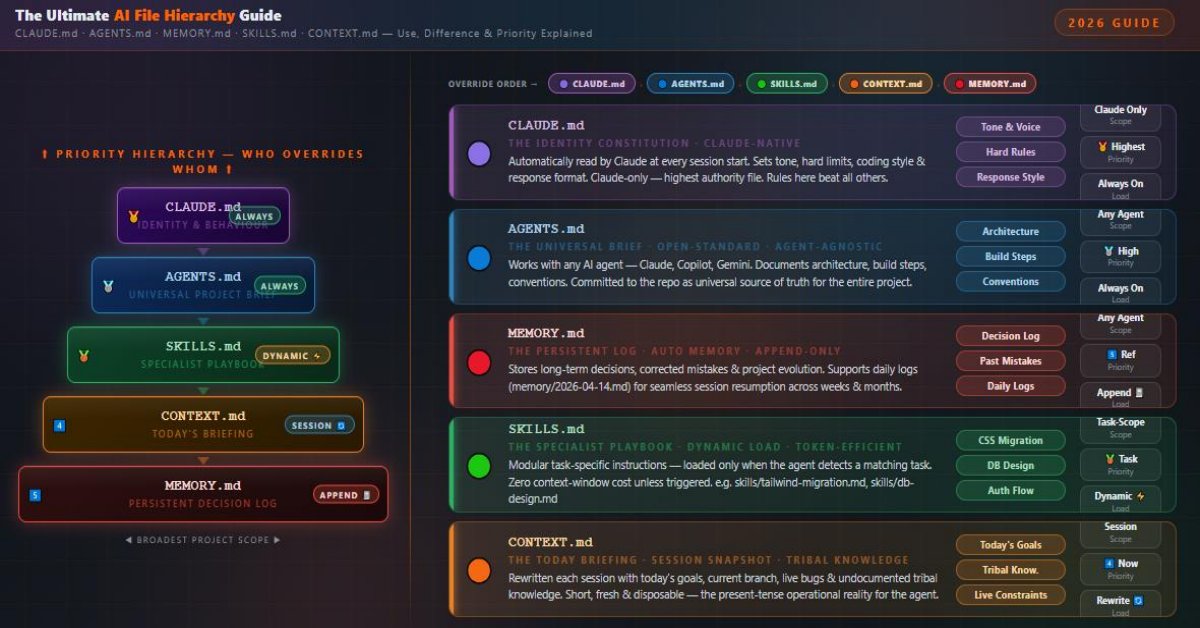
This architecture dramatically improves consistency, reduces context window waste, preserves long-term learning, and enables agents to operate with near-human tribal knowledge of your codebase. Result: 3-5x better code quality and significantly faster iteration when using Cursor, Claude Projects, Windsurf, or any advanced coding agent.
What Are AI Agent Instruction Files?
When you work with an AI coding assistant — whether it’s Claude (by Anthropic), Cursor, Windsurf, or any agentic IDE — the agent needs to understand your project just like a new developer joining a team would. It needs to know: what are the rules? what has already been decided? what is happening right now? what special skills does it need for this task?
Instead of cramming all of this into every single prompt (which would quickly burn your context window), developers have developed a convention of using dedicated Markdown files that the agent reads at different points in a session. These files serve as structured instructions, persistent memory, and real-time snapshots for your AI agent.
The five key files in this ecosystem are:
- CLAUDE.md — Claude-specific identity and behavior rules
- AGENTS.md — Open-standard architectural source of truth for any agent
- MEMORY.md — Long-term decisions and a persistent evolving log
- SKILLS.md — Task-specific modular instruction sets, loaded on demand
- CONTEXT.md — Current session state, goals, and tribal knowledge
Quick-Reference Master Table
| File | Primary Role | Agent Scope | Load Timing | Update Frequency | Token Strategy | Override Priority | Analogy |
|---|---|---|---|---|---|---|---|
| CLAUDE.md | Identity & Behaviour | Claude only | Always · session start | Rarely | Always present — keep lean (<100 lines) | 🥇 Highest | Employee Contract |
| AGENTS.md | Architecture & Conventions | Any AI agent | Always · session start | Rarely | Always present — universally readable | 🥈 High | Company Policy Manual |
| MEMORY.md | Persistent Decision Log | Any AI agent | Always or on-demand | Every session (append) | Grows over time · summarise periodically | 5️⃣ Reference | Project Journal / Diary |
| SKILLS.md | Task-Specific Expertise | Any AI agent | Dynamic · task-triggered | When skill evolves | 0 tokens unless triggered ⚡ | 🥉 Task-scoped | Specialist Certificate |
| CONTEXT.md | Session State & Tribal Knowledge | Any AI agent | Session-scoped · rewritten | Every session (overwrite) | Short & fresh · 20–40 lines ideal | 4️⃣ Session-scoped | Morning Standup |
CLAUDE.md — The Home Base (Claude-Specific Identity File)
CLAUDE.md is the original, Claude-native instruction file developed and recognized by Anthropic. When Claude starts a session in a directory, it automatically looks for and reads CLAUDE.md if it exists — no configuration needed. Think of it as Claude’s orientation manual for your specific project.
What Goes Inside CLAUDE.md?
CLAUDE.md is the place to define Claude’s personality and behavior within your specific project. It typically contains:
var. Follow Airbnb ESLint config.”)schema.prisma directly. Never use console.log in production components.”)
      # Project: FinanceDash

      Stack: Next.js 14 | TypeScript | Tailwind | Supabase
## Rules
- Always use `server actions` for mutations
- Never store secrets in `.env.local` without adding to `.gitignore`
- Use Zod for all input validation
## Style
- Be direct. Skip preamble. Code first.
- Use functional components only. No class components.
Why CLAUDE.md Is Unique
Unlike the other files in this guide, CLAUDE.md is Claude-proprietary. Other AI agents (GPT-4, Gemini, Copilot) won’t know what to do with it by default. It exists specifically within Claude’s agentic framework. This is both its strength and its limitation — which is exactly why AGENTS.md was created as an open alternative.
CLAUDE.md files. If you place a CLAUDE.md inside /backend/, Claude will read it when operating within that folder, allowing for scope-layered rules without global pollution.AGENTS.md — The Universal Brief (Open-Standard Source of Truth)
AGENTS.md is the open-standard evolution of the project instruction file. While CLAUDE.md was built by and for Claude, AGENTS.md was designed to be agent-agnostic — meaning it works equally well whether your AI is Claude, GPT-based Copilot, Gemini in Vertex AI, or any future agent.
Think of it as the “source of truth” that lives in your repository and speaks to any intelligent agent that picks up the codebase. If CLAUDE.md is the briefing you give Claude personally, AGENTS.md is the briefing you’d put in the team’s shared Notion — available to everyone, written to be universally understood.
AGENTS.md. It is always loaded, not dynamically triggered.What Goes Inside AGENTS.md?
- CLAUDE.md = Private briefing for Claude specifically. May include Claude-specific formatting hints, personality rules, and Claude-aware behaviors.
- AGENTS.md = Public, agent-neutral briefing for any AI. Focuses on architecture, build process, and universal conventions — not tied to Claude’s specific behavior.
- In a project with both files, Claude will read both, with CLAUDE.md typically taking precedence on Claude-specific behavior.
# AGENTS.md — FinanceDash Project
## Architecture
- Frontend: Next.js 14 App Router (./app/)
- Backend: Supabase (PostgreSQL + Auth + Storage)
- API Layer: tRPC v11 (./server/)
## Build
- Install: `pnpm install`
- Dev: `pnpm dev`
- Test: `pnpm test` (Vitest)
## Conventions
- Components in PascalCase
- Utilities in camelCase
- API routes use kebab-case
## Agent Rules
- Never run `pnpm db:migrate` without explicit user approval
- Always lint before suggesting a PR
MEMORY.md — The Persistent Log (Auto Memory & Long-Term Decisions)
Here’s a painful reality of working with AI agents: every new session starts with amnesia. Claude doesn’t remember that last week you decided to switch from React Query to SWR. It doesn’t remember that you corrected it for using any types in TypeScript. Without a memory system, you repeat yourself endlessly.
MEMORY.md solves this. Often called the “Auto Memory” file, it serves as a persistent log of decisions, corrections, and project evolution that transcends individual sessions.
What Goes Inside MEMORY.md?
memory/2026-04-14.md format, allowing the agent to resume exactly where yesterday’s session ended.MEMORY.md, developers create a /memory/ folder with date-stamped files like memory/2026-04-14.md. At the start of each session, the agent reads the most recent log file to understand the exact state of the codebase and what tasks were in progress. This is especially powerful for solo developers working on long-running projects.
# Project Memory Log
## Decisions
- [2026-03-15] Chose Zustand over Redux for state management (simpler API)
- [2026-04-01] Switched from JWT to Supabase Auth sessions
- [2026-04-10] Deprecated /pages directory — App Router only now
## Corrections (User Feedback)
- Never suggest `any` type in TypeScript — use `unknown` with type guards
- Always use Zod `.parse()` not `.safeParse()` unless explicitly needed
## Last Session (2026-04-14)
- Completed: Dashboard chart component (./app/dashboard/Chart.tsx)
- In Progress: User settings page — auth check middleware needed
- Next: Write Vitest tests for Chart component
SKILLS.md — The Specialized Playbook (Dynamic, Task-Triggered Instructions)
Not every session requires the same knowledge. When you’re debugging a CSS layout issue, you don’t need instructions about database schema design. When you’re migrating a component library to Tailwind CSS, you don’t need the guide to setting up authentication. SKILLS.md is built around this principle of relevance.
A SKILLS.md file (sometimes organized as multiple skill files like skills/tailwind-migration.md or skills/database-design.md) contains deep, specific instructions for a particular task type. Crucially, it is loaded dynamically — only when the agent detects a relevant task is being performed.
What Goes Inside SKILLS.md?
Every token loaded into the context window at session start is a token not available for your actual work. If AGENTS.md is 800 tokens, MEMORY.md is 600 tokens, and you have five SKILLS.md files at 500 tokens each — loading them all would consume 4,000 tokens before you’ve typed a single word. SKILLS.md’s dynamic loading means only the skills you actually need appear in context.
| File | Load Strategy | Token Impact |
|---|---|---|
| CLAUDE.md | Always | Medium (always present) |
| AGENTS.md | Always | Medium (always present) |
| MEMORY.md | Always or On Demand | Grows over time |
| SKILLS.md | Dynamic / On Demand | Minimal (only when needed) |
| CONTEXT.md | Session-scoped | Small (refreshed each session) |
# Skill: Tailwind CSS Migration
## Trigger
Load this skill when the user asks to migrate CSS, update styles, or refactor class names.
## Token Mapping
- `primary-blue` → `text-blue-600`
- `bg-card` → `bg-white shadow-md rounded-lg`
- `container-lg` → `max-w-5xl mx-auto px-4`
## Rules
- Never use arbitrary values `[...]` unless no Tailwind token exists
- Group utilities in order: layout → spacing → typography → colors
- Remove all CSS module imports after migration
CONTEXT.md — The Project Snapshot (Session State & Tribal Knowledge)
If MEMORY.md is the long-term memory of your project, CONTEXT.md is the short-term working memory — a snapshot of exactly where you are right now. It’s the file you rewrite at the start of a new working session to tell the agent: here’s what’s happening today, here’s what I need, here’s what you must know that isn’t written anywhere else.
What Goes Inside CONTEXT.md?
useUserStore hook must always be called inside AuthGuard — calling it outside causes a hydration mismatch in prod only.”)/fixtures/payment.json.”)
# Session Context — 2026-04-14
## Today's Goal
- Finish UserSettings page (./app/settings/page.tsx)
- Implement email change with Supabase re-verification flow
- Fix the bug in useUserStore where stale state persists on logout
## Current Branch
feat/user-settings (from main, last synced 2026-04-13)
## Known Issues
- Supabase email templates broken in dev — test auth emails in prod only
- `pnpm build` takes 4+ min due to icon tree-shaking issue — known, not a priority
## Tribal Knowledge
- Never destructure Supabase session inside a Server Component — causes serialization error
- The `UserAvatar` component has a hardcoded fallback that only renders in CSR — don't SSR it
The Hierarchy — How These Files Work Together (And Who Wins When They Conflict)
Understanding each file individually is half the battle. Understanding how they interact — and who takes precedence when instructions conflict — is what separates a good AI setup from a great one.
- CLAUDE.md — Absolute top. Claude-specific behavior overrides everything for Claude sessions. If CLAUDE.md says “never use semicolons,” that rule wins over any other file.
- AGENTS.md — Universal project law. Sets the architectural and convention rules that all agents follow. Second priority.
- SKILLS.md — Task-specific overrides. When a skill is loaded, its specific rules take precedence over general AGENTS.md conventions for that specific task.
- CONTEXT.md — Session-level reality check. Provides current state that overrides assumptions from other files for this session only.
- MEMORY.md — Historical reference. Informs the agent about past decisions but doesn’t override current instructions — it’s a log, not a rulebook.
Visual Hierarchy Flow
| Layer | File | Scope | Load Timing | Override Priority |
|---|---|---|---|---|
| 🥇 1st | CLAUDE.md | Claude-specific behavior | Always (session start) | Highest |
| 🥈 2nd | AGENTS.md | Universal project rules | Always (session start) | High |
| 🥉 3rd | SKILLS.md | Task-specific expertise | Dynamic / On Demand | Medium (task-scoped) |
| 4th | CONTEXT.md | Current session state | Session-scoped | Medium (session-scoped) |
| 5th | MEMORY.md | Historical project log | On demand or always | Low (reference only) |
.claude/skills/
├── commit/
│   └── SKILL.md
├── deploy/
│   ├── SKILL.md
│   └── deploy.sh
└── test/
    └── SKILL.md
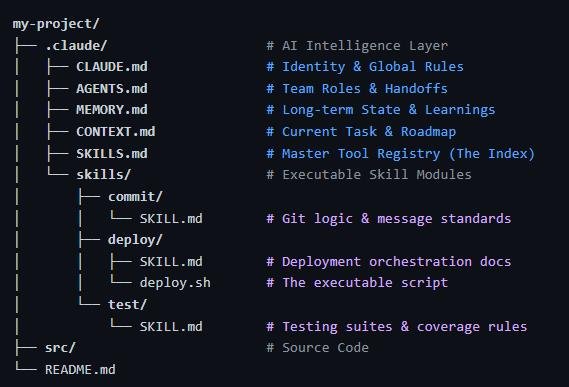
my-project/
├── .claude/                    # AI Intelligence Layer
│   ├── CLAUDE.md               # Identity & Global Rules
│   ├── AGENTS.md               # Team Roles & Handoffs
│   ├── MEMORY.md               # Long-term State & Learnings
│   ├── CONTEXT.md              # Current Task & Roadmap
│   ├── SKILLS.md               # Master Tool Registry (The Index)
│   └── skills/                 # Executable Skill Modules
│       ├── commit/
│       │   └── SKILL.md        # Git logic & message standards
│       ├── deploy/
│       │   ├── SKILL.md        # Deployment orchestration docs
│       │   └── deploy.sh       # The executable script
│       └── test/
│           └── SKILL.md        # Testing suites & coverage rules
├── src/                        # Source Code
└── README.md
How They Interact in a Real Session
CLAUDE.md first (Claude-specific rules), then AGENTS.md (universal architecture). It now understands the project’s identity, rules, and structure.MEMORY.md (or the latest memory/2026-04-14.md) to understand historical decisions and where the last session left off.CONTEXT.md to understand today’s specific goals, current branch, known issues, and tribal knowledge for this session.skills/tailwind-migration.md — bringing the specialized playbook into context only now.MEMORY.md with decisions made and tasks completed, so the next session picks up seamlessly.Full Comparison Table: All Five Files at a Glance
| Attribute | CLAUDE.md | AGENTS.md | MEMORY.md | SKILLS.md | CONTEXT.md |
|---|---|---|---|---|---|
| Primary Purpose | Claude-specific behavior & identity | Universal project architecture & rules | Long-term decisions & history | Task-specific expertise | Current session state |
| Agent Scope | Claude only | Any AI agent | Any agent | Any agent | Any agent |
| Load Timing | Always at session start | Always at session start | Always or on demand | Dynamic / on demand | Session-scoped |
| Update Frequency | Rarely (stable rules) | Rarely (stable architecture) | Every session (append) | When skill evolves | Every session (rewrite) |
| Token Cost | Medium (always present) | Medium (always present) | Growing over time | Low (only when triggered) | Low (short & fresh) |
| Override Priority | Highest (for Claude) | High (universal) | Low (reference) | Medium (task-scoped) | Medium (session-scoped) |
| Analogy | Employee handbook for Claude | Company-wide policy manual | Project journal / diary | Specialist certification | Today’s to-do list & briefing |
| Proprietary? | Yes (Claude-specific) | No (open standard) | No | No | No |
When To Use Each File — Practical Decision Guide
- You exclusively use Claude and want to customize its tone, verbosity, or response style
- You have Claude-specific formatting requirements (e.g., “Always use XML tags for code blocks”)
- You want to set hard behavioral guardrails that are Claude-native (e.g., “Never use artifacts, always respond inline”)
- You want subdirectory-level rule customization (e.g., different rules for
/frontend/vs/backend/)
- Your team uses multiple AI tools and you need a universal source of truth
- You want to document build steps, architecture, and conventions for any agent to understand
- The project is open source or shared with collaborators who might use different AI assistants
- You want a “commit this to the repo” standard that documents agent behavior for the entire project lifecycle
- You’ve made important architectural decisions the agent needs to remember forever
- The agent has made mistakes you’ve corrected and must not repeat
- You’re working on a long-running project spanning weeks or months
- You want session continuity — picking up exactly where you left off
- You have specific recurring tasks that need deep, specialized instructions
- Your context window is under pressure and you can’t afford to load everything upfront
- Different tasks require fundamentally different approaches (e.g., testing vs. migration vs. API design)
- You want to build a reusable library of expertise that you can share across projects
- You start a new focused work session and want to brief the agent efficiently
- There are undocumented quirks or bugs the agent needs to know about right now
- The codebase has temporary constraints (a broken API, a feature flag that’s enabled, a merge freeze)
- You’re handing work off to another session or collaborator who uses AI
Best Practices for Real Projects — Getting the Most From All Five Files
Don’t try to write all five files on day one of a project. Start with CLAUDE.md or AGENTS.md (just 10–20 lines of real rules), then add MEMORY.md after your first few sessions reveal decisions worth remembering. Let the files grow organically from real project experience.
MEMORY.md should be append-only for decisions and corrections. Don’t rewrite it — date-stamp new entries and add them chronologically. This way the agent can see evolution, not just current state, which helps it understand why things are the way they are.
Before you type your first question in a new session, update CONTEXT.md with today’s goals, current branch, and any new tribal knowledge. Then tell Claude: “Read CONTEXT.md before we begin.” This two-minute habit saves hours of re-explanation.
Add a section in AGENTS.md that lists available skills and their triggers. For example: “When performing database schema work, load skills/database-design.md. When migrating CSS, load skills/tailwind-migration.md.” This creates a discoverable skills index for the agent.
Don’t duplicate architecture docs in CLAUDE.md. Use it exclusively for Claude-specific behavior rules (tone, format, response style, hard limits). Move all architecture and conventions to AGENTS.md. This prevents confusion and keeps each file’s purpose clean.
Commit CLAUDE.md, AGENTS.md, MEMORY.md, SKILLS.md, and CONTEXT.md to Git. They are part of your project’s infrastructure just like package.json or .eslintrc. Other developers (and future AI agents) will thank you.
Common Mistakes to Avoid
CLAUDE.md becomes a 500-line monster. It bloats the context window, mixes concerns (behavior + architecture + memory), and becomes impossible to maintain. Solution: Use each file for its intended purpose. CLAUDE.md should rarely exceed 50–80 lines.
Starting sessions with a stale MEMORY.md that doesn’t reflect recent decisions is worse than having no MEMORY.md — the agent gets confidently wrong information. Solution: Make updating MEMORY.md a mandatory end-of-session habit, even if just 2–3 bullet points.
Referencing all SKILLS.md files in AGENTS.md to “always load” defeats the entire purpose of dynamic loading. Solution: Skills should be trigger-based. Either the agent auto-detects the task type, or you manually reference the skill at the start of a task-specific session.
CONTEXT.md is not a design document. It should be written today, for today. Avoid writing future plans or historical context here — that belongs in MEMORY.md. Solution: CONTEXT.md should be completely accurate to right now, and happily discardable tomorrow.
If your team uses both Claude and another AI tool, and you only maintain CLAUDE.md, the second tool operates without any project knowledge. Solution: Maintain AGENTS.md as the universal source of truth, and let CLAUDE.md handle only Claude-specific overrides.
The majority of AI coding sessions start with zero project context, forcing developers to re-explain their stack, rules, and goals in every single prompt. This is the single biggest waste of both time and context window space in AI-assisted development. Even a minimal 10-line AGENTS.md with your stack and three key rules is infinitely better than nothing. Start somewhere. Today.
Frequently Asked Questions
Do I need all five files for every project?
No. For a small solo project, start with just AGENTS.md (or CLAUDE.md if you only use Claude) to establish basic rules and architecture. Add MEMORY.md once you’ve made meaningful decisions worth remembering. SKILLS.md and CONTEXT.md are power-user additions that pay off most on larger, longer-running projects. Use only what adds real value — over-engineering your instruction file setup is a real trap.
Can CLAUDE.md and AGENTS.md coexist in the same project?
Absolutely — and this is actually the recommended setup. AGENTS.md serves as the universal, tool-agnostic brief for your project. CLAUDE.md sits on top and adds Claude-specific behavior customizations. When Claude reads both, it inherits the universal rules from AGENTS.md and applies any Claude-specific overrides from CLAUDE.md. Think of it as AGENTS.md setting the baseline, and CLAUDE.md fine-tuning for Claude’s specific capabilities.
Does Claude actually read these files automatically?
Yes — CLAUDE.md is automatically detected and read by Claude in agentic/project contexts (like Claude’s Projects feature or in agentic IDE integrations). AGENTS.md is increasingly recognized by modern Claude versions and tools. For MEMORY.md, SKILLS.md, and CONTEXT.md, you typically need to either instruct Claude to read them explicitly in your first message, or set up your environment so they are referenced in CLAUDE.md or AGENTS.md with an instruction to load them at session start.
How long should each file be?
A useful rule of thumb: CLAUDE.md and AGENTS.md should be under 100 lines each — focused and high-signal. MEMORY.md grows over time and can become long, but consider summarizing older entries periodically. SKILLS.md files work best at 50–150 lines per skill topic. CONTEXT.md should be short (20–40 lines) and rewritten each session — if it’s getting long, some of it probably belongs in MEMORY.md.
What’s the difference between MEMORY.md and CONTEXT.md in simple terms?
MEMORY.md is your project’s diary — it records what happened, decisions made, mistakes corrected, going all the way back to the beginning. CONTEXT.md is your morning briefing — it tells the agent what’s happening right now, what today’s goals are, and what quirks apply to this specific session. MEMORY.md accumulates; CONTEXT.md resets. MEMORY.md is the past; CONTEXT.md is the present.
Can I use a folder structure instead of a single SKILLS.md file?
Yes — and it’s often better. A /skills/ directory with individual files like skills/database-design.md, skills/auth-implementation.md, and skills/tailwind-migration.md is cleaner and more scalable than one giant SKILLS.md. Reference the folder structure in AGENTS.md so the agent knows where to look when it detects a relevant task type.
Should these files be committed to Git?
Yes, commit all of them (with one possible exception: CONTEXT.md). CLAUDE.md, AGENTS.md, MEMORY.md, and SKILLS.md are project infrastructure and should be version-controlled like any other config file. CONTEXT.md is more personal and session-specific — you may choose to gitignore it or commit it; both approaches are valid depending on whether you want to share session context with teammates.
What if the agent ignores these files?
If your agent isn’t automatically reading the files, explicitly tell it at the start of each session: “Before we begin, please read AGENTS.md, MEMORY.md, and CONTEXT.md in that order.” You can also include in CLAUDE.md or AGENTS.md a self-referential instruction like: “At the start of every session, confirm you have read AGENTS.md, MEMORY.md, and CONTEXT.md.” Most agentic tools will follow this instruction.
Is AGENTS.md an official Anthropic standard?
Not exclusively — AGENTS.md is an open community standard that has emerged from the developer community as a tool-agnostic alternative to vendor-specific instruction files. It is not an Anthropic specification, but Anthropic has moved toward recognizing it, and it is supported by various agentic IDE tools. Think of it as an emerging convention rather than a formal specification — similar to how CONTRIBUTING.md or CHANGELOG.md became standard through community adoption rather than a governing body.
How do SKILLS.md files get triggered dynamically?
There are two approaches. In truly autonomous agentic setups, the agent reads the skills index in AGENTS.md, detects the task type from your request, and loads the relevant skill file automatically. In manual setups (which is more common today), you simply reference the skill at the start of a task: “We’re doing a Tailwind migration today — please load skills/tailwind-migration.md.” The manual approach is perfectly effective and gives you precise control over what enters the context window.