
In 2026, over 60% of professionals and enterprise teams are using AI agents for daily operations, making the Claude Total Ecosystem a critical asset for modern productivity. By uniting conversational AI with autonomous task execution, this interconnected framework transforms raw prompts into fully shipped digital products. Mastering these advanced tools is one of the most effective strategies for scaling personal productivity, software development, creative workflows, and enterprise automation.
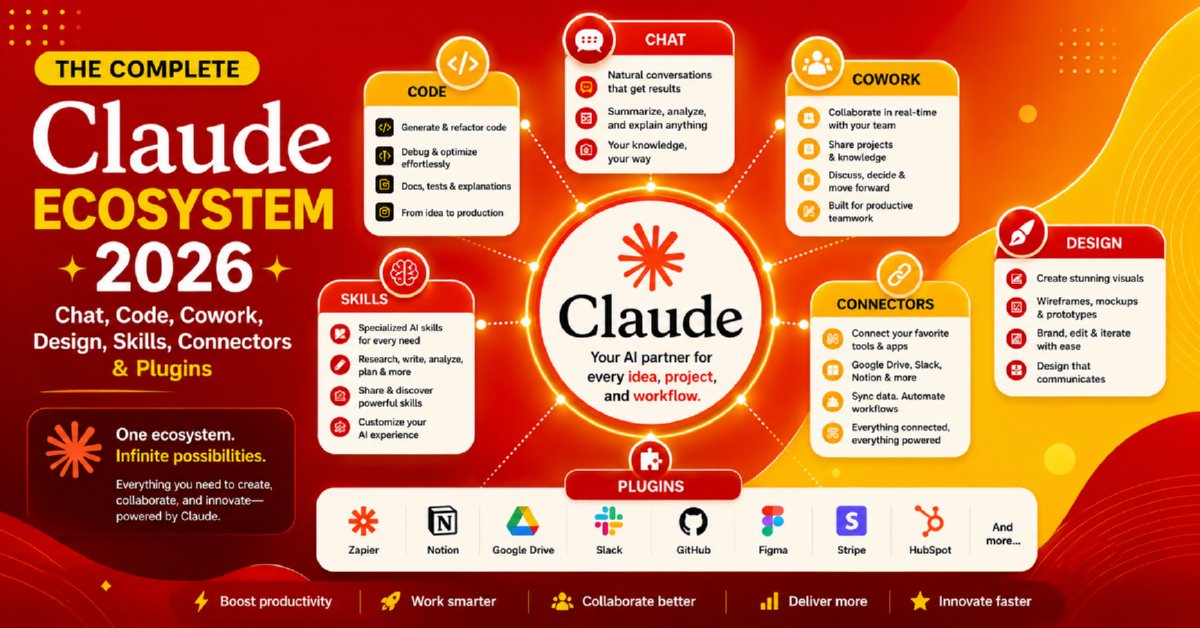
In this comprehensive guide, you will learn:
- How the complete Claude Ecosystem is organized and how every component works together.
- The differences between Claude Chat, Claude Code, Claude Cowork, Claude Design, Claude Skills, Connectors, and Plugins.
- How to choose the right Claude workspace for writing, programming, research, design, business strategy, and collaboration.
- How Claude Code accelerates software development, debugging, testing, documentation, and GitHub workflows.
- How Claude Skills extend AI capabilities through reusable expertise and specialized agent behaviors.
- How Connectors and Plugins integrate Claude with Google Workspace, GitHub, Slack, Notion, databases, cloud services, and enterprise applications.
- How to build end-to-end AI workflows by combining multiple Claude products into a unified productivity system.
- Best practices for security, privacy, enterprise deployment, and AI-assisted collaboration.
- Advanced prompt engineering techniques for obtaining more accurate, reliable, and production-ready outputs.
- The latest Claude ecosystem trends, practical use cases, and productivity strategies for 2026.
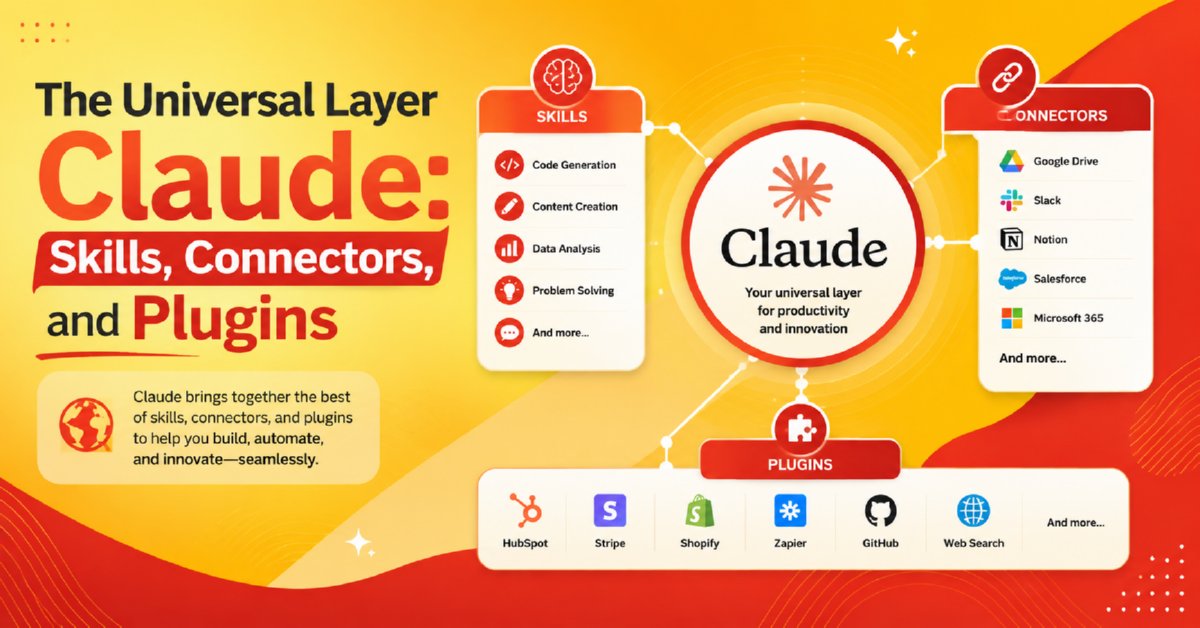
The beauty of the Claude Total Ecosystem lies in its highly modular architecture. Anthropic has intelligently separated the AI’s capabilities into purpose-built environments for conversation, coding, collaboration, design, specialized skills, and external integrations. Whether your goal is to brainstorm ideas, automate business processes, develop software, create visual content, or orchestrate intelligent AI agents across multiple platforms, there is a dedicated environment optimized for your success.
By 2026, Anthropic’s Claude has evolved far beyond a simple chatbot — it is now a structured, interconnected ecosystem of four purpose-built AI tools used by millions of individuals, teams, and enterprises worldwide. In a single workspace, Claude Chat handles thinking, Cowork handles delegation, Claude Code handles building, and Claude Design handles creation — all connected by a shared layer of Skills, Connectors, and Plugins. This guide is your complete 2026 reference to understanding what each part does, how they connect, and which tool is right for your exact situation.
What Is the Claude Ecosystem in 2026?
Most AI tools force every kind of task into one chat window. Claude’s 2026 ecosystem takes a fundamentally different approach: it separates four distinct modes of working — thinking, delegating, building, and creating — into four dedicated products, each designed to be excellent at its specific job.
What makes this architecture powerful is the shared infrastructure running underneath all four products. The universal layer of Skills, Connectors, and Plugins means you configure your tools, integrations, and expertise guidelines once, and they apply everywhere. The Context and Memory layer ensures Claude remembers what it needs to across sessions. And the Autonomous Layer means Claude can increasingly act on your behalf without a prompt triggering every single step.
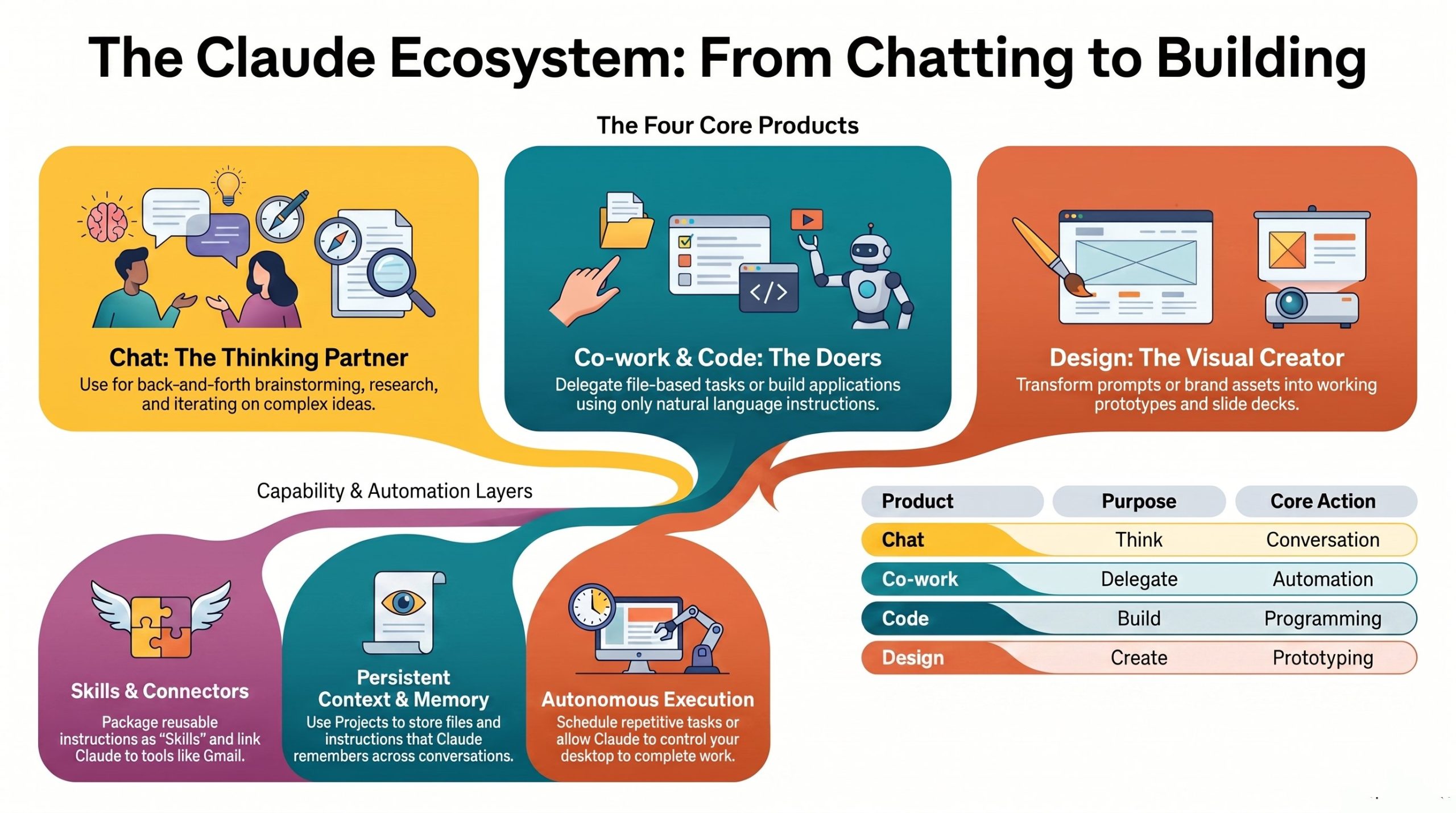
The core principle: The Claude ecosystem is not about replacing one chatbot with another. It is about giving every kind of intellectual and creative work its own right-sized tool — and then connecting those tools with shared memory, context, and automation.
The Four Core Products
Each flagship product in the Claude ecosystem is built around a single primary job. Understanding that distinction is the key to using the ecosystem well.
Claude Chat
Your conversational thinking partner. Use it to brainstorm, research, debate ideas, summarize documents, and iterate on strategy. The only Claude product that syncs fully across mobile, web, and desktop in real time. Relies on account-level Memory to carry context across every conversation.
Claude Cowork
Your on-computer delegate for real tasks. Cowork runs locally on your machine, accesses your folders, drafts your emails, and builds your presentations. Paired with Scheduled Tasks, it executes recurring workflows automatically — no prompt required.
Claude Code
Build apps, websites, and Chrome extensions in plain language — no prior coding experience required. Maintains project-specific context via a claude.md file and runs automated Routines for testing, deployment, and repeated build steps.
Claude Design
Generate working prototypes, polished slide decks, and full landing pages from a prompt or a Figma file. Design integrates directly with Claude Code so finished visuals can be shipped into functional products in one step.
Claude Chat — Thinking as a Discipline
Claude Chat is the entry point most people start with, and in 2026 it remains the most universally used product in the ecosystem. Its strength is the quality of back-and-forth reasoning — the ability to challenge an assumption, surface a counterargument, or help you refine a half-formed idea into a clear strategy.
Because Chat syncs across mobile, web, and desktop, it works wherever thinking happens — on a commute, in a meeting, or at a desk. Account-level Memory means that by 2026, Chat carries forward months of learned preferences, communication style, and business context without you re-explaining yourself in every session.
Chat connects seamlessly to Projects, so research, documents, and chat history for a specific topic stay grouped together — ready for Cowork to act on or Code to build from.
Claude Cowork — Delegation Done Right
Claude Cowork addresses a gap that pure chatbots have always had: execution. Chatbots give you answers; Cowork actually does the work. Running natively on your computer, Cowork can open folders, rename and organize files, draft full email threads, and build multi-slide presentations from an outline.
The integration with Connectors is what makes Cowork genuinely useful at scale. A Connector to Google Drive means Cowork can pull the latest sales report and embed it in a presentation deck. A Connector to Gmail means it can send the follow-up email you asked it to draft — without you copying and pasting.
Scheduled Tasks push Cowork into autonomous territory. You define a task once — for example, “every Monday at 8am, pull last week’s metrics from Google Sheets and email a summary to the team” — and Cowork runs it without you present.
Claude Code — Building Without Barriers
Claude Code is the ecosystem’s most democratizing product. In 2026, the barrier to shipping software has dropped significantly because Claude Code allows anyone to describe what they want to build in plain English and receive a working application in return.
Claude Code maintains context for long-running projects using a claude.md file — a plain-text document stored in the project root that defines the codebase structure, stack choices, naming conventions, and team guidelines. This means Claude Code always knows what it is building and why, regardless of how many sessions have passed since it was configured.
When Design and Code work together, the pipeline is complete: Design generates the visual layer, and Code immediately turns it into a live, functional product. Routines then handle the ongoing maintenance — running automated tests, pushing to staging, or generating changelogs — without manual re-prompting.
Claude Design — From Prompt to Prototype
Claude Design closes the gap between idea and visual output. Rather than describing a design to Claude and receiving text instructions for a designer, Claude Design generates the actual artifact — a working HTML prototype, a structured slide deck, or a styled landing page.
Figma integration means teams can feed existing brand assets and design systems directly into Claude Design, so outputs respect established visual guidelines rather than starting from scratch. The direct handoff to Claude Code makes the workflow coherent: design in Design, ship in Code.
The Universal Layer: Skills, Connectors, and Plugins
The universal layer is what prevents the Claude ecosystem from becoming four separate, disconnected tools. It provides a shared infrastructure of expertise, integrations, and packaged capabilities that plug into Chat, Cowork, and Code simultaneously.
⚡ Skills — Repeatable Expertise
A Skill is a set of saved guidelines that Claude follows every time it performs a specific type of task. A brand voice Skill ensures Claude writes in your tone whether it is drafting a Cowork email or responding in Chat. A compliance Skill ensures legal disclaimers are automatically included in relevant outputs — consistently, without reminders.
🔗 Connectors — External Tool Integration
Connectors link Claude products to the tools you already use — Gmail, Slack, Google Drive, Notion, GitHub, and more. They allow Claude to read data from those apps and take real actions inside them, not just generate text about them. A Slack Connector means Claude can post an update. A GitHub Connector means Claude Code can open a pull request.
🧩 Plugins — Role-Specific Bundles
Plugins package Skills and Connectors together into ready-to-install bundles built for specific roles. A legal Plugin includes a brief-drafting Skill plus connectors to legal databases. A Design Plugin includes Figma integration plus brand-consistency Skills. Instead of configuring twelve settings, you install one Plugin.
The Context and Memory Layer
Work loses its value if every session starts from zero. The Context and Memory layer is what makes Claude’s knowledge of your work accumulate over time rather than evaporate at the end of every conversation.
Projects — Organized Context
Projects are the ecosystem’s folder system. Each Project stores custom instructions, uploaded reference files, and a threaded history of related conversations — so when you return to a brief, a codebase, or a research topic, Claude already has everything it needs. Projects are shared across Chat, Cowork, and Code, keeping context consistent across tools.
Memory — Learned Preferences
Memory operates at two levels in 2026. Account-level Memory in Chat tracks preferences, communication style, and recurring business context across all conversations over time. Project-level Memory in Code is handled by the claude.md file, which stores codebase specifics — tech stack, file structure, naming rules — so Claude Code always has immediate, project-specific context without re-reading entire repositories.
The Autonomous Layer
The autonomous layer is where the Claude ecosystem moves from reactive AI — waiting for your prompt — to proactive AI that works on your behalf on a schedule. By 2026, this layer handles a growing share of predictable, structured work automatically.
Scheduled Tasks — Cowork on Autopilot
Scheduled Tasks allow Cowork to execute defined workflows at set times. A morning briefing task might scan your calendar, summarize overnight emails, check project status in Google Drive, and deliver a structured summary before your workday starts — without you opening a single app.
Routines — Code on Autopilot
Routines give Claude Code the equivalent capability for software development. Define a Routine to run automated tests after every commit, generate a changelog on Friday afternoons, or push builds to a staging environment when a branch is merged — and Claude Code handles it without a developer re-prompting each step.
The 2026 shift: The autonomous layer is where the Claude ecosystem transitions from a tool you use to a system that works alongside you — executing low-complexity, high-frequency tasks automatically so human attention stays focused on high-judgment decisions.
Quick Comparison: Which Claude Tool to Use in 2026
| Product | Primary Job | Best Used For | Key Feature |
|---|---|---|---|
| Chat | Think | Brainstorming, research, strategy, writing | Cross-device sync + account Memory |
| Cowork | Delegate | File management, emails, presentations | Local computer access + Scheduled Tasks |
| Code | Build | Apps, websites, Chrome extensions | claude.md context + Routines |
| Design | Create | Prototypes, decks, landing pages | Figma integration + Code handoff |
Who Benefits Most from the Claude Ecosystem?
The Claude ecosystem in 2026 is designed for people who do multiple kinds of intellectual work — not just one. Here is how different roles naturally map to different parts of the ecosystem:
Founders and Operators
Use Chat for strategy and thinking, Cowork to handle communications and reporting, and Code to ship internal tools without a full engineering team. Scheduled Tasks handle the daily operational overhead autonomously.
Developers and Engineers
Claude Code is the primary environment — with claude.md maintaining codebase context and Routines automating the CI/CD pipeline. Design closes the gap between design handoffs and working implementations.
Creative and Marketing Teams
Claude Design handles campaign visuals and deck creation. Chat handles copy research and refinement. Plugins enforce brand consistency across all outputs automatically.
Knowledge Workers and Researchers
Chat paired with Projects creates a persistent research environment that accumulates context across weeks of work. Connectors pull in live data from external sources without manual copy-paste.
Final Thoughts
The Claude ecosystem in 2026 is not a collection of features — it is a considered architecture for how AI-assisted work should be structured. Each of the four products has a clear job: Chat thinks, Cowork delegates, Code builds, and Design creates.
The universal layer of Skills, Connectors, and Plugins ensures expertise and integrations are configured once and applied everywhere. The Context and Memory layer ensures that knowledge accumulates instead of resetting. And the Autonomous Layer ensures that the most predictable, repeatable work gets handled without requiring human attention each time.
The practical result is an ecosystem where the right tool handles the right task, everything shares context, and Claude progressively takes on more of the operational load — leaving human judgment focused on the decisions that actually require it.
Frequently Asked Questions
What is the Claude ecosystem in 2026?
It is Anthropic’s connected suite of four AI products — Chat, Cowork, Code, and Design — unified by a shared layer of Skills, Connectors, and Plugins, plus persistent memory and context and an autonomous execution layer.
Is Claude Chat still useful if I use Cowork?
Yes. Chat is for thinking and iteration — working through ideas, researching options, and refining strategy. Cowork is for executing defined tasks on your computer. They serve different stages of the same workflow and work best used together.
Do I need coding knowledge to use Claude Code?
No. Claude Code is built for natural language input, which means non-developers can describe what they want to build and receive working software. Technical users gain additional control through direct code access and the claude.md context file.
How do Claude Design and Claude Code work together?
Claude Design generates the visual layer — a prototype, a deck, or a landing page — and then passes it directly to Claude Code, which turns it into a live, functional product. The two products are designed so this handoff requires no manual effort.
What are Skills, Connectors, and Plugins exactly?
Skills are saved expertise guidelines Claude follows every time. Connectors link Claude to external tools like Gmail, Slack, and Google Drive. Plugins bundle both into role-specific packages — a legal Plugin, a Design Plugin, a marketing Plugin — that install in one step.
What is the claude.md file and why does it matter?
The claude.md file is a plain-text document stored in a Claude Code project that defines the tech stack, file structure, naming conventions, and guidelines for that specific codebase. It replaces account-level memory for code projects, keeping context precise and project-specific rather than mixed with general conversation history.
What is the difference between Scheduled Tasks and Routines?
Scheduled Tasks belong to Cowork and automate time-based workflows — like a daily briefing or a weekly report. Routines belong to Claude Code and automate event-driven development workflows — like running tests on commit or pushing builds to staging.
How does Memory work across the Claude ecosystem?
Chat uses account-level Memory that accumulates preferences and context across all conversations over time. Code uses the claude.md file for project-specific memory. Both can draw on Projects for grouped, long-running context tied to specific work areas.